

70-640 Exam Questions - Online Test
70-640 Premium VCE File

150 Lectures, 20 Hours

Our pass rate is high to 98.9% and the similarity percentage between our and real exam is 90% based on our seven-year educating experience. Do you want achievements in the Microsoft 70-640 exam in just one try? I am currently studying for the . Latest , Try Microsoft 70-640 Brain Dumps First.
Check 70-640 free dumps before getting the full version:
NEW QUESTION 1
You need to deploy a read-only domain controller (RODC) that runs Windows Server 2008 R2.
What is the minimal forest functional level that you should use?
- A. Windows Server 2008 R2
- B. Windows Server 2008
- C. Windows Server 2003
- D. Windows 2000
Answer: C
Explanation:
http://technet.microsoft.com/en-us/library/cc731243.aspx
Prerequisites for Deploying an RODC
Complete the following prerequisites before you deploy a read-only domain controller (RODC):
Ensure that the forest functional level is Windows Server 2003 or higher, so that linked-valuereplication (LVR) is available.
NEW QUESTION 2
Your network contains an Active Directory forest named contoso.com. The forest contains four child domains named east.contoso.com, west.contoso.com, south.contoso.com, and north.contoso.com.
You need to create four new groups in the forest root domain. The groups must be configured as shown in the following table. 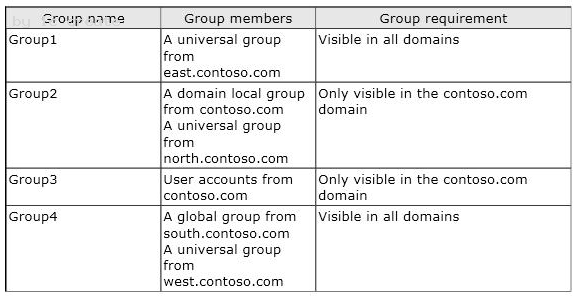
What should you do?
To answer, drag the appropriate group type to the correct group name in the answer area. 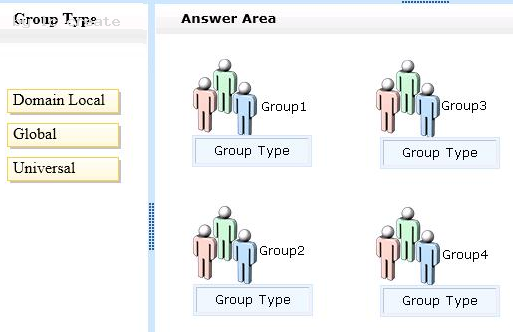
Answer:
Explanation:
NEW QUESTION 3
Your network contains an Active Directory domain named contoso.com. The domain contains a server named Server1 and a domain controller named DC1.
On Server1, you configure a collector-initiated subscription for the Application log of DC1. The subscription is configured to collect all events.
After several days, you discover that Server1 failed to collect any events from DC1, although there are more than 100 new events in the Application log of DC1.
You need to ensure that Server1 collects events from DC1.
What should you do?
- A. On Server1, run wecutil quick-confi
- B. On Server1, run winrm quickconfi
- C. On DC1, run wecutil quick-confi
- D. On DC1, run winrm quickconfi
Answer: D
Explanation:
Since the subscription has been created, wecutil quick-config has already run on Server1. Only thing left is to configure DC1 to forward the events, using winrm quickconfig. Explanation1: Mastering Windows Server 2008 R2 (Sybex, 2010) page 773 Windows event Collector Service The first time you select the Subscriptions node of Event Viewer or the Subscription tab of any log, a dialog box will appear stating that the Windows Event Collector Service must be running and configured. It then asks whether you want to start and configure the service. If you click Yes, it starts the service and changes the startup type from Manual to Automatic (Delayed Start), causing it to start each time Windows starts.
Explanation 2: http://technet.microsoft.com/en-us/library/cc748890.aspx To configure computers in a domain to forward and collect events
1. Log on to all collector and source computers. It is a best practice to use a domain account with administrative privileges.
2. On each source computer, type the following at an elevated command prompt: winrm quickconfig
NEW QUESTION 4
DRAG DROP
Your network contains an Active Directory forest named contoso.com.
You need to use Group Policies to deploy the applications shown in the following table: 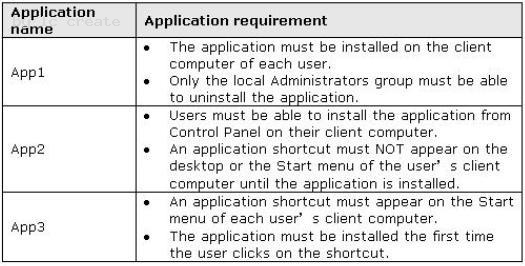
What should you do?
To answer, drag the appropriate deployment method to the correct application in the answer area. 
Answer:
Explanation:
NEW QUESTION 5
Your network contains an Active Directory forest named contoso.com.
You need to identify whether a fine-grained password policy is applied to a specific group.
Which tool should you use?
- A. Credential Manager
- B. Group Policy Management Editor
- C. Active Directory Users and Computers
- D. Active Directory Sites and Services
Answer: C
Explanation:
Use Active Directory Users and Computers to determine the value of the msDS-PSOApplied attribute of the specific group:
1. Open the Properties windows for the group in Active Directory Users and Computers
2. Click the Attribute Editor tab, and then click Filter
3. Ensure that the Show attributes/Optional check box is selected.
4. Ensure that the Show read-only attributes/Backlinks check box is selected.
5. Locate the value of msDS-PSOApplied in the Attributes list. Explanation:
http://technet.microsoft.com/en-us/library/cc754544.aspx
Defining the scope of fine-grained password policies
A PSO can be linked to a user (or inetOrgPerson) or a group object that is in the same domain as the PSO: (...)
A new attribute named msDS-PSOApplied has been added to the user and group objects in Windows Server 2008. The msDS-PSOApplied attribute contains a back-link to the PSO. Because the msDSPSOApplied attribute has a back-link, a user or group can have multiple PSOs applied to it.
As stated previously, in Windows Server 2008, a user or group can have multiple PSOs applied to it since the msDS-PSOApplied attribute of the user and group objects has a back-link to the PSO.
NEW QUESTION 6
As the Company administrator you had installed a read-only domain controller (RODC) server at remote location.
The remote location doesn't provide enough physical security for the server.
What should you do to allow administrative accounts to replicate authentication information to Read-Only Domain Controllers?
- A. Remove any administrative accounts from RODC's group
- B. Add administrative accounts to the domain Allowed RODC Password Replication group
- C. Set the Deny on Receive as permission for administrative accounts on the RODC computer account Security tab for the Group Policy Object (GPO)
- D. Configure a new Group Policy Object (GPO) with the Account Lockout settings enable
- E. Link the GPO to the remote locatio
- F. Activate the Read Allow and the Apply group policy Allow permissions for the administrators on the Security tab for the GP
- G. None of the above
Answer: B
Explanation: 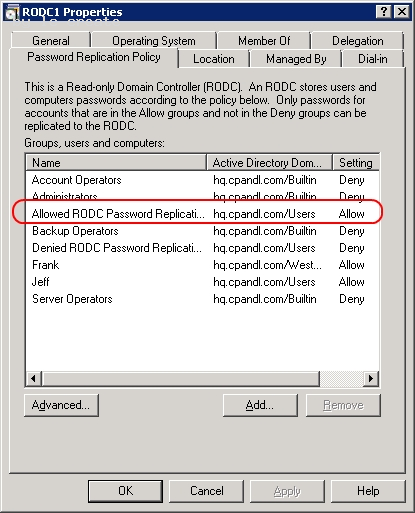
C:Documents and Settingsusernwz1Desktop1.PNG
http://technet.microsoft.com/en-us/library/cc730883%28v=ws.10%29.aspx Password Replication Policy When you initially deploy an RODC, you must configure the Password Replication Policy on the writable domain controller that will be its replication partner. The Password Replication Policy acts as an access control list (ACL). It determines if an RODC should be permitted to cache a password. After the RODC receives an authenticated user or computer logon request, it refers to the Password Replication Policy to determine if the password for the account should be cached. The same account can then perform subsequent logons more efficiently. The Password Replication Policy lists the accounts that are permitted to be cached, and accounts that are explicitly denied from being cached. The list of user and computer accounts that are permitted to be cached does not imply that the RODC has necessarily cached the passwords for those accounts. An administrator can, for example, specify in advance any accounts that an RODC will cache. This way, the RODC can authenticate those accounts, even if the WAN link to the hub site is offline.
Password Replication Policy Allowed and Denied lists Two new built-in groups are introduced in Windows Server 2008 Active Directory domains to support RODC operations. These are the Allowed RODC Password Replication Group and Denied RODC Password Replication Group. These groups help implement a default Allowed List and Denied List for the RODC Password Replication Policy. By default, the two groups are respectively added to the msDS-RevealOnDemandGroup and msDSNeverRevealGroup Active Directory attributes mentioned earlier. By default, the Allowed RODC Password Replication Group has no members. Also by default, the Allowed List attribute contains only the Allowed RODC Password Replication Group. By default, the Denied RODC Password Replication Group contains the following members: Enterprise Domain Controllers Enterprise Read-Only Domain Controllers Group Policy Creator Owners Domain Admins Cert Publishers Enterprise Admins Schema Admins Domain-wide krbtgt account By default, the Denied List attribute contains the following security principals, all of which are built-in groups: Denied RODC Password Replication Group Account Operators Server Operators Backup Operators Administrators The combination of the Allowed List and Denied List attributes for each RODC and the domain-wide Denied RODC Password Replication Group and Allowed RODC Password Replication Group give administrators great flexibility. They can decide precisely which accounts can be cached on specific RODCs. The following table summarizes the three possible administrative models for the Password Replication Policy. 
C:Documents and Settingsusernwz1Desktop1.PNG
NEW QUESTION 7
DRAG DROP
Your company plans to open a new branch office. The new office will have a low-speed connection to the Internet.
You plan to deploy a read-only domain controller (RODC) in the branch office.
You need to create an offline copy of the Active Directory database that can be used to install Active Directory on the new RODC.
Which commands should you run from Ntdsutil?
To answer, move the appropriate actions from the list of actions to the answer area and arrange them in the correct order. 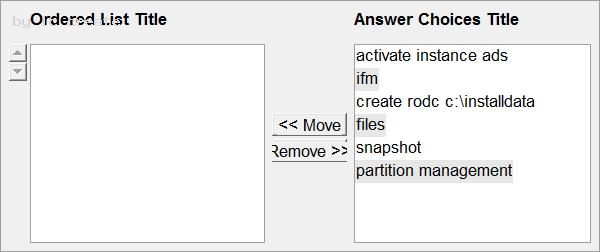
Answer:
Explanation:
NEW QUESTION 8
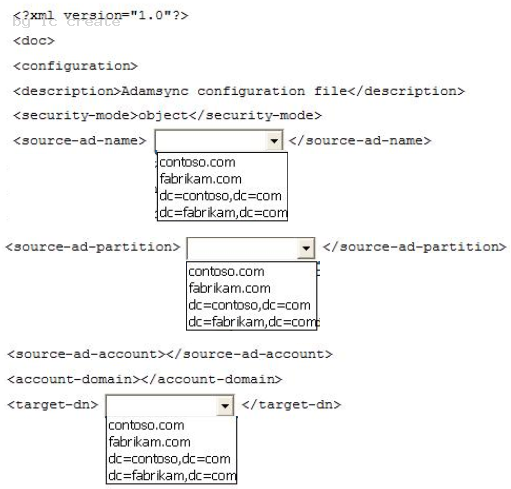
Your network contains an Active Directory domain named contoso.com. The domain contains a domain controller named DC1.
You install Active Directory Lightweight Directory Services (AD LDS) on a member server named Server2. On Server2, you create a directory partition named fabrikam.com.
You need to configure the MS-AdamSyncConfig.xml file to synchronize data from contoso.com to fabrikam.com.
What should you do? (To answer, select the appropriate options in the answer area.) 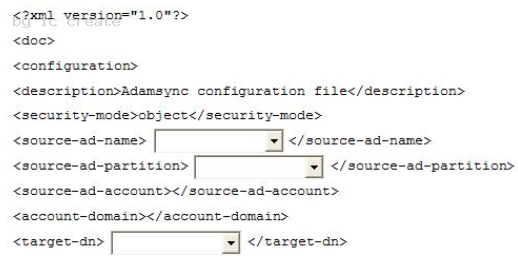
Answer:
Explanation:
NEW QUESTION 9
Your network contains an Active Directory domain. The domain contains an enterprise certification authority (CA).
You need to ensure that only members of a group named Admin1 can create certificate templates.
Which tool should you use to assign permissions to Admin1?
- A. the Certification Authority console
- B. Active Directory Users and Computers
- C. the Certificates snap-in
- D. Active Directory Sites and Services
Answer: D
Explanation:
We need to use Active Directory Sites and Services to assign permissions to create
certificate templates to global or universal groups.
The first Explanation lists what needs to be done, the second Explanation explains how to do it.
Explanation 1:
http://technet.microsoft.com/en-us/library/cc725621.aspx
Delegating Template Management
You can delegate the ability to manage individual certificate templates or to create any
certificate templates by defining appropriate permissions to global groups or universal
groups that a user belongs to.
There are three levels of delegation for certificate template administration:
Modify existing templates
Create new templates (by duplicating existing templates)
Full delegation (including modifying all existing templates and creating new ones)
Create New Templates
To delegate the ability to create certificate templates to users who are not members of the Domain Admins group in the forest root domain, or members of the Enterprise Admins group, it is necessary to define the appropriate permissions in the Configuration naming context of AD DS. To delegate the ability to duplicate and create new certificate templates, you must make the following permission assignments to a global or universal group of which the user is a member: Grant Create All Child Objects permission on the following container: CN=Certificate Templates,CN=Public Key Services,CN=Services,CN=Configuration,DC=ForestRoot. Grant Full Control permission to every certificate template in the following container: CN=Certificate Templates,CN=Public Key Services,CN=Services,CN=Configuration,DC=ForestRoot. The permissions assigned to the Certificate Templates container are not inherited by the individual certificate templates. Grant Create All Child Objects permission on the following container: CN=OID,CN=Public Key Services, CN=Services,CN=Configuration,DC=ForestRoot container. Explanation 2: Windows Server 2008 - PKI and Certificate Security (Microsoft Press, 2008) page 298 Delegate Permissions for Creation of New Templates You can delegate the permission to create new templates by assigning permissions to a custom universal group for the CN=Certificate Templates,CN=Public Key Services,CN=Services,CN=Configuration, ForestRootDomain container.
1. Log on as a member of the Enterprise Admins group or the forest root domain Domain
Admins group.
2. Open the Active Directory Sites And Services console.
3. From the View menu, ensure that the Show Services Node setting is enabled.
4. In the console tree, expand Services, expand Public Key Services, and then click
Certificate Templates.
5. In the console tree, right-click Certificate Templates, and then click Delegate Control.
6. In the Delegation Of Control wizard, click Next.
7. On the Users Or Groups page, click Add.
8. In the Select Users, Computers, Or Groups dialog box, type a user or group name, and
then click OK.
9. On the Users Or Groups page, click Next.
10.On the Tasks To Delegate page, click Create A Custom Task To Delegate, and then
click Next.
11.On the Active Directory Object Type page, click This Folder, Existing Objects In This
Folder, and Creation Of
New Objects In This Folder, and then click Next.
12.On the Permissions page, in the Permissions list, enable Full Control, and then click
Next.
13.On the Completing The Delegation Of Control wizard page, click Finish.
NEW QUESTION 10
Your network contains an Active Directory forest named contoso.com.
You need to identify whether a fine-grained password policy is applied to a specific group.
Which tool should you use?
- A. Active Directory Sites and Services
- B. Active Directory Users and Computers
- C. Security Configuration Wizard (SCW)
- D. Local Security Policy
Answer: A
NEW QUESTION 11
Your network consists of an Active Directory forest that contains one domain named contoso.com. All domain controllers run Windows Server 2008 R2 and are configured as DNS servers. You have two Active Directory-integrated zones: contoso.com and nwtraders.com.
You need to ensure a user is able to modify records in the nwtraders.com zone. The solution must prevent the user from modifying the SOA record in the contoso.com zone.
What should you do?
- A. From the DNS Manager console, modify the permissions of the nwtraders.com zon
- B. From the DNS Manager console, modify the permissions of the contoso.com zon
- C. From the Active Directory Users and Computers console, run the Delegation of Control Wizar
- D. From the Active Directory Users and Computers console, modify the permissions of the Domain Controllers organizational unit (OU).
Answer: A
NEW QUESTION 12
A corporate network includes a single Active Directory Domain Services (AD DS) domain and two AD DS sites.
The AD DS sites are named Toronto and Montreal. Each site has multiple domain controllers.
You need to determine which domain controller holds the Inter-Site Topology Generator role for the Toronto site.
What should you do?
- A. Use the Active Directory Sites and Services console to view the NTDS Site Settings for the Toronto sit
- B. Use the Ntdsutil tool with the roles paramete
- C. Use the Ntdsutil tool with the LDAP policies paramete
- D. Use the Active Directory Sites and Services console to view the properties of each domain controller in the Toronto sit
Answer: A
Explanation:
http://technet.microsoft.com/en-us/library/cc794776.aspx
Determine the ISTG Role Owner for a Site
The Intersite Topology Generator (ISTG) is the domain controller in each site that is responsible for generating the intersite topology. If you want to regenerate the intersite topology, you must determine the identity of the ISTG role owner in a site. You can use this procedure to view the NTDS Site Settings object properties and determine the ISTG role owner for the site.
To determine the ISTG role owner for a site
1. Open Active Directory Sites and Services.
2. In the console tree, click the site object whose ISTG role owner you want to determine.
3. In the details pane, right-click the NTDS Site Settings object, and then click Properties. The current role owner appears in the Server box under Inter-Site Topology Generator.
NEW QUESTION 13
Your network contains an Active Directory domain named contoso.com.
You have an organizational unit (OU) named Sales and an OU named Engineering.
You have a Group Policy object (GPO) linked to the domain.
You need to ensure that the settings in the GPO are not processed by user accounts or computer accounts in the Sales OU. You must achieve this goal by using the minimum amount of administrative effort.
What should you do?
- A. Modify the Group Policy permission
- B. Enable block inheritanc
- C. Configure the link orde
- D. Enable loopback processing in merge mod
- E. Enable loopback processing in replace mod
- F. Configure WMI filterin
- G. Configure Restricted Group
- H. Configure Group Policy PExplanation
- I. Link the GPO to the Sales O
- J. Link the GPO to the Engineering O
Answer: B
Explanation:
http://technet.microsoft.com/en-us/library/cc731076.aspx
Block Inheritance You can block inheritance for a domain or organizational unit. Blocking inheritance prevents Group Policy objects (GPOs) that are linked to higher sites, domains, or organizational units from being automatically inherited by the child-level.
NEW QUESTION 14
Your network contains an Active Directory domain named contoso.com.
The Active Directory sites are configured as shown in the Sites exhibit. (Click the Exhibit button.) 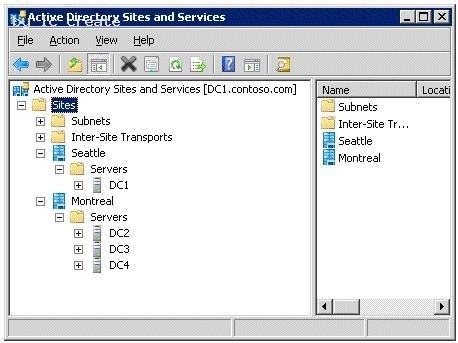
You need to ensure that DC1 and DC4 are the only servers that replicate Active Directory changes between the sites.
What should you do?
- A. Configure DC1 as a preferred bridgehead server for IP transpor
- B. Configure DC4 as a preferred bridgehead server for IP transpor
- C. From the DC4 server object, create a Connection object for DC1.
- D. From the DC1 server object, create a Connection object for DC4.
Answer: B
Explanation:
MCTS 70-640 Cert Guide: Windows Server 2008 Active Directory, Configuring (Pearson IT Certification, 2010) pages 193, 194
Bridgehead Servers
A bridgehead server is the domain controller designated by each site’s KCC to take control of intersite replication. The bridgehead server receives information replicated from other sites and replicates it to its site’s other domain controllers. It ensures that the greatest portion of replication occurs within sites rather than between them.
In most cases, the KCC automatically decides which domain controller acts as the bridgehead server.
However, you can use Active Directory Sites and Services to specify which domain controller will be the preferred bridgehead server by using the following steps:
1. In Active Directory Sites and Services, expand the site in which you want to specify the preferred bridgehead server.
2. Expand the Servers folder to locate the desired server, right-click it, and then choose Properties.
3. From the list labeled Transports available for intersite data transfer, select the protocol(s) for which you want to designate this server as a preferred bridgehead server and then click Add.
Original explanation:
Please Check Answer
Connections. The KCC creates connections that enable domain controllers to replicate with each other. A connection defines a one-way, inbound route from one domain controller, the source, to another domain controller, the destination. The KCC reuses existing connections where it can, deletes unused connections, and creates new connections if none exist that meet the current need. Bridgehead Servers. To communicate across site links, the KCC automatically designates a single server, called the bridgehead server, in each site to perform site-to-site replication. Subsequent replication occurs by replication within a site. When site links are established, authorized administrators can designate the bridgehead servers that they want to receive replication between sites. By designating a specific server to receive replication between sites, rather than using any available server, authorized administrators can specify the most beneficial conditions for the connection between sites. Bridgehead servers ensure that most replication occurs within sites rather than between sites.
http://technet.microsoft.com/library/dd277429.aspx
NEW QUESTION 15
A corporate network includes a single Active Directory Domain Services (AD D5) domain. The AD DS infrastructure is shown in the following graphic.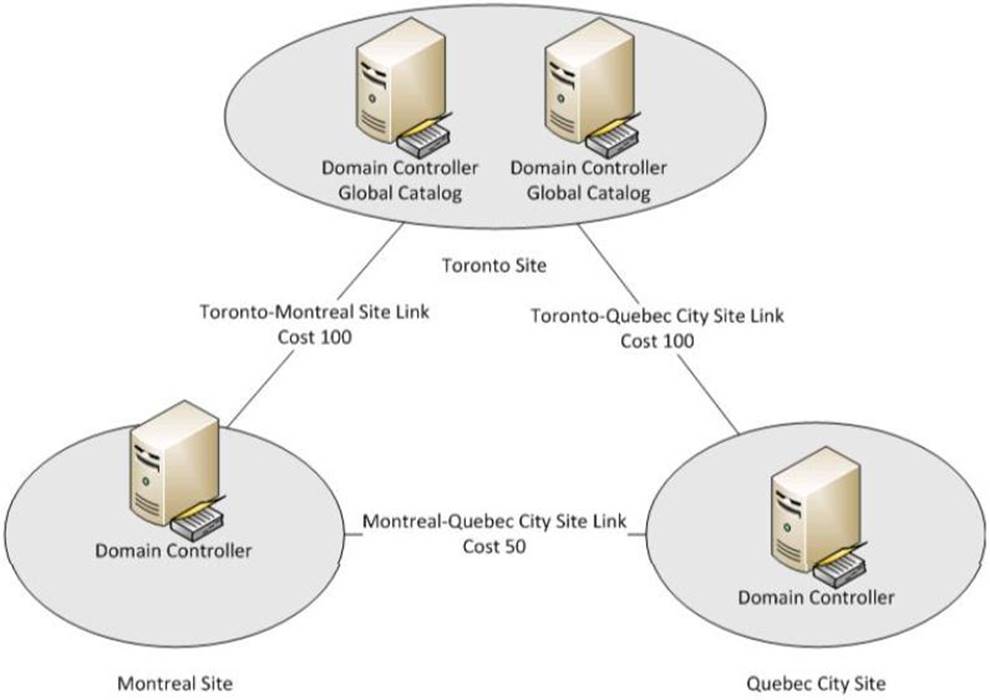
When the Montreal Site domain controller is offline, authentication requests for Montreal branch office users are sent to the Toronto Site domain controller.
You need to ensure that when the Montreal Site domain controller is offline, authentication requests for Montreal branch office users are sent to the Quebec City Site domain controller.
What should you do?
- A. Create a site link bridge between the Montreal Site and the Quebec City Sit
- B. Create a registry entry on each client computer in the Montreal branch office,
- C. Enable the global catalog role on the Montreal Site domain controller
- D. Delete the Toronto-Montreal Site Lin
Answer: A
NEW QUESTION 16
Your network contains an Active Directory forest.
All users have a value set for the Department attribute.
From Active Directory Users and computers, you search a domain for all users who have a
Department attribute value of Marketing.
The search returns 50 users.
From Active Directory Users and Computers, you search the entire directory for all users
who have a Department attribute value of Marketing. The search does not return any users.
You need to ensure that a search of the entire directory for users in the marketing department returns all of the users who have the Marketing Department attribute.
What should you do?
- A. Install the Windows Search Service role service on a global catalog serve
- B. From the Active Directory Schema snap-in, modify the properties of the Department attribut
- C. Install the Indexing Service role service on a global catalog serve
- D. From the Active Directory Schema snap-in, modify the properties of the user clas
Answer: B
Explanation:
http://technet.microsoft.com/en-us/library/how-global-catalog-servers-work.aspx
Global Catalog Partial Attribute Set The attributes that are replicated to the global catalog by default include a base set that have been defined by Microsoft as the attributes that are most likely to be used in searches. Administrators can use the Microsoft Management Console (MMC) Active Directory Schema snap-in to specify additional attributes to meet the needs of their installation. In the Active Directory Schema snap-in, you can select the Replicate this attribute to the global catalog check box to designate an attributeSchema object as a member of the PAS, which sets the value of the isMemberOfPartialAttributeSet attribute to TRUE.
NEW QUESTION 17
Your network contains an Active Directory domain.
You have two Group Policy objects (GPOS) named GPO1 and GPO2. GPO1 and GPO2 are linked to theFinance organizational unit (OU) and contain multiple settings.
You discover that GPO2 has a setting that conflicts with a setting in GPO1. When the policies are applied, the setting in GPO2 takes effect.
You need to ensure that the settings in GPO1 supersede the settings in GPO2. The solution must ensure that all non-conflicting settings in both GPOs are applied.
What should you do?
- A. Configure the link orde
- B. Configure Restricted Group
- C. Enable block inheritanc
- D. Link the GPO to the Finance O
- E. Enable Ioopback processing in merge mod
- F. Enable Ioopback processing in replace mod
- G. Link the GPO to the Human Resources O
- H. Configure Group Policy PExplanation
- I. Configure WMI filterin
- J. Modify the Group Policy permission
Answer: A
Explanation:
MS Press - Self-Paced Training Kit (Exam 70-640) (2nd Edition, July 2012) page 283
Precedence of Multiple Linked GPOs
An OU, domain, or site can have more than one GPO linked to it. In the event of multiple GPOs, the GPOs’ link order determines their precedence. In Figure 6-10, two GPOs are linked to the People OU.
Figure 6-10 GPO link order
The object higher on the list, with a link order of 1, has the highest precedence. Therefore, settings that are enabled or disabled in the Power User Configuration GPO have precedence over these same settings in the Standard User Configuration GPO.
To change the precedence of a GPO link:
1. Select the OU, site, or domain in the GPMC console tree.
2. Click the Linked Group Policy Objects tab in the details pane.
3. Select the GPO.
4. Use the Up, Down, Move To Top, and Move To Bottom arrow icons to change the link order of the selected GPO.
NEW QUESTION 18
Your company has an Active Directory domain. You install a new domain controller in the
domain. Twenty users report that they are unable to log on to the domain.
You need to register the SRV records.
Which command should you run on the new domain controller?
- A. Run the netsh interface reset comman
- B. Run the ipconfig /flushdns comman
- C. Run the dnscmd /EnlistDirectoryPartition comman
- D. Run the sc stop netlogon command followed by the sc start netlogon comman
Answer: D
Explanation:
MCTS 70-640 Cert Guide: Windows Server 2008 Active Directory, Configuring (Pearson IT Certification, 2010) page 62 The SRV resource records for a domain controller are important in enabling clients to locate the domain controller. The Netlogon service on domain controllers registers this resource record whenever a domain controller is restarted. You can also re-register a domain controller’s SRV resource records by restarting this service from the Services branch of Server Manager or by typing net start netlogon. An exam Question might ask you how to troubleshoot the nonregistration of SRV resource records.
NEW QUESTION 19
Your network contains an Active Directory domain. The domain contains 20 domain controllers. You need to identify which domain controllers are global catalog servers. Which tool should you use?
- A. Dcdiag
- B. Get-ADComputer
- C. Net computer
- D. Netsh
Answer: D
Explanation: The FSMO role holders can be easily found by use of the Netdom command.
On any domain controller, click Start, click Run, type CMD in the Open box, and then click
OK.
In the Command Prompt window, type netdom query /domain:<domain> fsmo (where
<domain> is the name of YOUR domain).
Note: netsh is also known as the command prompt.
Recommend!! Get the Full 70-640 dumps in VCE and PDF From Surepassexam, Welcome to Download: https://www.surepassexam.com/70-640-exam-dumps.html (New 631 Q&As Version)
- The Renovate Guide To 70-461 practice test
- Microsoft 70-735 Study Guides 2021
- Best Quality AZ-202 Exam Questions 2021
- What Highest Quality 70-534 pdf Is?
- Far out Microsoft 70-410 exam dumps
- The Refresh Guide To 70-486 examcollection
- Microsoft MB2-713 Dumps Questions 2021
- Update DA-100 Testing Bible For Analyzing Data With Microsoft Power BI Certification
- Replace 70-486 Exam Study Guides With New Update Exam Questions
- Microsoft 70-475 Exam Questions 2021