

70-640 Exam Questions - Online Test
70-640 Premium VCE File

150 Lectures, 20 Hours

Our pass rate is high to 98.9% and the similarity percentage between our and real exam is 90% based on our seven-year educating experience. Do you want achievements in the Microsoft 70-640 exam in just one try? I am currently studying for the . Latest , Try Microsoft 70-640 Brain Dumps First.
Check 70-640 free dumps before getting the full version:
NEW QUESTION 1
Your network contains an Active Directory domain named contoso.com.
You have an organizational unit (OU) named Sales and an OU named Engineering.
Users in the Sates OU frequently log on to client computers in the Engineering OU.
You need to meet the following requirements:
. All of the user settings in the Group Policy objects (GPOs) linked to both the Sales OU and the Engineering OU must be applied to sales users when they log on to client computers in the Engineering OU.
. Only the policy settings in the GPOs linked to the Sales OU must be applied to sales users when they log on to client computers in the Sales OU. . Policy settings in the GPOs linked to the Sales OU must not be applied to users in the Engineering OU.
What should you do?
- A. Modify the Group Policy permission
- B. Enable block inheritanc
- C. Configure the link orde
- D. Enable loopback processing in merge mod
- E. Enable loopback processing in replace mod
- F. Configure WMI filterin
- G. Configure Restricted Group
- H. Configure Group Policy PExplanation
- I. Link the GPO to the Sales O
- J. Link the GPO to the Engineering O
Answer: D
Explanation:
We have to use loopback processing in merge mode if we want all User Configuration
settings from the GPO's that are linked to the Sales OU and the Engineering OU to be
applied.
Explanation 1:
http://technet.microsoft.com/en-us/library/cc782810.aspx
Loopback processing with merge or replace
Setting loopback causes the User Configuration settings in GPOs that apply to the
computer to be applied to every user logging on to that computer, instead of (in replace
mode) or in addition to (in merge mode) the User Configuration settings of the user. This
allows you to ensure that a consistent set of policies is applied to any user logging on to a
particular computer, regardless of their location in Active Directory.
Loopback can be set to Not Configured, Enabled, or Disabled. In the Enabled state,
loopback can be set to Merge or Replace. In either case the user only receives user-related
policy settings.
Loopback with Replace—In the case of Loopback with Replace, the GPO list for the user is
replaced in its entirety by the GPO list that is already obtained for the computer at
computer startup (during step 2 in Group Policy processing and precedence). The User
Configuration settings from this list are applied to the user.
Loopback with Merge—In the case of Loopback with Merge, the Group Policy object list is
a concatenation. The default list of GPOs for the user object is obtained, as normal, but
then the list of GPOs for the computer (obtained during computer startup) is appended to
this list. Because the computer's GPOs are processed after the user's GPOs, they have
precedence if any of the settings conflict.
Explanation 2:
http://kudratsapaev.blogspot.in/2009/07/loopback-processing-of-group-policy.html
For a clear and easy explanation of Loopback Processing. Recommended!
Explanation 3:
Windows Server 2008 R2 Unleashed (SAMS, 2010) page 1028
Loopback Processing
When a user is processing domain policies, the policies that apply to that user are based
on the location of the user object in the Active Directory hierarchy. The same goes for
domain policy application for computers.
There are situations, however, when administrators or organizations want to ensure that all
users get the same policy when logging on to a particular computer or server. For example,
on a computer that is used for training or on a Remote Desktop Session Host, also known
as a Terminal Server, when the user desktop environment must be the same for each user,
this can be controlled by enabling loopback processing in Replace mode on a policy that is
applied to the computer objects.
To explain a bit further, if a domain policy has the loopback settings enabled and set to Replace mode, any settings defined within that policy in the User Configuration node are applied to all users who log on to the computer this particular policy is applied to. When loopback processing is enabled and configured in Merge mode on a policy applied to a computer object and a user logs on, all of the user policies are applied and then all of the user settings within the policy applied to the computer object are also applied to the user. This ensures that in either Replace or Merge mode, loopback processing applies the settings contained in the computer-linked policies last.
NEW QUESTION 2
Your network contains an Active Directory domain. The domain contains four domain controllers.
You create a new application directory partition.
You need to ensure that the new application directory partition replicates to only three of the domain controllers.
Which tool should you use?
- A. Active Directory Administrative Center
- B. Dsamain
- C. Dsmod
- D. Ntdsutil
Answer: A
NEW QUESTION 3
One of the remote branch offices is running a Windows Server 2008 read only domain controller (RODC). For security reasons you don't want some critical credentials like (passwords, encryption keys) to be stored on RODC.
What should you do so that these credentials are not replicated to any RODC's in the forest? (Select 2)
- A. Configure RODC filtered attribute set on the server
- B. Configure RODC filtered set on the server that holds Schema Operations Master rol
- C. Delegate local administrative permissions for an RODC to any domain user without granting that user any user rights for the domain
- D. Configure forest functional level server for Windows server 2008 to configure filtered attribute se
- E. None of the above
Answer: BD
Explanation:
http://technet.microsoft.com/en-us/library/cc753223.aspx Adding attributes to the RODC filtered attribute set The RODC filtered attribute set is a dynamic set of attributes that is not replicated to any RODCs in the forest. You can configure the RODC filtered attribute set on a schema master that runs Windows Server 2008. When the attributes are prevented from replicating to RODCs, that data cannot be exposed unnecessarily if an RODC is stolen or compromised. A malicious user who compromises an RODC can attempt to configure it in such a way that it tries to replicate attributes that are defined in the RODC filtered attribute set. If the RODC tries to replicate those attributes from a domain controller that is running Windows Server 2008, the replication request is denied. However, if the RODC tries to replicate those attributes from a domain controller that is running Windows Server 2003, the replication request could succeed. Therefore, as a security precaution, ensure that forest functional level is Windows Server 2008 if you plan to configure the RODC filtered attribute set. When the forest functional level is Windows Server 2008, an RODC that is compromised cannot be exploited in this manner because domain controllers that are running Windows Server 2003 are not allowed in the forest.
NEW QUESTION 4
A network contains an Active Directory forest. The forest contains three domains and two sites.
You remove the global catalog from a domain controller named DC2. DC2 is located in Site1.
You need to reduce the size of the Active Directory database on DC2. The solution must minimize the impact on all users in Site1.
What should you do first?
- A. On DC2, start the Protected Storage servic
- B. On DC2, stop the Active Directory Domain Services servic
- C. Start DC2 in Safe Mod
- D. Start DC2 in Directory Services Restore Mod
Answer: B
Explanation:
http://technet.microsoft.com/en-us/library/cc816811.aspx
Returning Unused Disk Space from the Active Directory Database to the File System
During ordinary operation, the free disk space in the Active Directory database file becomes fragmented. Each time garbage collection runs (every 12 hours, by default), free disk space is automatically defragmented online to optimize its use within the database file. The unused disk space is maintained for the database; it is not returned to the file system.
Only offline defragmentation can return unused disk space from the directory database to the file system.
When database contents have decreased considerably through a bulk deletion (for example, when you remove the global catalog from a domain controller), or if the size of the database backup is significantly increased as a result of the amount of free disk space, use offline defragmentation to reduce the size of the Ntds.dit file.
On domain controllers that are running Windows Server 2008, offline defragmentation does not require restarting the domain controller in Directory Services Restore Mode (DSRM), as is required on domain controllers that are running versions of Windows Server 2000 and Windows Server 2003. You can use a new feature in Windows Server 2008, restartable Active Directory Domain Services (AD DS), to stop the AD DS service. When the service is stopped, services that depend on AD DS shut down automatically. However, any other services that are running on the domain controller, such as Dynamic Host Configuration Protocol (DHCP), continue to run and respond to clients.
NEW QUESTION 5
Your company has an Active Directory forest that contains client computers that run Windows Vista andMicrosoft Windows XP.
You need to ensure that users are able to install approved application updates on their computers.
Which two actions should you perform? (Each correct answer presents part of the solution. Choose two.)
- A. Set up Automatic Updates through Control Panel on the client computer
- B. Create a GPO and link it to the Domain Controllers organizational uni
- C. Configure the GPO to automatically search for updates on the Microsoft Update sit
- D. Create a GPO and link it to the domai
- E. Configure the GPO to direct the client computers to the Windows Server Update Services (WSUS) server for approved update
- F. Install the Windows Server Update Services (WSUS). Configure the server to search for new updates on the Interne
- G. Approve all required update
Answer: CD
Explanation:
http://technet.microsoft.com/en-us/library/cc720539%28v=ws.10%29.aspx
Configure Automatic Updates by Using Group Policy
When you configure the Group Policy settings for WSUS, use a Group Policy object (GPO)
linked to an Active Directory container appropriate for your environment.
NEW QUESTION 6
Your network contains an Active Directory domain.
You need to back up all of the Group Policy objects (GPOs), Group Policy permissions, and Group Policy links for the domain.
What should you do?
- A. From Group Policy Management Console (GPMC), back up the GPO
- B. From Windows Explorer, copy the content of the %systemroot%SYSVOL folde
- C. From Windows Server Backup, perform a system state backu
- D. From Windows PowerShell, run the Backup-GPO cmdle
Answer: C
Explanation:
http://social.technet.microsoft.com/Forums/en/winserverGP/thread/d7c621fc-e0e9-47dd-a4df-9082b3313a6
For back up all of the Group Policy objets (GPOs Policy permissions, and Group Policy links for the domain) the answer is C. For details: System State data
http://technet.microsoft.com/en-us/library/cc785306(WS.10).aspx
NEW QUESTION 7
Your network contains an Active Directory forest named contoso.com. The forest contains
six domains.
You need to ensure that the administrators of any of the domains can specify a user principal name (UPN) suffix of litwareinc.com when they create user accounts by using Active Directory Users and Computers.
Which tool should you use?
- A. Set-ADAccountControl
- B. Active Directory Domains and Trusts
- C. Set-ADDomain
- D. Active Directory Users and Computers
Answer: C
NEW QUESTION 8
Your network contains an Active Directory domain named contoso.com.
The properties of the contoso.com DNS zone are configured as shown in the exhibit. (Click the Exhibit button.) 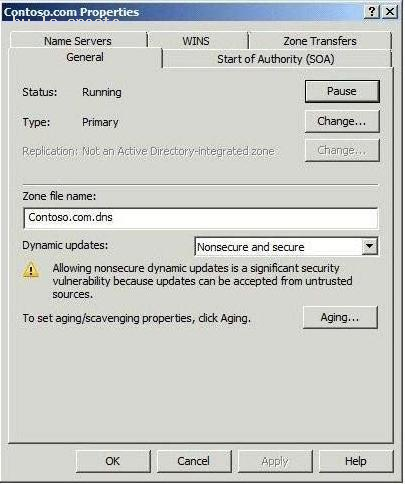
You need to update all service location (SRV) records for a domain controller in the domain.
What should you do?
- A. Restart the Netlogon servic
- B. Restart the DNS Client servic
- C. Run sc.exe and specify the triggerinfo paramete
- D. Run ipconfig.exe and specify the /registerdns paramete
Answer: A
Explanation:
MCTS 70-640 Cert Guide: Windows Server 2008 Active Directory, Configuring (Pearson IT Certification, 2010) page 62
The SRV resource records for a domain controller are important in enabling clients to locate the domain controller. The Netlogon service on domain controllers registers this resource record whenever a domain controller is restarted. You can also re-register a domain controller’s SRV resource records by restarting this service from the Services branch of Server Manager or by typing net start netlogon. An exam question might ask you how to troubleshoot the nonregistration of SRV resource records.
NEW QUESTION 9
Your network contains an Active Directory domain named contoso.com. Contoso.com
contains a member server that runs Windows Server 2008 R2 Standard.
You need to create an enterprise subordinate certification authority (CA) that can issue certificates based on version 3 certificate templates.
You must achieve this goal by using the minimum amount of administrative effort.
What should you do first?
- A. Run the certutil.exe - addenrollmentserver comman
- B. Install the Active Directory Certificate Services (AD CS) role on the member serve
- C. Upgrade the member server to Windows Server 2008 R2 Enterpris
- D. Run the certutil.exe - installdefaulttemplates comman
Answer: C
NEW QUESTION 10
You have a server named Server1 that has the following Active Directory Certificate Services (AD CS) role services installed:
Enterprise root certification authority (CA)
Certificate Enrollment Web Service
Certificate Enrollment Policy Web Service
You create a new certificate template.
External users report that the new template is unavailable when they request a new certificate.
You verify that all other templates are available to the external users.
You need to ensure that the external users can request certificates by using the new template.
What should you do on Server1?
- A. Run iisreset.exe /restar
- B. Run gpupdate.exe /forc
- C. Run certutil.exe dspublis
- D. Restart the Active Directory Certificate Services servic
Answer: A
Explanation:
http://social.technet.microsoft.com/wiki/contents/articles/7734.certificate-enrollment-web-services-in-activedirectory-certificate-services.aspx Certificate Enrollment Web Services in Active Directory Certificate Services Troubleshooting Managing Certificate Enrollment Policy Web Service Polling for Certificate Templates Certificate Templates are stored in AD DS, and the Certificate Enrollment Policy Web Service polls the AD DS periodically for template changes. Changes made to templates are not reflected in real time on the Certificate Enrollment Policy Web Service. When administrators duplicate or modify templates, there can be a lag between the time at which the change is made and when the new templates are available. By default, the Certificate Enrollment Policy Web Service polls the directory every 30 minutes for changes. The Certificate Enrollment Policy Web Service can be manually forced to refresh its template cache by recycling IIS using the command iisreset.
NEW QUESTION 11
Your network contains a single Active Directory domain that has two sites named Site1 and
Site2. Site1 has two domain controllers named DC1 and DC2. Site2 has two domain controllers named DC3 and DC4.
DC3 fails.
You discover that replication no longer occurs between the sites.
You verify the connectivity between DC4 and the domain controllers in Site1.
On DC4, you run repadmin.exe /kcc.
Replication between the sites continues to fail.
You need to ensure that Active Directory data replicates between the sites.
What should you do?
- A. From Active Directory Sites and Services, modify the properties of DC3.
- B. From Active Directory Sites and Services, modify the NTDS Site Settings of Site2.
- C. From Active Directory Users and Computers, modify the location settings of DC4.
- D. From Active Directory Users and Computers, modify the delegation settings of DC4.
Answer: A
Explanation:
MCTS 70-640 Cert Guide: Windows Server 2008 Active Directory, Configuring (Pearson IT Certification, 2010) pages 193, 194
Bridgehead Servers
A bridgehead server is the domain controller designated by each site’s KCC to take control of intersite replication. The bridgehead server receives information replicated from other sites and replicates it to its site’s other domain controllers. It ensures that the greatest portion of replication occurs within sites rather than between them.
In most cases, the KCC automatically decides which domain controller acts as the bridgehead server.
However, you can use Active Directory Sites and Services to specify which domain controller will be the preferred bridgehead server by using the following steps:
1. In Active Directory Sites and Services, expand the site in which you want to specify the preferred bridgehead server.
2. Expand the Servers folder to locate the desired server, right-click it, and then choose Properties.
3. From the list labeled Transports available for intersite data transfer, select the protocol(s) for which you want to designate this server as a preferred bridgehead server and then click Add.
NEW QUESTION 12
Your network consists of a single Active Directory domain. All domain controllers run Windows Server 2008 R2. The Audit account management policy setting and Audit directory services access setting are enabled for the entire domain.
You need to ensure that changes made to Active Directory objects can be logged. The logged changes must include the old and new values of any attributes.
What should you do?
- A. Run auditpol.exe and then configure the Security settings of the Domain Controllers O
- B. From the Default Domain Controllers policy, enable the Audit directory service access setting and enable directory service change
- C. Enable the Audit account management policy in the Default Domain Controller Polic
- D. Run auditpol.exe and then enable the Audit directory service access setting in the Default Domain polic
Answer: A
Explanation:
http://technet.microsoft.com/en-us/library/cc731607%28v=ws.10%29.aspx AD DS Auditing Step-by-Step Guide In Windows Server 2008 you can now set up AD DS auditing with a new audit subcategory to log old and new values when changes are made to objects and their attributes.
The ability to audit changes to objects in AD DS is enabled with the new audit policy subcategory Directory Service Changes. This guide provides instructions for implementing this audit policy subcategory. The types of changes that you can audit include a user (or any security principal) creating, modifying, moving, or undeleting an object. The new audit policy subcategory adds the following capabilities to auditing in AD DS: When a successful modify operation is performed on an attribute, AD DS logs the previous and current values of the attribute. If the attribute has more than one value, only the values that change as a result of the modify operation are logged. If a new object is created, values of the attributes that are populated at the time of creation are logged. If the user adds attributes during the create operation, those new attribute values are logged. In most cases, AD DS assigns default values to attributes (such as samAccountName). The values of such system attributes are not logged. If an object is moved, the previous and new location (distinguished name) is logged for moves within the domain. When an object is moved to a different domain, a create event is generated on the domain controller in the target domain. If an object is undeleted, the location where the object is moved to is logged. In addition, if the user adds, modifies, or deletes attributes while performing an undelete operation, the values of those attributes are logged.
In Windows Server 2008, you implement the new auditing feature by using the following controls: Global audit policy System access control list (SACL) Schema Global audit policy Enabling the global audit policy, Audit directory service access, enables all directory service policy subcategories. You can set this global audit policy in the Default Domain Controllers Group Policy (under Security SettingsLocal PoliciesAudit Policy). In Windows Server 2008, this global audit policy is not enabled by default. Although the subcategory Directory Service Access is enabled for success events by default, the other subcategories are not enabled by default. You can use the command-line tool Auditpol.exe to view or set audit policy subcategories. There is no
Windows interface tool available in Windows Server 2008 to view or set audit policy
subcategories.
Further information:
http://technet.microsoft.com/en-us/library/cc731451%28v=ws.10%29.aspx
Auditpol
Displays information about and performs functions to manipulate audit policies.
http://servergeeks.wordpress.com/2012/12/31/auditing-directory-services/
AD Scenario – Auditing Directory Services
Auditing of Directory Services depends on several controls, these are:
1. Global Audit Policy (at category level using gpmc.msc tool)
2. Individual Audit Policy (at subcategory level using auditpol.exe tool)
3. System ACLs – to specify which operations are to be audited for a security principal.
4. Schema (optional) – this is an additional control in the schema that you can use to create
exceptions to what is audited.
In Windows Server 2008, you can now set up AD DS (Active Directory Domain Services)
auditing with a new audit policy subcategory (Directory Service Changes) to log old and
new values when changes are made to AD DS objects and their attributes. This can be
done using auditpol.exe tool.
Command to check which audit policies are active on your machine: auditpol /get
/category:* 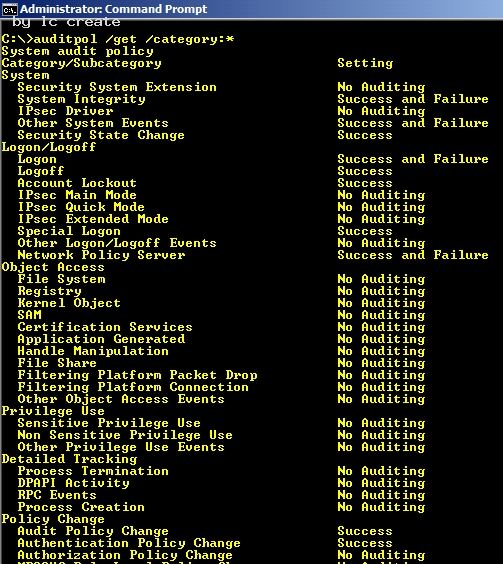
C:Documents and Settingsusernwz1Desktop1.PNG Command to view the audit policy categories and Subcategories: 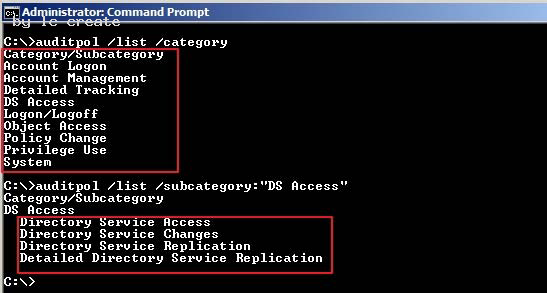
C:Documents and Settingsusernwz1Desktop1.PNG
How to enable the global audit policy using the Windows interface i.e. gpmc tool Click Start, point to Administrative Tools, and then Group Policy Management or run gpmc.msc command.
In the console tree, double-click the name of the forest, double-click Domains, double-click the name of your domain, double-click Domain Controllers, right-click Default Domain Controllers Policy, and then click Edit. 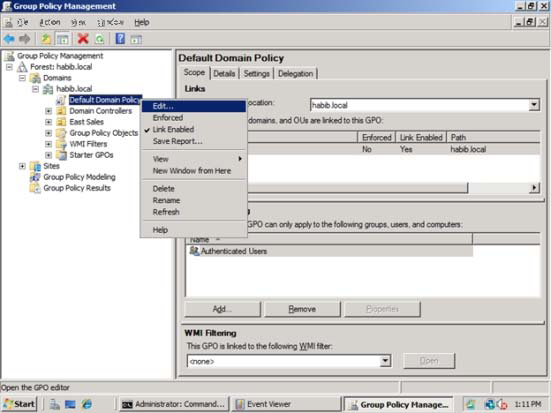
C:Documents and Settingsusernwz1Desktop1.PNG
Under Computer Configuration, double-click Policies, double-click Windows Settings, double-click Security Settings, double-click Local Policies, and then click Audit Policy. 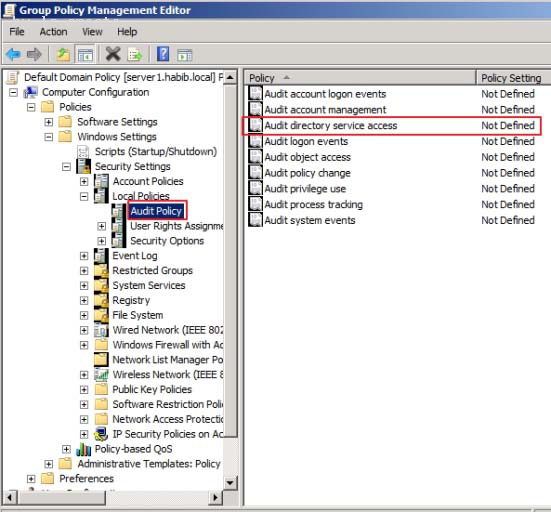
C:Documents and Settingsusernwz1Desktop1.PNG
In the details pane, right-click Audit directory service access, and then click Properties.
Select the Define these policy settings check box.
Under Audit these attempts, select the Success, check box, and then click OK. 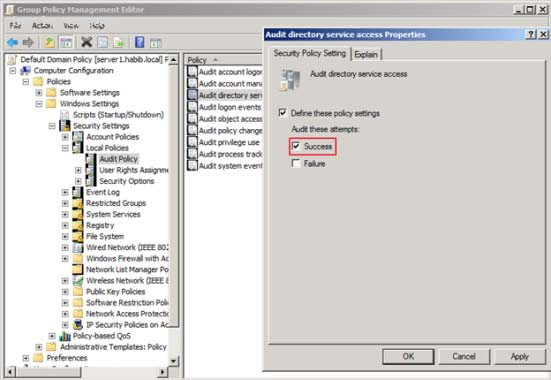
C:Documents and Settingsusernwz1Desktop1.PNG
How to enable the change auditing policy using a command line
Click Start, right-click Command Prompt, and then click Run as administrator.
Type the following command, and then press ENTER:
auditpol /set /subcategory:”directory service changes” /success:enable
To verify if the auditing is enabled or not for “Directory Service Changes”, you can run
below command:
auditpol /get /category:”DS Access” 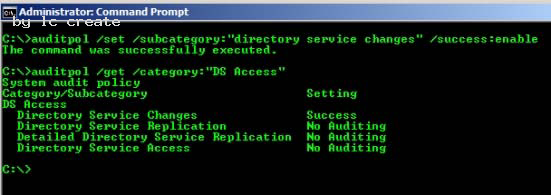
C:Documents and Settingsusernwz1Desktop1.PNG
How to set up auditing in object SACLs Click Start, point to Administrative Tools, and then click Active Directory Users and Computers. Right-click the organizational unit (OU) (or any object) for which you want to enable
auditing, and then click Properties.
Click the Security tab, click Advanced, and then click the Auditing tab. 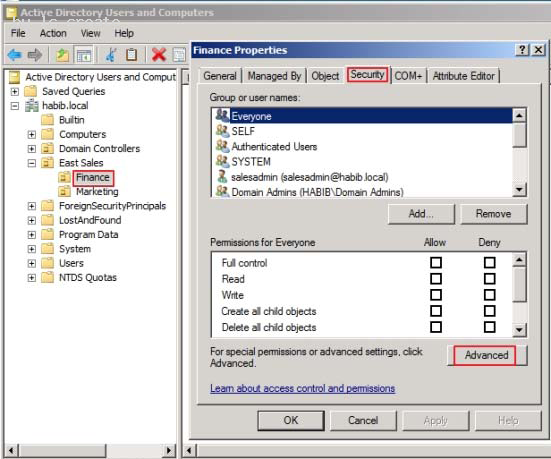
C:Documents and Settingsusernwz1Desktop1.PNG
Click Add, and under Enter the object name to select, type Authenticated Users (or any other security principal) and then click OK. 
C:Documents and Settingsusernwz1Desktop1.PNG
In Apply onto, click Descendant User objects (or any other objects). Under Access, select the Successful check box for Write all properties. Click OK 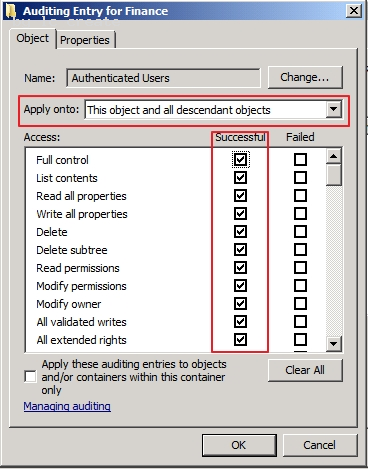
C:Documents and Settingsusernwz1Desktop1.PNG
Click OK until you exit the property sheet for the OU or other object.
To Test whether auditing is working or not, try creating or modifying objects in Finance OU
and check the Security event logs.
I just created a new user account in Finance OU named f4. 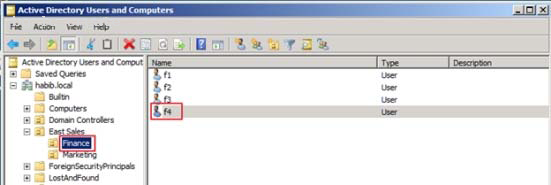
C:Documents and Settingsusernwz1Desktop1.PNG
If you check the security event logs you will find eventid 5137 (Create)
Note:
Once the auditing is enabled these eventids will appear in security event logs: 5136
(Modify), 5137 (Create), 5138 (Undelete), 5139 (Move). 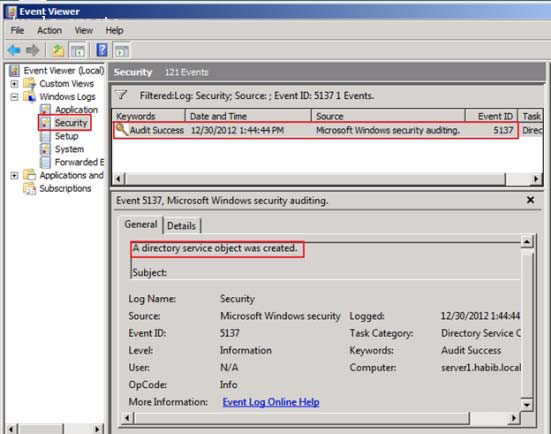
C:Documents and Settingsusernwz1Desktop1.PNG
NEW QUESTION 13
As an administrator at Company, you have installed an Active Directory forest that has a single domain.
You have installed an Active Directory Federation services (AD FS) on the domain member server.
What should you do to configure AD FS to make sure that AD FS token contains information from the active directory domain?
- A. Add a new account store and configure i
- B. Add a new resource partner and configure it
- C. Add a new resource store and configure it
- D. Add a new administrator account on AD FS and configure it
- E. None of the above
Answer: A
Explanation:
http://technet.microsoft.com/en-us/library/cc772309%28v=ws.10%29.aspx Step 3: Installing and Configuring AD FS Now that you have configured the computers that will be used as federation servers, you are ready to install Active Directory Federation Services (AD FS) components on each of the computers. This section includes the following procedures: Install the Federation Service on ADFS-RESOURCE and ADFS-ACCOUNT Configure ADFS-ACCOUNT to work with AD RMS Configure ADFS-RESOURCE to Work with AD RMS
NEW QUESTION 14
What is the maximum number of domains that a Windows Server 2008 R2 computer, configured as a domain controller, may participate in at one time?
- A. Zero
- B. One
- C. Two
- D. Any number of domains
Answer: B
Explanation:
Personal comment:
A computer, be it a workstation or a server, can be a member of only one domain at a time. 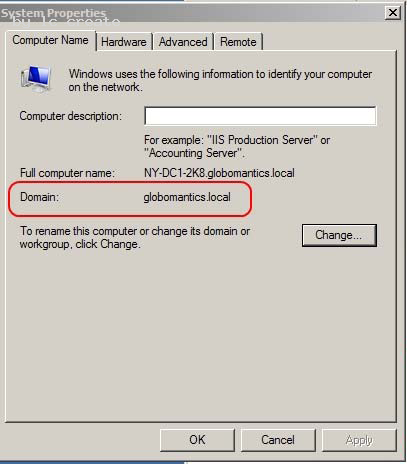
C:Documents and Settingsusernwz1Desktop1.PNG 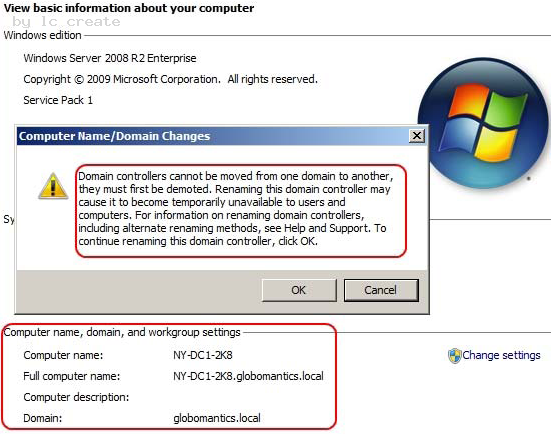
C:Documents and Settingsusernwz1Desktop1.PNG
NEW QUESTION 15
Your network contains an Active Directory domain. The domain contains several domain controllers. All domain controllers run Windows Server 2008 R2.
You need to restore the Default Domain Policy Group Policy object (GPO) to the Windows Server 2008 R2 default settings.
What should you do?
- A. Run dcgpofix.exe /target:d
- B. Run dcgpofix.exe /target:domai
- C. Delete the link for the Default Domain Controllers Policy, and then run gpupdate.exe /forc
- D. Delete the link for the Default Domain Controllers Policy, and then run gpupdate.exe /syn
Answer: B
NEW QUESTION 16
Your network contains an Active Directory domain. The domain contains an organizational unit (OU) named OU1. OU1 contains all managed service accounts in the domain.
You need to prevent the managed service accounts from being deleted accidentally from OU1.
Which cmdlet should you use?
- A. Set-ADUser
- B. Set-ADOrganizationalUnit
- C. Set-ADServiceAccount
- D. Set-ADObject
Answer: D
Explanation: http://technet.microsoft.com/en-us/library/hh852326.aspx Set-ADObject Modifies an Active Directory object.
Parameter -ProtectedFromAccidentalDeletion <Boolean>Specifies whether to prevent the object from
being deleted. When this property is set to true, you cannot delete the corresponding object without changing the value of the property. Possible values for this parameter include: $false or 0 $true or 1 The following example shows how to set this parameter to true. -ProtectedFromAccidentalDeletion $true
NEW QUESTION 17
Your network contains an Active Directory domain. All domain controllers run Windows Server 2008 R2.
You need to receive a notification when more than 100 Active Directory objects are deleted per second.
What should you do?
- A. Create custom views from Event Viewe
- B. Run the Get-ADForest cmdle
- C. Run the ntdsutil.exe comman
- D. Configure the Active Directory Diagnostics Data Collector Set (DCS).
- E. Create a Data Collector Set (DCS).
- F. Run the dsamain.exe comman
- G. Run the dsquery.exe comman
- H. Run the repadmin.exe comman
- I. Configure subscriptions from Event Viewe
- J. Run the eventcreate.exe comman
Answer: E
Explanation:
http://technet.microsoft.com/en-us/magazine/ff458614.aspx
Configure Windows Server 2008 to Notify you when Certain Events Occur
You can configure alerts to notify you when certain events occur or when certain performance thresholds are reached. You can send these alerts as network messages and as events that are logged in the application event log. You can also configure alerts to start applications and performance logs.
To configure an alert, follow these steps:
1. In Performance Monitor, under the Data Collector Sets node, right-click the User-Defined node in the left pane, point to New, and then choose Data Collector Set.
2. (...)
3. In the Performance Counters panel, select the first counter, and then use the Alert When Value Is text box to set the occasion when an alert for this counter is triggered. Alerts can be triggered when the counter is above or below a specific value. Select Above or Below, and then set the trigger value. The unit of measurement is whatever makes sense for the currently selected counter or counters. For example, to generate an alert if processor time is over 95 percent, select Over, and then type 95. Repeat this process to configure other counters you’ve selected.
NEW QUESTION 18
You create a new Active Directory domain. The functional level of the domain is Windows Server 2003. The domain contains five domain controllers that run Windows Server 2008 R2.
You need to monitor the replication of the group policy template files.
Which tool should you use?
- A. Dfsrdiag
- B. Fsutil
- C. Ntdsutil
- D. Ntfrsutl
Answer: D
Explanation:
With domain functional level 2008 you have available dfs-r sysvol replication. So with
DFL2008 you can use the DFSRDIAG tool. It is not available with domain functional level
2003.
With domain functional level 2003 you can only use Ntfrsutl.
NEW QUESTION 19
A corporate network contains a Windows Server 2008 R2 Active Directory forest. You need to add a user principal name (UPN) suffix to the forest. Which tool should you use?
- A. Active Directory Users and Computers console
- B. Active Directory Sites and Services console
- C. Ntdsutil
- D. Active Directory module for Windows PowerShell
- E. Active Directory Domains and Trusts Console
Answer: E
Explanation: Create Alternate UPN Suffix for a Domain To create an alternate UPN suffice in a domain, administrators must follow the steps given as below:
. Log on to Windows Server 2008 R2 domain controller with domain admin or enterprise admin account credentials.
. From the desktop screen, click.Start.
. From the Start menu, go to.Administrative Tools > Active Directory Domains and Trusts.
. On.Active Directory Domains and Trusts.snap-in, from the console tree in the left pane, right-clickActive Directory Domains and Trusts [computername.domainname].(‘srv2k8r2-dc01.mydomain.com’ in this demonstration).
. From the displayed context menu, click.Properties.
Click Properties Description: 
http://www.tutorialspoint.com/shorttutorials/wp-content/uploads/2013/01/Add-Alternate-UPN-Suffix.jpg
. On the properties box that appears, in the.Alternative UPN suffixes.field, specify the desired alternate UPN suffix for the domain and click.Add.
. Once added, click.OK.to save the settings.
. Close.Active Directory Domains and Trusts.snap-in when done.
Recommend!! Get the Full 70-640 dumps in VCE and PDF From 2passeasy, Welcome to Download: https://www.2passeasy.com/dumps/70-640/ (New 631 Q&As Version)
- Top Quality AZ-102 Exam Questions 2021
- Microsoft MS-500 Testing Software 2021
- Free 70-765 Study Guides 2021
- The Secret of Microsoft 70-535 practice test
- Breathing 70-741 Free Practice Questions 2021
- Up to the minute Microsoft 70-410 exam
- The Secret of Microsoft 70-488 vce
- Accurate Microsoft 70-334 Test Engine Online
- Microsoft AZ-301 Dumps Questions 2021
- Free MD-100 Bootcamp 2021