

70-640 Exam Questions - Online Test
70-640 Premium VCE File

150 Lectures, 20 Hours

We provide which are the best for clearing 70-640 test, and to get certified by Microsoft TS: Windows Server 2008 Active Directory. Configuring. The covers all the knowledge points of the real 70-640 exam. Crack your Microsoft 70-640 Exam with latest dumps, guaranteed!
Check 70-640 free dumps before getting the full version:
NEW QUESTION 1
You have a Windows Server 2008 R2 Enterprise Root certification authority (CA).
You need to grant members of the Account Operators group the ability to only manage Basic EFS certificates.
You grant the Account Operators group the Issue and Manage Certificates permission on the CA.
Which three tasks should you perform next? (Each correct answer presents part of the solution.
Choose three.)
- A. Enable the Restrict Enrollment Agents option on the C
- B. Enable the Restrict Certificate Managers option on the C
- C. Add the Basic EFS certificate template for the Account Operators grou
- D. Grant the Account Operators group the Manage CA permission on the C
- E. Remove all unnecessary certificate templates that are assigned to the Account Operators grou
Answer: BCE
Explanation:
http://technet.microsoft.com/en-us/library/cc779954%28v=ws.10%29.aspx
Role-based administration
Role explanation
Role-based administration involves CA roles, users, and groups. To assign a role to a user or group, you must assign the role's corresponding security permissions, group memberships, or user rights to the user or group.
These security permissions, group memberships, and user rights are used to distinguish which users have which roles. The following table describes the CA roles of role-based administration and the groups relevant to role-based administration. 
C:Documents and Settingsusernwz1Desktop1.PNG
Certificate Manager: Delete multiple rows in database (bulk deletion)
Issue and approve certificates
Deny certificates
Revoke certificates
Reactivate certificates placed on hold
Renew certificates
Recover archived key
Read CA database
Read CA configuration information
http://technet.microsoft.com/en-us/library/cc753372.aspx
Restrict Certificate Managers
A certificate manager can approve certificate enrollment and revocation requests, issue certificates, and manage certificates. This role can be configured by assigning a user or group the Issue and Manage Certificatespermission.
When you assign this permission to a user or group, you can further refine their ability to manage certificates by group and by certificate template. For example, you might want to implement a restriction that they can only approve requests or revoke smart card logon certificates for users in a certain office or organizational unit that is the basis for a security group. This restriction is based on a subset of the certificate templates enabled for the certification authority (CA) and the user groups that have Enroll permissions for that certificate template from that CA.
To configure certificate manager restrictions for a CA:
1. Open the Certification Authority snap-in, and right-click the name of the CA.
2. Click Properties, and then click the Security tab.
3. Verify that the user or group that you have selected has Issue and Manage Certificates permission. If they do not yet have this permission, select the Allow check box, and then click Apply.
4. Click the Certificate Managers tab.
5. Click Restrict certificate managers, and verify that the name of the group or user is displayed.
6. Under Certificate Templates, click Add, select the template for the certificates that you want this user or group to manage, and then click OK. Repeat this step until you have selected all certificate templates that you want to allow this certificate manager to manage.
7. Under Permissions, click Add, type the name of the client for whom you want the certificate manager to manage the defined certificate types, and then click OK.
8. If you want to block the certificate manager from managing certificates for a specific user, computer, or group, under Permissions, select this user, computer, or group, and click Deny.
9. When you are finished configuring certificate manager restrictions, click OK or Apply.
NEW QUESTION 2
Your network contains an Active Directory domain named contoso.com. The domain contains a domain controller named DC1. DC1 has the DNS Server server role installed and hosts an Active Directory-integrated zone for contoso.com. The no-refresh interval and the refresh interval are both set to three days. The Advanced DNS settings of DC1 are shown in the Advanced DNS Settings exhibit. (Click the Exhibit button.)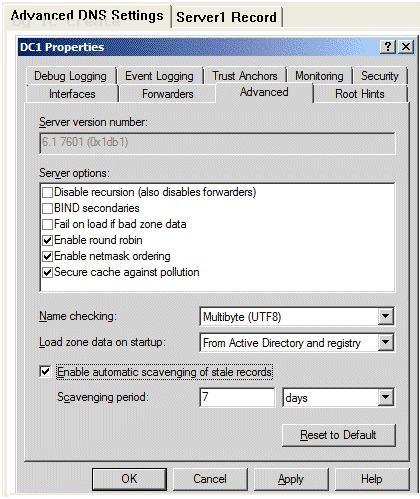
You open the properties of a static record named Server1 as shown in the Server1 Record exhibit.(Click the Exhibit button.) 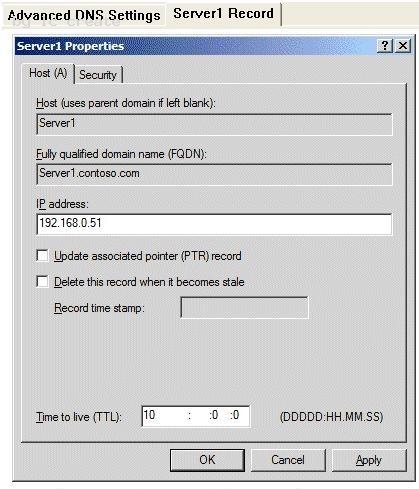
You discover that the scavenging process ran today, but the record for Server1 was not
deleted.
You run dnscmd.exe and specify the age all records parameter.
You need to identify when the record for Server1 will be deleted from the zone.
In how many days will the record be deleted?
- A. 13
- B. 10
- C. 23
- D. 7
Answer: D
Explanation:
The blank Record time stamp field indicates a static record. That's the reason it wasn't deleted. The timestamp has been set using dnscmd /ageallrecords. The Time to live setting means that the server will hold a cached record for 10 days, so it has nothing to do with this question. The record will become stale in six days (no-refresh interval + refresh interval, that's 3 + 3 days), so now that the timestamp has been set it will be deleted when the next scavenging operation occurs, in seven days.
Explanation 1: http://technet.microsoft.com/en-us/library/cc772069.aspx dnscmd /ageallrecords Sets the current time on all time stamps in a zone or node. Record scavenging does not occur unless the records are time stamped. Name server (NS) resource records, start of authority (SOA) resource records, and Windows Internet Name Service (WINS) resource records are not included in the scavenging process, and they are not time stamped even when the ageallrecords command runs.
Explanation 2: http://www.windowsitpro.com/article/dns/scavenging-stale-dns-records
When a record is older than the sum of the no-refresh interval and the refresh interval, the scavenging feature considers the record stale and deletes it. So, when you set No-refresh interval to 3 days and Refresh interval to 5 days, scavenging will delete records that are more than 8 days old.
NEW QUESTION 3
Your network contains an Active Directory domain. The domain contains two file servers. The file servers are configured as shown in the following table.
You create a Group Policy object (GPO) named GPO1 and you link GPO1 to OU1.
You configure the advanced audit policy.
You discover that the settings are not applied to Server1. The settings are applied to Server2.
You need to ensure that access to the file shares on Server1 is audited.
What should you do?
- A. From Active Directory Users and Computers, modify the permissions of the computer account for Server1.
- B. From GPO1, configure the Security Option
- C. From Active Directory Users and Computers, add Server1 to the Event Log Readers grou
- D. On Server1, run seceditexe and specify the /configure paramete
- E. On Server1, run auditpol.exe and specify the /set paramete
Answer: E
Explanation:
http://technet.microsoft.com/en-us/library/cc755264.aspx
Auditpol set
Sets the per-user audit policy, system audit policy, or auditing options.
NEW QUESTION 4
Your network contains an Active Directory domain named contoso.com.
You create two global groups named Group1 and Group2. The group membership of each group is shown in the following table. 
You create the Password Settings objects (PSOs) shown in the following table. 
In the table below, identify which PSOs will apply to User1 and User2. Make only one selection in each column. 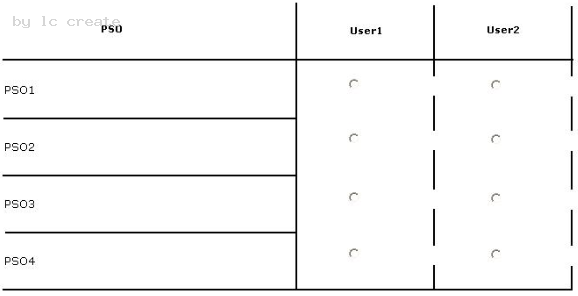
Answer:
Explanation:
NEW QUESTION 5
Your network contains an Active Directory domain named contoso.com.
You need to create a script that runs the Best Practices Analyzer (BPA) each week for all of the server roles that BPA supports on each domain controller.
You must achieve this goal by using the minimum amount of administrative effort.
Which tools should you use? (Each correct answer presents part of the solution. Choose three.)
- A. Get-Troubleshooting Pack / Invoke-Troubleshooting Pac
- B. Import-Module Best Practice
- C. Get-BPA Model / Invoke-BPA Mode
- D. Import-Module Troubleshooting Pac
- E. Get- BPA Resul
Answer: BCE
Explanation:
Explanation 1: http://technet.microsoft.com/en-us/library/dd759206.aspx To scan all roles by using Windows PowerShell cmdlets
1. Open a Windows PowerShell session with elevated user rights.
2. Import the Server Manager module into your Windows PowerShell session. To import the Server Manager module, type the following, and then press ENTER. Import-Module ServerManager
3. Import the BPA module. Type the following, and then press Enter. Import-Module BestPractices
4. Pipe all roles for which BPA scans can be performed into the Invoke-BPAModel cmdlet to start scans. Get-BPAModel | Invoke-BPAModel Explanation 2: http://technet.microsoft.com/en-us/library/ee617286.aspx Get-BpaResult The Get-BPAResult cmdlet allows you to retrieve and view the results of the most recent Best Practices Analyzer (BPA) scan for a specific model.
NEW QUESTION 6
You are formulating the backup strategy for Active Directory Lightweight Directory Services (AD LDS) to ensure that data and log files are backed up regularly. This will also ensure the continued availability of data to applications and users in the event of a system failure.
Because you have limited media resources, you decided to backup only specific ADLDS instance instead of taking backup of the entire volume.
What should you do to accomplish this task?
- A. Use Windows Server backup utility and enable checkbox to take only backup of database and log files of AD LDS
- B. Use Dsdbutil.exe tool to create installation media that corresponds only to the ADLDS instance
- C. Move AD LDS database and log files on a separate volume and use windows server backup utility
- D. None of the above
Answer: B
Explanation:
http://technet.microsoft.com/en-us/library/cc730941.aspx
Backing up AD LDS instance data with Dsdbutil.exe
With the Dsdbutil.exe tool, you can create installation media that corresponds only to the AD LDS instance that you want to back up, as opposed to backing up entire volumes that contain the AD LDS instance.
NEW QUESTION 7
You create a new Active Directory domain. The functional level of the domain is Windows Server 2008 R2. The domain contains five domain controllers.
You need to monitor the replication of the group policy template files.
Which tool should you use?
- A. Dfsrdiag
- B. Fsutil
- C. Ntdsutil
- D. Ntfrsutl
Answer: A
Explanation:
With domain functional level 2008 you have available dfs-r sysvol replication. So with
DFL2008 you can use the DFSRDIAG tool. It is not available with domain functional level
2003.
With domain functional level 2003 you can only use Ntfrsutl.
NEW QUESTION 8
Your network contains an Active Directory domain named adatum.com.
The password policy of the domain requires that the passwords for all user accounts be changed every 50 days.
You need to create several user accounts that will be used by services. The passwords for these accounts must be changed automatically every 50 days.
Which tool should you use to create the accounts?
- A. Active Directory Administrative Center
- B. Active Directory Users and Computers
- C. Active Directory Module for Windows PowerShell
- D. ADSI Edit
- E. Active Directory Domains and Trusts
Answer: C
Explanation:
Use the New-ADServiceAccount cmdlet in PowerShell to create the new accounts as
managed service accounts. Managed service accounts offer Automatic password
management, making password management easier.
Explanation 1:
http://technet.microsoft.com/en-us/library/dd367859.aspx
What are the benefits of new service accounts?
In addition to the enhanced security that is provided by having individual accounts for
critical services, there are four important administrative benefits associated with managed
service accounts:
(...)
Unlike with regular domain accounts in which administrators must reset passwords
manually, the network passwords for these accounts will be reset automatically.
(...)
Explanation 2:
http://technet.microsoft.com/en-us/library/dd391964.aspx
Use the Active Directory module for Windows PowerShell to create a managed service
account.
Explanation 3:
http://technet.microsoft.com/en-us/library/dd548356.aspx
To create a new managed service account
1. On the domain controller, click Start, and then click Run. In the Open box, type dsa.msc, and then click OK to open the Active Directory Users and Computers snap-in. Confirm that the Managed Service Account container exists.
2. Click Start, click All Programs, click Windows PowerShell 2.0, and then click the
Windows PowerShell icon.
3. Run the following command: New-ADServiceAccount [-SAMAccountName <String>] [-Path <String>].
Explanation 4:
http://technet.microsoft.com/en-us/library/hh852236.aspx
Use the -ManagedPasswordIntervalInDays parameter with New-ADServiceAccount to
specify the number of days for the password change interval.
-ManagedPasswordIntervalInDays<Int32>Specifies the number of days for the password
change interval. If set to 0 then the default is used. This can only be set on object creation.
After that the setting is read only. This value returns the msDSManagedPasswordInterval
of the group managed service account object.
The following example shows how to specify a 90 day password changes interval:
-ManagedPasswordIntervalInDays 90
NEW QUESTION 9
Your network contains an Active Directory domain named contoso.com.
You need to audit changes to a service account. The solution must ensure that the audit logs contain the before and after values of all the changes.
Which security policy setting should you configure?
- A. Audit Sensitive Privilege Use
- B. Audit User Account Management
- C. Audit Directory Service Changes
- D. Audit Other Account Management Events
Answer: C
Explanation:
Explanation 1: http://technet.microsoft.com/en-us/library/dd772641.aspx
Audit Directory Service Changes This security policy setting determines whether the operating system generates audit events when changes are made to objects in Active Directory Domain Services (AD DS). Explanation 2: http://technet.microsoft.com/en-us/library/cc731607.aspx AD DS Auditing Step-by-Step Guide This guide includes a description of the new Active Directory. Domain Services (AD DS) auditing feature in Windows Server. 2008. With the new auditing feature, you can log events that show old and new values; for example, you can show that Joe's favorite drink changed from single latte to triple-shot latte.
NEW QUESTION 10
Your network contains an Active Directory domain named contoso.com. The domain has one Active Directory site.
The domain contains an organizational unit (OU) named 0U1. OU1 contains user accounts for 100 users and their managers.
You apply a Group Policy object (GPO) named GPO1 to OU1. GPO1 restricts several desktop settings.
The managers request that the desktop settings not be applied to them.
You need to prevent the desktop settings in GPO1 from being applied to the managers. All other users in OU1 must have GPO1 applied to them.
What should you do?
- A. Link GPO1 to the site and remove the link for GPO1 from OU1.
- B. Move the managers to a child OU of OU1 and block inheritance on the child O
- C. Configure the permissions on OU1.
- D. Disable the computer configurations of GPO1.
Answer: B
NEW QUESTION 11
Your company has an Active Directory forest. Not all domain controllers in the forest are configured as Global Catalog Servers. Your domain structure contains one root domain and one child domain.
You modify the folder permissions on a file server that is in the child domain. You discover that some Access Control entries start with S-1-5-21 and that no account name is listed.
You need to list the account names.
What should you do?
- A. Move the RID master role in the child domain to a domain controller that holds the Global Catalo
- B. Modify the schema to enable replication of the friendlynames attribute to the Global Catalo
- C. Move the RID master role in the child domain to a domain controller that does not hold the Global Catalo
- D. Move the infrastructure master role in the child domain to a domain controller that does not hold the Global Catalo
Answer: D
Explanation:
http://technet.microsoft.com/en-us/library/cc780850%28v=ws.10%29.aspx Security identifiers Security identifiers (SIDs) are numeric values that identify a user or group. For each access control entry (ACE), there exists a SID that identifies the user or group for whom access is allowed, denied, or audited. Well-known security identifiers (special identities): Network (S-1-5-2) Includes all users who are logged on through a network connection. Access tokens for interactive users do not contain the Network SID. http://technet.microsoft.com/en-us/library/cc773108%28v=ws.10%29.aspx Operations master roles Active Directory supports multimaster replication of the directory data store between all domain controllers (DC) in the domain, so all domain controllers in a domain are essentially peers. However, some changes are impractical to perform in using multimaster replication, so, for each of these types of changes, one domain controller, called the operations master, accepts requests for such changes. In every forest, there are at least five operations master roles that are assigned to one or more domain controllers. Forest-wide operations master roles must appear only once in every forest. Domain-wide operations master roles must appear once in every domain in the forest.
Domain-wide operations master roles Every domain in the forest must have the following roles: Relative ID (RID) master Primary domain controller (PDC) emulator master Infrastructure master These roles must be unique in each domain. This means that each domain in the forest can have only one RID master, PDC emulator master, and infrastructure master.
Infrastructure master At any time, there can be only one domain controller acting as the infrastructure master in each domain. The infrastructure master is responsible for updating Explanations from objects in its domain to objects in other domains. The infrastructure master compares its data with that of a global catalog. Global catalogs receive regular updates for objects in all domains through replication, so the global catalog data will always be up to date. If the infrastructure master finds data that is out of date, it requests the updated data from a global catalog. The infrastructure master then replicates that updated data to the other domain controllers in the domain. Important Unless there is only one domain controller in the domain, the infrastructure master role should not be assigned to the domain controller that is hosting the global catalog. If the infrastructure master and global catalog are on the same domain controller, the infrastructure master will not function. The infrastructure master will never find data that is out of date, so it will never replicate any changes to the other domain controllers in the domain.
In the case where all of the domain controllers in a domain are also hosting the global catalog, all of the domain controllers will have the current data and it does not matter which domain controller holds the infrastructure master role. The infrastructure master is also responsible for updating the group-to-user Explanations whenever the members of groups are renamed or changed. When you rename or move a member of a group (and that member resides in a different domain from the group), the group may temporarily appear not to contain that member. The infrastructure master of the group's domain is responsible for updating the group so it knows the new name or location of the member. This prevents the loss of group memberships associated with a user account when the user account is renamed or moved. The infrastructure master distributes the update via multimaster replication. There is no compromise to security during the time between the member rename and the group update. Only an administrator looking at that particular group membership would notice the temporary inconsistency.
NEW QUESTION 12
Your network contains an Active Directory domain. The domain is configured as shown in the exhibit. (Click the Exhibit button.)
You have a Group Policy object (GPO) linked to the domain. The GPO is used to deploy a number of software packages.
You need to ensure that the GPO is applied only to client computers that have sufficient free disk space.
What should you do?
- A. Modify the Group Policy permission
- B. Enable block inheritanc
- C. Configure the link orde
- D. Enable loopback processing in merge mod
- E. Enable loopback processing in replace mod
- F. Modify the Group Policy permission
- G. Enable block inheritanc
- H. Configure the link orde
- I. Enable loopback processing in merge mod
- J. Enable loopback processing in replace mod
Answer: F
NEW QUESTION 13
You are decommissioning a child domain. The child domain contains five operations master roles.
You need to transfer the forest operations master roles to a newly installed domain controller in a different child domain.
Which two domain operations master roles should you transfer? (Each correct answer presents part of the solution. Choose two.)
- A. RID master
- B. PDC emulator
- C. Schema master
- D. Domain naming master
- E. Infrastructure master
Answer: CD
Explanation: Forestwide Operations Master Roles The schema master and domain naming master are forestwide roles, meaning that there is only one schema master and one domain naming master in the entire forest.
Note:
* Operations Master Roles
The five operations master roles are assigned automatically when the first domain
controller in a given domain is created. Two forest-level roles are assigned to the first
domain controller created in a forest and three domain-level roles are assigned to the first
domain controller created in a domain.
* The five FSMO roles [in Windows 2003] are:
Schema master - Forest-wide and one per forest.
Domain naming master - Forest-wide and one per forest.
RID master - Domain-specific and one for each domain.
PDC - PDC Emulator is domain-specific and one for each domain.
Infrastructure master - Domain-specific and one for each domain.
NEW QUESTION 14
You had installed an Active Directory Federation Services (AD FS) role on a Windows
server 2008 in your organization.
Now you need to test the connectivity of clients in the network to ensure that they can successfully reach the new Federation server and Federation server is operational.
What should you do? (Select all that apply)
- A. Go to Services tab, and check if Active Directory Federation Services is running
- B. In the event viewer, Applications, Event ID column look for event ID 674.
- C. Open a browser window, and then type the Federation Service URL for the new federation serve
- D. None of the above
Answer: BC
Explanation: http://technet.microsoft.com/en-us/library/cc734875.aspx Verify Verify that a specific event (ID 674) was generated on the federation server proxy
computer. This event is generated when the federation server proxy is able to successfully
communicate with the Federation Service.
To perform this procedure, you must be a member of the local Administrators group, or you
must have been delegated the appropriate authority.
1. Log on to a client computer with Internet access.
2. Open a browser window, and then type the Uniform Resource Locator (URL) for the Federation Service endpoint, along with the path to the clientlogon.aspx page that is stored on the federation server proxy.
3. Press ENTER.
Note -At this point your browser should display the error Server Error in '/adfs' Application. This step is necessary to generate event message 674 to verify that the clientlogon.aspx page is being loaded properly by Internet Information Services (IIS).
4. Log on to the federation server proxy.
5. Click Start, point to Administrative Tools, and then click Event Viewer.
6. In the details pane, double-click Application.
7. In the Event column, look for event ID 674.
NEW QUESTION 15
Your company has an Active Directory forest that contains Windows Server 2008 R2 domain controllers and DNS servers. All client computers run Windows XP SP3.
You need to use your client computers to edit domain-based GPOs by using the ADMX files that are stored in the ADMX central store.
What should you do?
- A. Add your account to the Domain Admins grou
- B. Upgrade your client computers to Windows 7.
- C. Install .NET Framework 3.0 on your client computer
- D. Create a folder on PDC emulator for the domain in the PolicyDefinitions pat
- E. Copy the ADMX files to the PolicyDefinitions folde
Answer: B
Explanation:
http://technet.microsoft.com/en-us/library/cc709647%28v=ws.10%29.aspx Managing Group Policy ADMX Files Step-by-Step Guide
Microsoft Windows Vista. and Windows Server 2008 introduce a new format for displaying registry-based policy settings. Registry-based policy settings (located under the Administrative Templates category in the Group Policy Object Editor) are defined using a standards-based, XML file format known as ADMX files. These new files replace ADM files, which used their own markup language. The Group Policy tools —Group Policy Object Editor and Group Policy Management Console—remain largely unchanged. In the majority of situations, you will not notice the presence of ADMX files during your day-to-day Group Policy administration tasks. http://blogs.technet.com/b/grouppolicy/archive/2008/12/17/questions-on-admx-in-windows-xp-and-windows2003-environments.aspx Questions on ADMX in Windows XP and Windows 2003 environments We had a question a couple of days ago about the usage of ADMX template formats in Windows XP/Server 2003 environments. Essentially the question was: “…What’s the supported or recommended way of getting W2k8 ADMX templates applying in a W2k3 domain with or with no W2k8 DCs. What I’ve done in test is, created a central store in the /Sysvol/domain/policies folder on the 2k3 DC (PDC) and created and edited a GPO using GPMC from the W2k8 member server applying to a W2k8 machine and it seems to work just fine. Is this the right way to do it?…” The answer is Yes. Again this is one of those things that confuse people. The template format has nothing to do with the policy file that’s created. Its just used to create the policy by the administrative tool itself. In the case of GPMC on Windows XP and Windows Server 2003 and previous – this tool used the ADM file format. These ADM files were copied into every policy object on the SYSVOL, which represents about 4MB of duplicated bloat per policy. This was one of the areas that caused major problems with an issue called SYSVOL bloat. In Vista and Server 2008 this template format changed to ADMX. This was a complete change towards a new XML based format that aimed to eliminate SYSVOL bloat. It doesn’t copy itself into every policy object but relies on a central or local store of these templates (Note that even in the newer tools you can still import custom ADM files for stuff like Office etc). In the question above, the person wanted to know if copying the local store, located under c:/windows/ policydefinitions, could be copied into a Windows Server 2003 domain environment as the central store and Explanationd by the newer admin tools. Again the domain functional mode has little to do with Group Policy. I talked about that one before. The things that we care about are the administrative tools and the client support for the policy functions. So of course it can. Here’s the confusion-reducing scoop – Group Policy as a platform only relies on two main factors. Active Directory to store metadata about the policy objects and to allow client discoverability for the location of the policy files. The other is the SYSVOL to store the policy files. So at its core that’s LDAP and SMB file shares. Specific extensions on top of the policy platform may require certain domain functionality but that’s very specific to that extension. Examples are the new Wireless policy and BitLocker extensions in Vista SP1. They require schema updates – not GP itself. So if you don't currently use them then you don't have to update schema. So provided you’re using Windows Vista SP1 with RSAT or Windows Server 2008 to administer the policies you get all the benefits to manage downlevel clients. That means eliminating SYSVOL bloat. That means all the joys of Group Policy PExplanations. Honestly – it amazes us the amount of IT Pros that still haven’t discovered GPP…especially with the power it has to practically eliminate logon scripts! As a last point – IT Pros also ask us when we will be producing an updated GPMC version for Windows XP to support all the new stuff. The answer is that we are not producing any updated GPMC versions for Windows XP and Server 2003. All the new administrative work is being done on the newer platforms. So get moving ahead! There are some really good benefits in the newer tools and very low impact to your current environment. You only need a single Windows Vista SP1 machine to start!
NEW QUESTION 16
You need to remove the Active Directory Domain Services role from a domain controller named DC1.
What should you do?
- A. Run the netdom remove DC1 comman
- B. Run the Dcpromo utilit
- C. Remove the Active Directory Domain Services rol
- D. Run the nltest /remove_server: DC1 comman
- E. Reset the Domain Controller computer account by using the Active Directory Users and Computers utilit
Answer: B
Explanation:
Answer: Run the Dcpromo utility. Remove the Active Directory Domain Services role.
http://technet.microsoft.com/en-us/library/cc771844%28v=ws.10%29.aspx Removing a Domain Controller from a Domain
To remove a domain controller by using the Windows interface
1. Click Start, click Run, type dcpromo, and then press ENTER.
Further information: http://technet.microsoft.com/en-us/library/cc772217%28v=ws.10%29.aspx Netdom Enables administrators to manage Active Directory domains and trust relationships from the command prompt. Netdom is a command-line tool that is built into Windows Server 2008 and Windows Server 2008 R2. It is available if you have the Active Directory Domain Services (AD DS) server role installed. It is also available if you install the Active Directory Domain Services Tools that are part of the Remote Server Administration Tools (RSAT). Commands Netdom remove
Removes a workstation or server from the domain.
http://technet.microsoft.com/en-us/library/cc731935%28v=ws.10%29.aspx Nltest Performs network administrative tasks. Nltest is a command-line tool that is built into Windows Server 2008 and Windows Server 2008 R2. It is available if you have the AD DS or the AD LDS server role installed. It is also available if you install the Active Directory Domain Services Tools that are part of the Remote Server Administration Tools (RSAT). You can use nltest to: Get a list of domain controllers Force a remote shutdown Query the status of trust Test trust relationships and the state of domain controller replication in a Windows domain Force a user-account database to synchronize on Windows NT version 4.0 or earlier domain controllers Personal comment #1: There is no /remove_server switch for the nltest command Personal comment #2: Resetting the Domain Controller's computer account has nothing to do with this question
NEW QUESTION 17
Your network contains an Active Directory domain named contoso.com.
You have an organizational unit (OU) named Sales and an OU named Engineering.
You have two Group Policy objects (GPOs) named GPO1 and GPO2. GPO1 and GPO2
are linked to the Sales OU and contain multiple settings.
You discover that GPO2 has a setting that conflicts with a setting in GPO1. When the
policies are applied, the setting in GPO2 takes effect.
You need to ensure that the settings in GPO1 supersede the settings in GPO2. The solution must ensure that all non-conflicting settings in both GPOs are applied.
What should you do?
- A. Modify the Group Policy permission
- B. Enable block inheritanc
- C. Configure the link orde
- D. Enable loopback processing in merge mod
- E. Enable loopback processing in replace mod
- F. Configure WMI filterin
- G. Configure Restricted Group
- H. Configure Group Policy PExplanation
- I. Link the GPO to the Sales O
- J. Link the GPO to the Engineering O
Answer: C
NEW QUESTION 18
Your network contains an Active Directory domain named contoso.com.
The domain has a branch site that contains a read-only domain controller (RODC) named RODC1.
A user named User1 is a member of the Allowed RODC Password Replication Group. User1 frequently logs on to a computer in the branchsite.
You remove User1 from the Allowed RODC Password Replication Group.
You need to ensure that the password of User1 is no longer cached on RODC1.
What should you do?
- A. Add User1 to the Denied RODC Password Replication Group, and then force Active Directory replicatio
- B. Run repadmin /rodcpwdrepl rodc2.contoso.com dc.contoso.com cn=User1,cn-users,dc=contoso,dc-co
- C. Run repadmin /prp delete rodcl.contoso.com allow cn=User1, cn=users, dc=contoso,dc=co
- D. Reset the password of User1, and then force Active Directory replicatio
Answer: D
NEW QUESTION 19
You have a domain controller that runs Windows Server 2008 R2 and is configured as a DNS server.
You need to record all inbound DNS queries to the server.
What should you configure in the DNS Manager console?
- A. Enable debug loggin
- B. Enable automatic testing for simple querie
- C. Configure event logging to log errors and warning
- D. Enable automatic testing for recursive querie
Answer: A
Explanation:
http://technet.microsoft.com/en-us/library/cc753579.aspx DNS Tools Event-monitoring utilities The Windows Server 2008 family includes two options for monitoring DNS servers: Default logging of DNS server event messages to the DNS server log. DNS server event messages are separated and kept in their own system event log, the DNS server log, which you can view using DNS Manager or Event Viewer. The DNS server log contains events that are logged by the DNS Server service. For example, when the DNS server starts or stops, a corresponding event message is written to this log. Most additional critical DNS Server service events are also logged here, for example, when the server starts but cannot locate initializing data and zones or boot information stored in the registry or (in some cases) Active Directory Domain Services (AD DS).
You can use Event Viewer to view and monitor client-related DNS events. These events appear in the System log, and they are written by the DNS Client service at any computers running Windows (all versions). Optional debug options for trace logging to a text file on the DNS server computer. You can also use DNS Manager to selectively enable additional debug logging options for temporary trace logging to a text-based file of DNS server activity. The file that is created and used for this feature, Dns.log, is stored in the %systemroot%System32Dns folder.
http://technet.microsoft.com/en-us/library/cc776361%28v=ws.10%29.aspx Using server debug logging options The following DNS debug logging options are available: Direction of packets Send Packets sent by the DNS server are logged in the DNS server log file. Receive Packets received by the DNS server are logged in the log file. Further information:
http://technet.microsoft.com/en-us/library/cc759581%28v=ws.10%29.aspx Select and enable debug logging options on the DNS server
100% Valid and Newest Version 70-640 Questions & Answers shared by Certleader, Get Full Dumps HERE: https://www.certleader.com/70-640-dumps.html (New 631 Q&As)
- Improved 70-413 Exam Study Guides With New Update Exam Questions
- Microsoft 70-774 Dumps 2021
- how many questions of 70-464 dumps?
- 100% Correct 70-333 Exam Questions and Answers 2021
- Microsoft 70-333 Free Practice Questions 2021
- Renew Planning And Administering Microsoft Azure For SAP Workloads AZ-120 Free Exam
- How Many Questions Of AZ-204 Exam Prep
- Microsoft 70-744 Study Guides 2021
- Update DA-100 Testing Bible For Analyzing Data With Microsoft Power BI Certification
- What 100% Guarantee 70-488 exam Is?