

70-640 Exam Questions - Online Test
70-640 Premium VCE File

150 Lectures, 20 Hours

for Microsoft certification, Real Success Guaranteed with Updated . 100% PASS 70-640 TS: Windows Server 2008 Active Directory. Configuring exam Today!
Free 70-640 Demo Online For Microsoft Certifitcation:
NEW QUESTION 1
Your company has a main office and a branch office.
The network contains a single Active Directory domain.
The main office contains a domain controller named DC1.
You need to install a domain controller in the branch office by using an offline copy of the Active Directory database.
What should you do first?
- A. From the Ntdsutil tool, create an IFM media se
- B. From the command prompt, run djoin.exe /loadfil
- C. From Windows Server Backup, perform a system state backu
- D. From Windows PowerShell, run the get-ADDomainController cmdle
Answer: A
Explanation:
http://technet.microsoft.com/en-us/library/cc816722%28v=ws.10%29.aspx
Installing an Additional Domain Controller by Using IFM When you install Active Directory Domain Services (AD DS) by using the install from media (IFM) method, you can reduce the replication traffic that is initiated during the installation of an additional domain controller in an Active Directory domain. Reducing the replication traffic reduces the time that is necessary to install the additional domain controller. Windows Server 2008 and Windows Server 2008 R2 include an improved version of the Ntdsutil tool that you can use to create installation media for an additional domain controller. You can use Ntdsutil.exe to create installation media for additional domain controllers that you are creating in a domain. The IFM method uses the data in the installation media to install AD DS, which eliminates the need to replicate every object from a partner domain controller. However, objects that were modified, added, or deleted since the installation media was created must be replicated. If the installation media was created recently, the amount of replication that is required is considerably less than the amount of replication that is required for a regular AD DS installation.
NEW QUESTION 2
All vendors belong to a global group named vendors.
You place three file servers in a new organizational unit (OU) named ConfidentialFileServers. The three file servers contain confidential data located in shared folders.
You need to record any failed attempts made by the vendors to access the confidential data.
Which two actions should you perform? (Each correct answer presents part of the solution. Choose two.)
- A. Create a new Group Policy Object (GPO) and link it to the ConfidentialFileServers O
- B. Configure the Audit object access failure audit policy settin
- C. Create a new Group Policy Object (GPO) and link it to the ConfidentialFileServers O
- D. Configure the Audit privilege use Failure audit policy settin
- E. On each shared folder on the three file servers, add the Vendors global group to the Auditing ta
- F. Configure Failed Full control setting in the AuditingEntry dialog bo
- G. On each shared folder on the three file servers, add the three servers to the Auditing ta
- H. Configure Failed Full control setting in the AuditingEntry dialog bo
- I. Create a new Group Policy Object (GPO) and link it to the ConfidentialFileServers O
- J. Configure the Deny access to this computer from the network user rights setting for the Vendors global grou
Answer: AC
Explanation:
Windows Server 2008 R2 Unleashed (SAMS, 2010) page 671
Auditing Resource Access Object access can be audited, although it is not one of the recommended settings. Auditing object access can place a significant load on the servers, so it should only be enabled when it is specifically needed. Auditing object access is a two-step process: Step one is enabling “Audit object access” and step two is selecting the objects to be audited. When enabling Audit object access, you need to decide if both failure and success events will be logged. The two options are as follows: Audit object access failure enables you to see if users are attempting to access objects to which they have no rights. This shows unauthorized attempts.
Audit object access success enables you to see usage patterns. This shows misuse of privilege.
After object access auditing is enabled, you can easily monitor access to resources such as folders, files, and printers.
Auditing Files and Folders
The network administrator can tailor the way Windows Server 2008 R2 audits files and folders through the property pages for those files or folders. Keep in mind that the more files and folders that are audited, the more events that can be generated, which can increase administrative overhead and system resource requirements.
Therefore, choose wisely which files and folders to audit. To audit a file or folder, do the following:
1. In Windows Explorer, right-click the file or folder to audit and select Properties.
2. Select the Security tab and then click the Advanced button.
3. In the Advanced Security Settings window, select the Auditing tab and click the Edit button.
4. Click the Add button to display the Select User or Group window.
5. Enter the name of the user or group to audit when accessing the file or folder. Click the Check Names button to verify the name.
NEW QUESTION 3
Your network contains an Active Directory forest. The forest contains one domain named contoso.com.
You discover the following event in the Event log of domain controllers: “The request for a new accountidentifier pool failed. The operation will be retried until the request succeeds. The error is “ %1 “” You need to ensure that the domain controllers can acquire new account-identifier pools successfully.
What should you do?
- A. Move the domain naming master rol
- B. Move the global catalog serve
- C. Restart the Active Directory Domain Services (AD DS) servic
- D. Deploy an additional global catalog serve
- E. Move the infrastructure master rol
- F. Move the PDC emulator rol
- G. Install a read-only domain controller (RODC).
- H. Move the RID master rol
- I. Move the bridgehead serve
- J. Move the schema master rol
Answer: H
Explanation:
http://technet.microsoft.com/en-us/library/cc756699.aspx
Event ID 16651 — RID Pool Request
Users, computers, and groups stored in Active Directory are collectively known as security
principals. Each security principal is assigned a unique alphanumeric string called a SID.
The SID includes a domain prefix identifier that uniquely identifies the domain and a
relative identifier (RID) that uniquely identifies the security principal within the domain. The
RID is a monotonically increasing number at the end of the SID. Each domain controller is
assigned a pool of RIDs from the global RID pool by the domain controller that holds the
RID master role (also known as flexible single master operations or FSMO) in each Active
Directory domain. The RID master (also known as the RID pool manager, RID manager, or
RID operations master) is responsible for issuing a unique RID pool to each domain
controller in its domain. By default, RID pools are obtained in increments of 500. (...) Newly
promoted domain controllers must acquire a RID pool before they can advertise their
availability to Active Directory clients or share the SYSVOL. Existing domain controllers
require additional RID allocations in order to continue creating security principals when
their current RID pool becomes depleted.
Event Details
Message
The request for a new account-identifier pool failed. The operation will be retried until the
request succeeds.
The error is " %1 "
Resolve
Check connectivity to the RID master, and check its replication status
A relative ID (RID) pool was not allocated to the local domain controller. Ensure that the
local domain controller can communicate with the domain controller that is identified as the
RID operations master.
Ensure that the RID master is online and replicating to other domain controllers.
NEW QUESTION 4
You have a DNS zone that is stored in a custom application directory partition. You install a new domain controller.
You need to ensure that the custom application directory partition replicates to the new domain controller.
What should you use?
- A. the Active Directory Administrative Center console
- B. the Active Directory Sites and Services console
- C. the DNS Manager console
- D. the Dnscmd tool
Answer: D
Explanation:
http://technet.microsoft.com/en-us/library/cc772069.aspx
dnscmd /enlistdirectorypartition Adds the DNS server to the specified directory partition's replica set.
NEW QUESTION 5
You are the administrator of an organization with a single Active Directory domain.
A user who left the company returns after 16 weeks.
The user tries to log onto their old computer and receives an error stating that
authentication has failed.
The user's account has been enabled.
You need to ensure that the user is able to log onto the domain using that computer.
What do you do?
- A. Reset the computer account in Active Director
- B. Disjoin the computer from the domain and then rejoin the computer to the domai
- C. Run the ADadd command to rejoin the computer accoun
- D. Run the MMC utility on the user's computer and add the Domain Computers snap-i
- E. Re-create the user account and reconnect the user account to the computer accoun
Answer: A
Explanation:
http://social.technet.microsoft.com/wiki/contents/articles/9157.trust-relationship-between-workstation-andprimary-domain-failed.aspx Trust Relationship between Workstation and Primary Domain failed What are the common causes which generates this message on client systems?
There might be multiple reasons for this kind of behaviour. Below are listed a few of them:
1. Single SID has been assigned to multiple computers.
2. If the Secure Channel is Broken between Domain controller and workstations
3. If there are no SPN or DNSHost Name mentioned in the computer account attributes
4. Outdated NIC Drivers. How to Troubleshoot this behaviour?
2. If the Secure Channel is Broken between Domain controller and workstations When a Computer account is joined to the domain, Secure Channel password is stored with computer account in domain controller. By default this password will change every 30 days (This is an automatic process, no manual intervention is required). Upon starting the computer, Netlogon attempts to discover a DC for the domain in which its machine account exists. After locating the appropriate DC, the machine account password from the workstation is authenticated against the password on the DC. If there are problems with system time, DNS configuration or other settings, secure channel’s password between Workstation and DCs may not synchronize with each other. A common cause of broken secure channel [machine account password] is that the secure channel password held by the domain member does not match that held by the AD. Often, this is caused by performing a Windows System Restore (or reverting to previous backup or snapshot) on the member machine, causing an old (previous) machine account password to be presented to the AD.
Resolution: Most simple resolution would be unjoin/disjoin the computer from the domain and rejoin the computer account back to the domain. (this is a somewhat similar principle to performing a password reset for a user account) Or You can go ahead and reset the computer account using netdom.exe tool http://technet.microsoft.com/en-us/library/cc772217%28v=ws.10%29.aspx Netdom Enables administrators to manage Active Directory domains and trust relationships from the command prompt. Netdom is a command-line tool that is built into Windows Server 2008 and Windows Server 2008 R2. It is available if you have the Active Directory Domain Services (AD DS) server role installed. It is also available if you install the Active Directory Domain Services Tools that are part of the Remote Server Administration Tools (RSAT). You can use netdom to: Join a computer that runs Windows XP Professional, Windows Vista, or Windows 7 to a Windows Server 2008 R2, Windows Server 2008, Windows Server 2003, Windows 2000, or Windows NT 4.0 domain.
Manage computer accounts for domain member workstations and member servers.
Management operations include:
Establish one-way or two-way trust relationships between domains, including the following
kinds of trust relationships:
Verify or reset the secure channel for the following configurations:
* Member workstations and servers.
* Backup domain controllers (BDCs) in a Windows NT 4.0 domain.
* Specific Windows Server 2008 R2, Windows Server 2008, Windows Server 2003, or
Windows 2000 replicas.
Manage trust relationships between domains.
Syntax
NetDom <Operation> [<Computer>] [{/d: | /domain:} <Domain>] [<Options>]
http://technet.microsoft.com/en-us/library/cc788073%28v=ws.10%29.aspx
Netdom reset Resets the secure connection between a workstation and a domain
controller.
Syntax netdom reset <Computer> {/d: | /domain:}<Domain> [{/s: | /server:}<Server>] [{/uo: |
/usero:}<User> {/po: | /passwordo}{<Password>|*}] [{/help | /?}]
Further information:
http://technet.microsoft.com/en-us/library/cc835085%28v=ws.10%29.aspx
Netdom trust
Establishes, verifies, or resets a trust relationship between domains.
Syntax netdom trust <TrustingDomainName> {/d: | /domain:} <TrustedDomainName> [{/ud:
| /userd:}[<Domain>]
<User> [{/pd: | /passwordd:}{<Password>|*}] [{/uo: | /usero:}<User>] [{/po: |
/passwordo:}{<Password>|*}] [/verify] [/reset] [/passwordt:<NewRealmTrustPassword>]
[/add [/realm]] [/remove [/force]] [/twoway] [/kerberos] [/transitive[:{YES|NO}]]
[/oneside:{TRUSTED | TRUSTING}] [/force] [/quarantine[:{YES | NO}]]
[/namesuffixes:<TrustName> [/togglesuffix:#]] [/EnableSIDHistory] [/ForestTRANsitive]
[/SelectiveAUTH][/AddTLN][/AddTLNEX][/RemoveTLN] [/RemoveTLNEX][{/help | /?}]
NEW QUESTION 6
You have a Windows Server 2008 R2 Enterprise Root CA.
Security policy prevents port 443 and port 80 from being opened on domain controllers and on the issuing CA.
You need to allow users to request certificates from a Web interface. You install the Active Directory Certificate Services (AD CS) server role.
What should you do next?
- A. Configure the Online Responder Role Service on a member serve
- B. Configure the Online Responder Role Service on a domain controlle
- C. Configure the Certificate Enrollment Web Service role service on a member serve
- D. Configure the Certificate Enrollment Web Service role service on a domain controlle
Answer: C
Explanation:
http://technet.microsoft.com/en-us/library/dd759209.aspx Certificate Enrollment Web Service Overview The Certificate Enrollment Web Service is an Active Directory Certificate Services (AD CS) role service that enables users and computers to perform certificate enrollment by using the HTTPS protocol. Together with the Certificate Enrollment Policy Web Service, this enables policy-based certificate enrollment when the client computer is not a member of a domain or when a domain member is not connected to the domain. Personal note: Since domain controllers are off-limits (regarding open ports), you are left to install the Certificate Enrollment Web Service role service on a plain member server
NEW QUESTION 7
Your network contains 10 domain controllers that run Windows Server 2008 R2. The network contains a member server that is configured to collect all of the events that occur on the domain controllers.
You need to ensure that administrators are notified when a specific event occurs on any of the domain controllers. You want to achieve this goal by using the minimum amount of administrative effort.
What should you do?
- A. From Event Viewer on the member server, create a subscriptio
- B. From Event Viewer on each domain controller, create a subscriptio
- C. From Event Viewer on the member server, run the Create Basic Task Wizar
- D. From Event Viewer on each domain controller, run the Create Basic Task Wizar
Answer: C
Explanation:
http://technet.microsoft.com/en-us/library/cc748900.aspx
To Run a Task in Response to a Given Event
1. Start Event Viewer.
2. In the console tree, navigate to the log that contains the event you want to associate with a task.
3. Right-click the event and select Attach Task to This Event.
4. Perform each step presented by the Create Basic Task Wizard. In the Action step in the wizard you can decide to send an e-mail.
NEW QUESTION 8
Your company has an organizational unit named Production. The Production organizational unit has a child organizational unit named R&D. You create a GPO named Software Deployment and link it to the Production organizational unit.
You create a shadow group for the R&D organizational unit. You need to deploy an application to users in the Production organizational unit.
You also need to ensure that the application is not deployed to users in the R&D organizational unit.
What are two possible ways to achieve this goal? (Each correct answer presents a complete solution. Choose two.)
- A. Configure the Block Inheritance setting on the R&D organizational uni
- B. Configure the Enforce setting on the software deployment GP
- C. Configure security filtering on the Software Deployment GPO to Deny Apply group policy for the R&D security grou
- D. Configure the Block Inheritance setting on the Production organizational uni
Answer: AC
Explanation:
Answer: Configure the Block Inheritance setting on the R&D organizational unit. Configure security filtering on the Software Deployment GPO to Deny Apply group policy for the R&D security group.
http://technet.microsoft.com/en-us/library/cc757050%28v=ws.10%29.aspx Managing inheritance of Group Policy
Blocking Group Policy inheritance You can block policy inheritance for a domain or organizational unit. Using block inheritance prevents GPOs linked to higher sites, domains, or organizational units from being automatically inherited by the child-level. By default, children inherit all GPOs from the parent, but it is sometimes useful to block inheritance. For example, if you want to apply a single set of policies to an entire domain except for one organizational unit, you can link the required GPOs at the domain level (from which all organizational units inherit policies
by default) and then block inheritance only on the organizational unit to which the policies
should not be applied.
Enforcing a GPO link You can specify that the settings in a GPO link should take
precedence over the settings of any child object by setting that link to Enforced. GPO-links
that are enforced cannot be blocked from the parent container. Without enforcement from
above, the settings of the GPO links at the higher level (parent) are overwritten by settings
in GPOs linked to child organizational units, if the GPOs contain conflicting settings. With
enforcement, the parent
GPO link always has precedence. By default, GPO links are not enforced. In tools prior to
GPMC, "enforced" was known as "No override."
In addition to using GPO links to apply policies, you can also control how GPOs are applied
by using security filters or WMI filters.
http://technet.microsoft.com/en-us/library/cc781988%28v=ws.10%29.aspx
Security filtering using GPMC
Security filtering Security filtering is a way of refining which users and computers will
receive and apply the settings in a Group Policy object (GPO). Using security filtering, you
can specify that only certain security principals within a container where the GPO is linked
apply the GPO. Security group filtering determines whether the GPO as a whole applies to
groups, users, or computers; it cannot be used selectively on different settings within a
GPO.
Notes:
GPOs cannot be linked directly to users, computers, or security groups. They can only be
linked to sites, domains and organizational units. However, by using security filtering, you
can narrow the scope of a GPO so that it applies only to a single group, user, or computer.
The location of a security group in Active Directory is irrelevant to security group filtering
and, more generally, irrelevant to Group Policy processing.
Further information:
http://technet.microsoft.com/en-us/library/cc731076.aspx
Block Inheritance
http://en.wikipedia.org/wiki/Active_Directory#Shadow_groups
Active Directory
Shadow groups
In Microsoft's Active Directory, OUs do not confer access permissions, and objects placed
within OUs are not automatically assigned access privileges based on their containing OU.
This is a design limitation specific to Active Directory. Other competing directories such as
Novell NDS are able to assign access privileges through object placement within an OU.
Active Directory requires a separate step for an administrator to assign an object in an OU
as a member of a group also within that OU. Relying on OU location alone to determine access permissions is unreliable, because the object may not have been assigned to the group object for that OU. A common workaround for an Active Directory administrator is to write a custom PowerShell or Visual Basic script to automatically create and maintain a user group for each OU in their directory. The scripts are run periodically to update the group to match the OU's account membership, but are unable to instantly update the security groups anytime the directory changes, as occurs in competing directories where security is directly implemented into the directory itself. Such groups are known as Shadow Groups. Once created, these shadow groups are selectable in place of the OU in the administrative tools. Microsoft refers to shadow groups in the Server 2008 Explanation documentation, but does not explain how to create them. There are no built-in server methods or console snap-ins for managing shadow groups.[5] The division of an organization's information infrastructure into a hierarchy of one or more domains and toplevel OUs is a key decision. Common models are by business unit, by geographical location, by IT Service, or by object type and hybrids of these. OUs should be structured primarily to facilitate administrative delegation, and secondarily, to facilitate group policy application. Although OUs form an administrative boundary, the only true security boundary is the forest itself and an administrator of any domain in the forest must be trusted across all domains in the forest.[6]
NEW QUESTION 9
A domain controller named DC12 runs critical services. Restructuring of the organizational unit hierarchy for the domain has been completed and unnecessary objects have been deleted.
You need to perform an offline defragmentation of the Active Directory database on DC12. You also need to ensure that the critical services remain online.
What should you do?
- A. Start the domain controller in the Directory Services restore mod
- B. Run the Defrag utilit
- C. Start the domain controller in the Directory Services restore mod
- D. Run the Ntdsutil utilit
- E. Stop the Domain Controller service in the Services (local) Microsoft Management Console (MMC). Run the Defrag utilit
- F. Stop the Domain Controller service in the Services (local) Microsoft Management Console (MMC). Run the Ntdsutil utilit
Answer: D
Explanation:
http://support.microsoft.com/kb/232122 Performing offline defragmentation of the Active Directory database Active Directory automatically performs online defragmentation of the database at certain intervals (by default, every 12 hours) as part of the Garbage Collection process. Online defragmentation does not reduce the size of the database file (Ntds.dit), but instead optimizes data storage in the database and reclaims space in the directory for new objects. Performing an offline defragmentation creates a new, compacted version of the database file. Depending on how fragmented the original database file was, the new file may be considerably smaller. http://rickardnobel.se/when-to-offline-defrag-ntds-dit/ When to offline defrag the Active Directory database This article will show a simple way to determine if there is any gain to do an offline defrag of your Active Directory database. During normal operations the Active Directory service will do an online defragmentation of the Active Directory database (always called ntds.dit) each 12 hours. This online defrag will arrange all pages in an optimal way internal in the ntds.dit, however the file size will never shrink, sometimes even grow. During the years of operations of the ntds.dit the file size will increase as user accounts, organizational units, groups, computers, dns records and more are added and later removed. When deleted objects are finally removed (after the so called tombstone lifetime, typically 180 days) the space they have occupied will unfortunately not decrease. 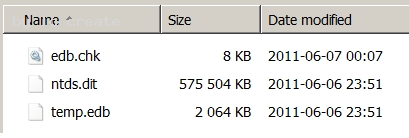
C:Documents and Settingsusernwz1Desktop1.PNG
The actual size of the ntds.dit could be easily studied through Explorer, as above. The size of the database is in this example around 575 MB. Note that Active Directory does not use a file level replication, so the file could be of various size on each Domain Controller in your domain. If wanted there is the possibility to take the AD services offline on one DC and then do an offline defragmentation of ntds.dit. This would both arrange all pages the best possible way, and also to reclaim any empty space inside the database, which could make backup and restore faster and also possible increase AD performance. The offline defrag means “offline” from an Active Directory perspective. This means that on Windows 2000 and 2003 you will have to reboot into Directory Services Restore Mode, and on Windows 2008 and R2 you will have to stop the AD services by typing “net stop ntds” in the command prompt. So in Windows 2008 and later it is far easier, but still something that you do not want to do if not necessary. There are numerous article on the web how to do the actual offline defrag, so we will not cover that part here. However, we will see the perhaps most important information and that is to be able to see in advance the amount of space that we could reclaim. With this information we could make our decision based on fact and not guesses. This has been possible since at least Windows 2003, but is not well documented. 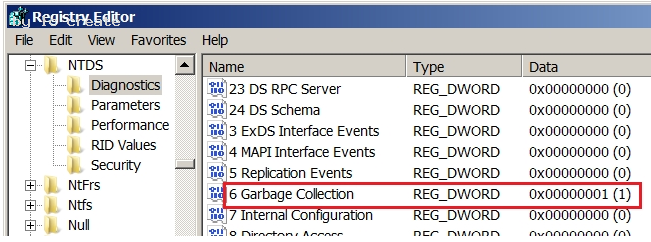
C:Documents and Settingsusernwz1Desktop1.PNG
To enable this you will have to alter a registry value on the Domain Controller you will investigate the reclaimable MBs. Use regedit and find the following key: HKEY_LOCAL_MACHINE System CurrentControlSet Services NTDS Diagnostics Change the value “6 Garbage Collection” from 0 to 1. This will increase the logging from the Garbage Collection process which runs together with the online defrag. So now wait for the next online defragmentation which runs twice a day and then study the Directory Service log in Event Viewer. 
C:Documents and Settingsusernwz1Desktop1.PNG
Search for event id 1646, usually together with event ids 700 and 701. 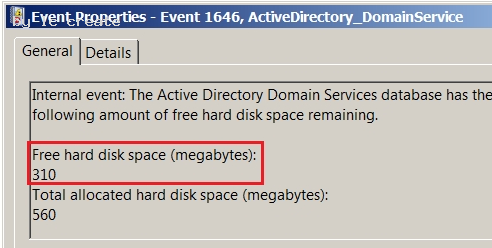
C:Documents and Settingsusernwz1Desktop1.PNG
Here we can note the amount of space that would be reclaimed from an offline defrag. The top value is the number of MB that the offline defrag would recover, here almost half the database size. If the amount is negligible then do not worry about this any more, and if there is a considerable amount of MBs reported then you could plan to do the offline defrag. 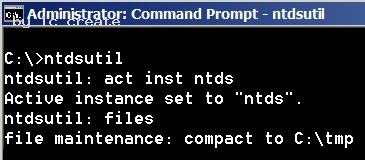
C:Documents and Settingsusernwz1Desktop1.PNG
Note that both the change of registry key and the actual offline defrag has to be done on
each domain controller, since neither does replicate.
As noted above we will not look at the commands for the offline defragmentation here,
since they are well documented already.
NEW QUESTION 10
You are the network administrator for the ABC Company.
The ABC Company has all Windows Server 2008 R2 Active Directory domains and uses
an Enterprise Root certificate server.
You need to verify that revoked certificate data is highly available.
What should you do?
- A. Implement a Group Policy Object(GPO) that has the Certificate Verification Enabled optio
- B. Using Network Load Balancing, implement an Online Certificate Status Protocol(OCSP) responde
- C. Implement a Group Policy object(GPO) that enables the Online Certificate Status Protocol(OCSP) responde
- D. Using Network Load Balancing, implement the Certificate Verification Enabled optio
Answer: B
Explanation:
Answer: Implement an Online Certificate Status Protocol (OCSP) responder by using Network Load Balancing.
http://technet.microsoft.com/en-us/library/cc731027%28v=ws.10%29.aspx AD CS: Online Certificate Status Protocol Support Certificate revocation is a necessary part of the process of managing certificates issued by certification authorities (CAs). The most common means of communicating certificate status is by distributing certificate revocation lists (CRLs). In the Windows Server. 2008 operating system, public key infrastructures (PKIs) where the use of conventional CRLs is not an optimal solution, an Online Responder based on the Online Certificate Status Protocol (OCSP) can be used to manage and distribute revocation status information.
What does OCSP support do? The use of Online Responders that distribute OCSP responses, along with the use of CRLs, is one of two common methods for conveying information about the validity of certificates. Unlike CRLs, which are distributed periodically and contain information about all certificates that have been revoked or suspended, an Online Responder receives and responds only to requests from clients for information about the status of a single certificate. The amount of data retrieved per request remains constant no matter how many revoked certificates there might be. In many circumstances, Online Responders can process certificate status requests more efficiently than by using CRLs.
Adding one or more Online Responders can significantly enhance the flexibility and scalability of an organization's PKI.
Further information: http://blogs.technet.com/b/askds/archive/2009/08/20/implementing-an-ocsp-responder-part-v-highavailability.aspx Implementing an OCSP Responder: Part V High Availability There are two major pieces in implementing the High Availability Configuration. The first step is to add the OCSP Responders to what is called an Array. When OCSP Responders are configured in an Array, the configuration of the OCSP responders can be easily maintained, so that all Responders in the Array have the same configuration. The configuration of the Array Controller is used as the baseline configuration that is then applied to other members of the Array. The second piece is to load balance the OCSP Responders. Load balancing of the OCSP responders is what actually provides fault tolerance.
NEW QUESTION 11
Your company has an Active Directory forest that contains a single domain. The domain member server has an Active Directory Federation Services (AD FS) role installed.
You need to configure AD FS to ensure that AD FS tokens contain information from the Active Directory domain.
What should you do?
- A. Add and configure a new account partne
- B. Add and configure a new resource partne
- C. Add and configure a new account stor
- D. Add and configure a Claims-aware applicatio
Answer: C
Explanation:
http://technet.microsoft.com/en-us/library/cc732095.aspx Understanding Account Stores Active Directory Federation Services (AD FS) uses account stores to log on users and extract security claims for those users. You can configure multiple account stores for a single Federation Service. You can also define their priority. The Federation Service uses Lightweight Directory Access Protocol (LDAP) to communicate with account stores. AD FS supports the following two account stores: Active Directory Domain Services (AD DS) Active Directory Lightweight Directory Services (AD LDS)
NEW QUESTION 12
Your company has one main office and four branch offices.
The main office contains a standard primary DNS zone named adatum.com. Each branch
office contains a copy of the adatum.com zone.
When records are added to the adatum.com zone, you discover that it takes up to one hour before the changes replicate to each zone in the branch offices.
You need to minimize the amount of time it takes for the records to be updated in the branch offices.
What should you do?
- A. On the DNS server in the main office, configure the Notify setting
- B. On the DNS servers in the branch offices, configure the Notify setting
- C. On the DNS servers in the branch offices, configure the Zone Aging/Scavenging Propertie
- D. On the DNS server in the main office, configure the Zone Aging/Scavenging Propertie
Answer: A
NEW QUESTION 13
Your company asks you to implement Windows Cardspace in the domain.
You want to use Windows Cardspace at your home.
Your home and office computers run Windows Vista Ultimate.
What should you do to create a backup copy of Windows Cardspace cards to be used at home?
- A. Log on with your administrator account and copy WindowsServiceProfiles folder to your USB drive
- B. Backup WindowsGlobalization folder by using backup status and save the folder on your USB drive
- C. Back up the system state data by using backup status tool on your USB drive
- D. Employ Windows Cardspace application to backup the data on your USB driv
- E. Reformat the C: Drive
- F. None of the above
Answer: D
Explanation:
http://windows.microsoft.com/en-us/windows7/windows-cardspace-for-itpros#
BKMK_HowdoIbackupmycardsortransferthemtoanothercomputer
Windows CardSpace for IT pros
Microsoft Windows CardSpace. is a system for creating relationships with websites and
online services.
Windows CardSpace provides a consistent way for:
Sites to request information from you.
You to review the identity of a site.
You to manage your information by using Information Cards.
You to review card information before you send it.
Windows CardSpace can replace the user names and passwords that you use to register
with and log on to websites and online services.
15. How do I back up my cards or transfer them to another computer?
Cards are stored on your computer in an encrypted format. To save a backup file
containing some or all of your cards or to use a card on a different computer, you can save
cards to a backup card file.
To back up your cards:
1. Start Windows CardSpace.
2. View all your cards.
3. In the pane on the right of your screen, click Back up cards.
4. Select the cards that you want to back up.
5. Browse to the folder where you want to save the backup card file, and then give it a
name.
When you complete these steps, you save a file containing some or all of your cards. You
can copy the backup card file to media such as a Universal Serial Bus (USB) storage
device, CD, or other digital media. You can restore the backup card file on this computer or
on another computer.
To restore your cards
1. Save the backup card file to the computer.
2. Browse to the location of the file on the computer.
3. Double-click the file, and then follow the instructions to restore the cards.
NEW QUESTION 14
Your network contains an Active Directory forest. The forest schema contains a custom attribute for user objects.
You need to generate a file that contains the last logon time and the custom attribute values for each user in the forest.
What should you use?
- A. the Get-ADUser cmdlet
- B. the Export-CSV cmdlet
- C. the Net User command
- D. the Dsquery User tool
Answer: A
Explanation:
http://technet.microsoft.com/en-us/library/cc771865.aspx
Adds or modifies user accounts, or displays user account information.
DSQUERY
Explanation 1:
http://technet.microsoft.com/en-us/library/cc754232.aspx
Parameters {<StartNode> | forestroot | domainroot}
Specifies the node in the console tree where the search starts. You can specify the forest root (forestroot), domain root (domainroot), or distinguished name of a node as the start node <StartNode>. If you specify forestroot, AD DS searches by using the global catalog.
-attr {<AttributeList> | *} Specifies that the semicolon separated LDAP display names included in <AttributeList> for each entry in the result set. If you specify the value of this parameter as a wildcard character (*), this parameter displays all attributes that are present on the object in the result set. In addition, if you specify a *, this parameter uses the default output format (a list), regardless of whether you specify the -l parameter. The default <AttributeList> is a distinguished name.
Explanation 2:
http://social.technet.microsoft.com/Forums/eu/winserverDS/thread/dda5fcd6-1a10-4d47-9379-02ca38aaa5b
Give an example of how to find a user with certain attributes using Dsquery. Note that it uses domainroot as the startnode, instead of forestroot what we need.
Explanation 3:
http://social.technet.microsoft.com/Forums/en-US/winservergen/thread/c6fc3826-78e1-48fd-ab6f-690378e0f787/
List all last login times for all users, regardless of whether they are disabled.
dsquery * -filter "(&(objectCategory=user)(objectClass=user))" -limit 0 -attr givenName sn sAMAccountName
lastLogon>>c:last_logon_for_all.txt
NEW QUESTION 15
Your network contains an Active Directory domain named litwareinc.com. The domain contains two sites named Site1 and Site2. Site2 contains a read-only domain controller (RODC).
You need to identify which user accounts attempted to authenticate to the RODC.
Which tool should you use?
- A. Repadmin
- B. Get-ADAccountResultantPasswordReplicationPolicy
- C. Active Directory Sites and Services
- D. Get-ADFineGrainedPasswordPolicy
Answer: A
NEW QUESTION 16
Your network contains a domain controller that runs Windows Server 2008 R2. You run the following command on the domain controller:
dsamain.exe -dbpath c:$SNAP_201006170326_VOLUMEC$WindowsNTDSntds.dit -ldapport 389 -allowNonAdminAccess
The command fails.
You need to ensure that the command completes successfully.
How should you modify the command?
- A. Include the path to Dsamai
- B. Change the value of the -dbpath paramete
- C. Change the value of the -ldapport paramete
- D. Remove the allowNonAdminAccess
Answer: C
Explanation: MS Press - Self-Paced Training Kit (Exam 70-640) (2nd Edition, July 2012) page 690 Use the AD DS database mounting tool to load the snapshot as an LDAP server. dsamain -dbpath c:$SNAP_datetime_VOLUMEC$windowsntdsntds.dit -ldapport portnumber Be sure to use ALL CAPS for the -dbpath value and use any number beyond 40,000 for the
-ldapport value to ensure that you do not conflict with AD DS.
Also note that you can use the minus (–) sign or the slash (/) for the options in the
command.
NEW QUESTION 17
Your network contains two Active Directory forests named contoso.com and fabrikam.com. Each forest contains a single domain.
A two-way forest trust exists between the forests. Selective authentication is enabled on the trust.
Contoso.com contains a group named Group 1.
Fabrikam.com contains a server named Server1.
You need to ensure that users in Group1 can access resources on Server1.
What should you modify?
- A. the permissions of the Group1 group
- B. the UPN suffixes of the contoso.com forest
- C. the UPN suffixes of the fabrikam.com forest
- D. the permissions of the Server1 computer account
Answer: A
Explanation:
MS Press - Self-Paced Training Kit (Exam 70-640) (2nd Edition, July 2012) pages 643, 644
After you have selected Selective Authentication for the trust, no trusted users will be able
to access resources in the trusting domain, even if those users have been given
permissions. The users must also be assigned the Allowed To Authenticate permission on
the computer object in the domain.
1. Open the Active Directory Users And Computers snap-in and make sure that Advanced Features is selected on the View menu.
2. Open the properties of the computer to which trusted users should be allowed to authenticate—that is, the computer that trusted users will log on to or that contains resources to which trusted users have been given permissions.
3. On the Security tab, add the trusted users or a group that contains them and select the Allow check box for the Allowed To Authenticate permission.
NEW QUESTION 18
You have an enterprise subordinate certification authority (CA). You have a custom Version 3 certificate template.
Users can enroll for certificates based on the custom certificate template by using the
Certificates console. The certificate template is unavailable for Web enrollment.
You need to ensure that the certificate template is available on the Web enrollment pages.
What should you do?
- A. Run certutil.exe Cpuls
- B. Run certutil.exe Cinstallcer
- C. Change the certificate template to a Version 2 certificate templat
- D. On the certificate template, assign the Autoenroll permission to the user
Answer: C
Explanation:
Identical to F/Q12. Explanation 1: http://technet.microsoft.com/en-us/library/cc732517.aspx Certificate Web enrollment cannot be used with version 3 certificate templates. Explanation 2: http://blogs.technet.com/b/ad/archive/2008/06/30/2008-web-enrollment-and-version-3-templates.aspx The reason for this blog post is that one of our customers called after noticing some unexpected behavior when they were trying to use the Server 2008 certificate web enrollment page to request a Version 3 Template based certificate. The problem was that no matter what they did the Version 3 Templates would not appear as certificates which could be requested via the web page. On the other hand, version 1 and 2 templates did appear in the page and requests could be done successfully using those templates.
NEW QUESTION 19
Your network contains an Active Directory domain. The domain contains eight domain controllers.
You need to verify that all the domain controllers can connect to the time server.
Which command should you run?
- A. netdom.exe query fsmo
- B. dcdiag.exe /e /test:Topology
- C. repadmin.exe /showrepl *
- D. dcdiag.exe /a
Answer: D
Recommend!! Get the Full 70-640 dumps in VCE and PDF From Certleader, Welcome to Download: https://www.certleader.com/70-640-dumps.html (New 631 Q&As Version)
- Renovate 70-685 Exam Study Guides With New Update Exam Questions
- What Refined 70-499 dumps Is?
- Regenerate Microsoft 70-410 practice test
- What Tested DP-100 Training Is
- Far out Microsoft 70-410 exam dumps
- The Secret of Microsoft 70-488 vce
- A Review Of Free 70-533 exam dumps
- Improved 70-413 Exam Study Guides With New Update Exam Questions
- High quality 70-743 Exam Dumps 2021
- The Secret of Microsoft 70-410 dumps