

AZ-100 Exam Questions - Online Test
AZ-100 Premium VCE File

150 Lectures, 20 Hours
Master the AZ-100 Exam Dumps content and be ready for exam day success quickly with this AZ-100 Exam Questions. We guarantee it!We make it a reality and give you real AZ-100 Study Guides in our Microsoft AZ-100 braindumps. Latest 100% VALID AZ-100 Braindumps at below page. You can use our Microsoft AZ-100 braindumps and pass your exam.
Also have AZ-100 free dumps questions for you:
NEW QUESTION 1
You have an Azure Storage accounts as shown in the following exhibit.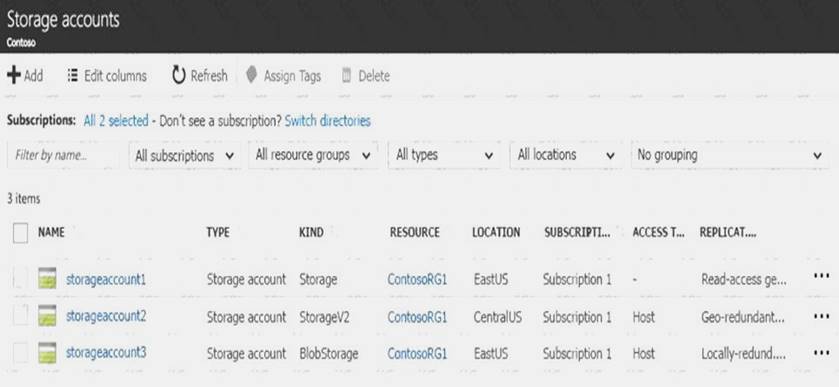
Use the drop-down menus to select the answer choice that completes each statement based on the information presented in the graphic.
NOTE: Each correct selection is worth one point.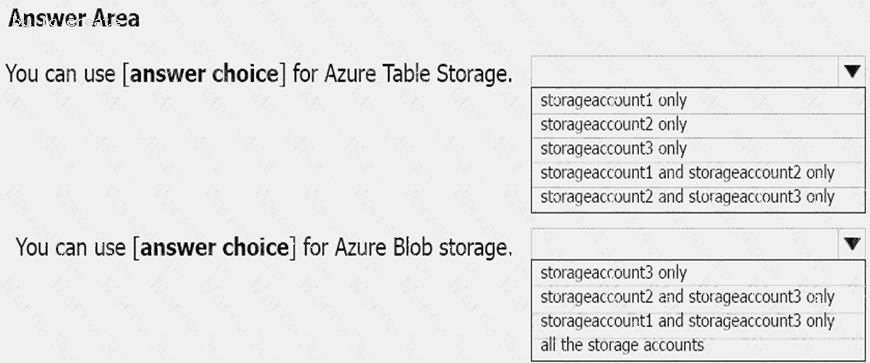
Answer:
Explanation: Box 1: storageaccount1 and storageaccount2 only Box 2: All the storage accounts
Note: The three different storage account options are: General-purpose v2 (GPv2) accounts, General-purpose v1 (GPv1) accounts, and Blob storage accounts. General-purpose v2 (GPv2) accounts are storage accounts that support all of the latest features for blobs, files, queues, and tables. Blob storage accounts support all the same block blob features as GPv2, but are limited to supporting only block blobs. General-purpose v1 (GPv1) accounts provide access to all Azure Storage services, but may not have the latest features or the lowest per gigabyte pricing.
References: https://docs.microsoft.com/en-us/azure/storage/common/storage-account-options
NEW QUESTION 2
Note: This question is part of a series of questions that present the same scenario. Each question in the series contains a unique solution that might meet the stated goals. Some question sets might have more than one correct solution, while others might not have a correct solution.
After you answer a question in this section, you will NOT be able to return to it. As a result, these questions will not appear in the review screen.
You have an Azure subscription that contains 10 virtual networks. The virtual networks are hosted in separate resource groups.
Another administrator plans to create several network security groups (NSGs) in the subscription.
You need to ensure that when an NSG is created, it automatically blocks TCP port 8080 between the virtual networks.
Solution: From the Resource providers blade, you unregister the Microsoft.ClassicNetwork provider. Does this meet the goal?
- A. Yes
- B. No
Answer: B
NEW QUESTION 3
Note: This question is part of a series of questions that present the same scenario. Each question in the series contains a unique solution that might meet the stated goals. Some question sets might have more than one correct solution, while others might not have a correct solution.
After you answer a question in this section, you will NOT be able to return to it. As a result, these questions will not appear in the review screen.
You have an Azure virtual machine named VM1. VM1 was deployed by using a custom Azure Resource Manager template named ARM1.json.
You receive a notification that VM1 will be affected by maintenance. You need to move VM1 to a different host immediately.
Solution: Solution: From the Overview blade, you move the virtual machine to a different subscription. Does this meet the goal?
- A. Yes
- B. No
Answer: B
Explanation: You would need to Redeploy the VM. References:
https://docs.microsoft.com/en-us/azure/virtual-machines/windows/redeploy-to-new-node
NEW QUESTION 4
You have an Azure Active Directory (Azure AD) tenant named contosocloud.onmicrosoft.com. Your company has a public DNS zone for contoso.com.
You add contoso.com as a custom domain name to Azure AD. You need to ensure that Azure can verify the domain name. Which type of DNS record should you create?
- A. RRSIG
- B. PTR
- C. DNSKEY
- D. TXT
Answer: D
Explanation: Create the TXT record. App Services uses this record only at configuration time to verify that you own the custom domain. You can delete this TXT record after your custom domain is validated and configured in App Service.
References: https://docs.microsoft.com/en-us/azure/dns/dns-web-sites-custom-domain
NEW QUESTION 5
You sign up for Azure Active Directory (Azure AD) Premium.
You need to add a user named admin1@contoso.com as an administrator on all the computers that will be joined to the Azure AD domain.
What should you configure in Azure AD?
- A. Device settings from the Devices blade.
- B. General settings from the Groups blade.
- C. User settings from the Users blade.
- D. Providers from the MFA Server blade.
Answer: C
Explanation: When you connect a Windows device with Azure AD using an Azure AD join, Azure AD adds the following
security principles to the local administrators group on the device: The Azure AD global administrator role
The Azure AD device administrator role The user performing the Azure AD join
In the Azure portal, you can manage the device administrator role on the Devices page. To open the Devices page:
1. Sign in to your Azure portal as a global administrator or device administrator.
2. On the left navbar, click Azure Active Directory.
3. In the Manage section, click Devices.
4. On the Devices page, click Device settings.
5. To modify the device administrator role, configure Additional local administrators on Azure AD joined devices.
References: https://docs.microsoft.com/en-us/azure/active-directory/devices/assign-local-admin
NEW QUESTION 6
Overview
The following section of the exam is a lab. In this section, you will perform a set of tasks in a live environment. While most functionality will be available to you as it would be in a live environment, some functionality (e.g., copy and paste, ability to navigate to external websites) will not be possible by design.
Scoring is based on the outcome of performing the tasks stated in the lab. In other words, it doesn’t matter how you accomplish the task, if you successfully perform it, you will earn credit for that task.
Labs are not timed separately, and this exam may have more than one lab that you must complete. You can use as much time as you would like to complete each lab. But, you should manage your time appropriately to ensure that you are able to complete the lab(s) and all other sections of the exam in the time provided.
Please note that once you submit your work by clicking the Next button within a lab, you will NOT be able to return to the lab.
To start the lab
You may start the lab by clicking the Next button.
You plan to allow connections between the VNET01-USEA2 and VNET01-USWE2 virtual networks.
You need to ensure that virtual machines can communicate across both virtual networks by using their private IP address. The solution must NOT require any virtual network gateways.
What should you do from the Azure portal?
Answer:
Explanation: Virtual network peering enables you to seamlessly connect two Azure virtual networks. Once peered, the virtual networks appear as one, for connectivity purposes.
Peer virtual networks
Step 1. In the Search box at the top of the Azure portal, begin typing VNET01-USEA2. When VNET01-USEA2 appears in the search results, select it.
Step 2. Select Peerings, under SETTINGS, and then select + Add, as shown in the following picture: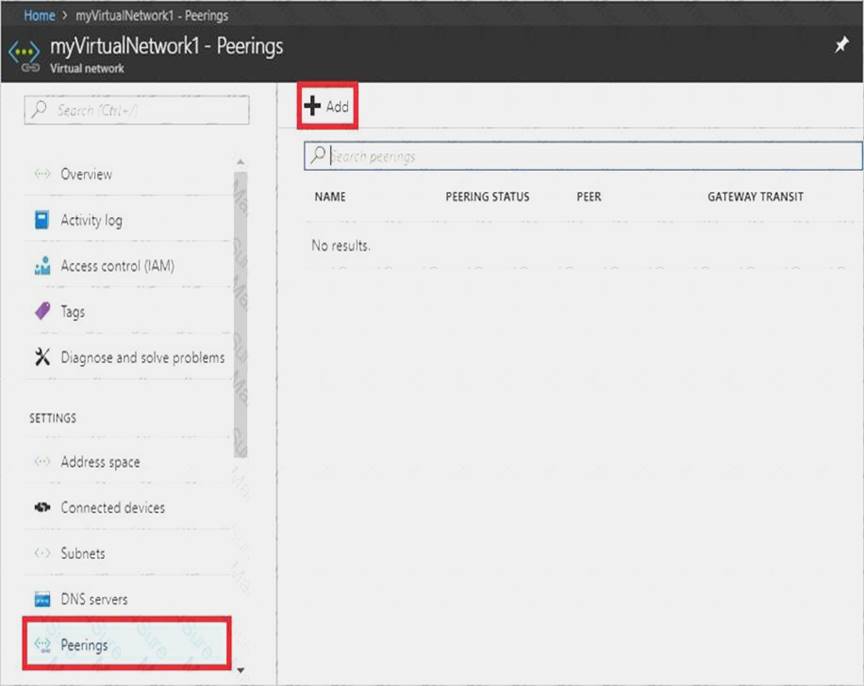
Step 3. Enter, or select, the following information, accept the defaults for the remaining settings, and then select OK.
Name: myVirtualNetwork1-myVirtualNetwork2 (for example) Subscription: elect your subscription.
Virtual network: VNET01-USWE2 - To select the VNET01-USWE2 virtual network, select Virtual network, then select VNET01-USWE2. You can select a virtual network in the same region or in a different region.
Now we need to repeat steps 1-3 for the other network VNET01-USWE2:
Step 4. In the Search box at the top of the Azure portal, begin typing VNET01- USEA2. When VNET01- USEA2 appears in the search results, select it.
Step 5. Select Peerings, under SETTINGS, and then select + Add. References:
https://docs.microsoft.com/en-us/azure/virtual-network/tutorial-connect-virtual-networks-portal
NEW QUESTION 7
Click to expand each objective. To connect to the Azure portal, type https://portal.azure.com in the browser address bar.
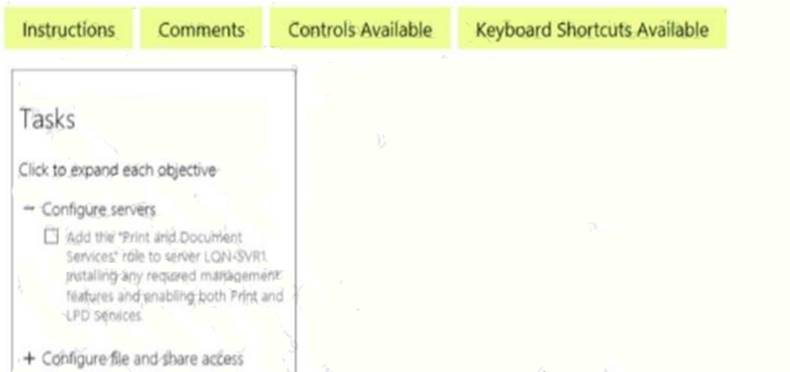
When you are finished performing all the tasks, click the ‘Next’ button.
Note that you cannot return to the lab once you click the ‘Next’ button. Scoring occur in the background while you complete the rest of the exam.
Overview
The following section of the exam is a lab. In this section, you will perform a set of tasks in a live environment. While most functionality will be available to you as it would be in a live environment, some functionality (e.g., copy and paste, ability to navigate to external websites) will not be possible by design.
Scoring is based on the outcome of performing the tasks stated in the lab. In other words, it doesn’t matter how you accomplish the task, if you successfully perform it, you will earn credit for that task.
Labs are not timed separately, and this exam may have more than one lab that you must complete. You can use as much time as you would like to complete each lab. But, you should manage your time appropriately to ensure that you are able to complete the lab(s) and all other sections of the exam in the time provided.
Please note that once you submit your work by clicking the Next button within a lab, you will NOT be able to return to the lab.
To start the lab
You may start the lab by clicking the Next button.
You plan to store media files in the rg1lod7523691n1 storage account.
You need to configure the storage account to store the media files. The solution must ensure that only users who have access keys can download the media files and that the files are accessible only over HTTPS.
What should you do from Azure portal?
Answer:
Explanation: We should create an Azure file share.
Step 1: In the Azure portal, select All services. In the list of resources, type Storage Accounts. As you begin typing, the list filters based on your input. Select Storage Accounts.
On the Storage Accounts window that appears.
Step 2: Locate the rg1lod7523691n1 storage account.
Step 3: On the storage account page, in the Services section, select Files.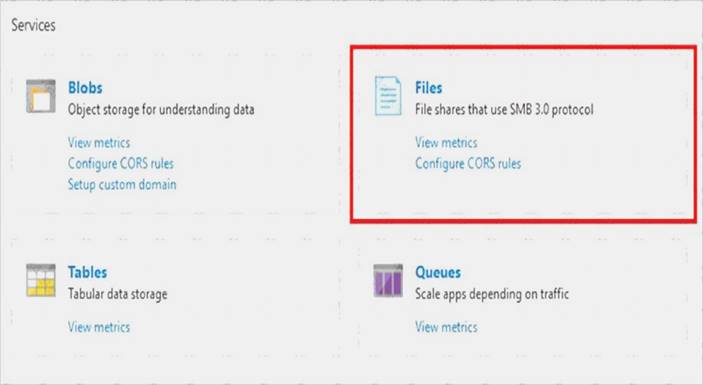
Step 4: On the menu at the top of the File service page, click + File share. The New file share page drops down.
Step 5: In Name type myshare. Click OK to create the Azure file share.
References: https://docs.microsoft.com/en-us/azure/storage/files/storage-how-to-use-files-portal
NEW QUESTION 8
You need to define a custom domain name for Azure AD to support the planned infrastructure. Which domain name should you use?
- A. ad.humongousinsurance.com
- B. humongousinsurance.onmicrosoft.com
- C. humongousinsurance.local
- D. humongousinsurance.com
Answer: D
Explanation: Every Azure AD directory comes with an initial domain name in the form of domainname.onmicrosoft.com. The initial domain name cannot be changed or deleted, but you can add your corporate domain name to Azure AD as well. For example, your organization probably has other domain names used to do business and users who sign in using your corporate domain name. Adding custom domain names to Azure AD allows you to assign user names in the directory that are familiar to your users, such as ‘alice@contoso.com.’ instead of 'alice@domain name.onmicrosoft.com'.
Scenario:
Network Infrastructure: Each office has a local data center that contains all the servers for that office. Each office has a dedicated connection to the Internet.
Humongous Insurance has a single-domain Active Directory forest named humongousinsurance.com Planned Azure AD Infrastructure: The on-premises Active Directory domain will be synchronized to Azure
AD.
References: https://docs.microsoft.com/en-us/azure/active-directory/fundamentals/add-custom-domain
NEW QUESTION 9
You plan to create an Azure Storage account in the Azure region of East US 2. You need to create a storage account that meets the following requirements: Replicates synchronously Remains available if a single data center in the region fails
How should you configure the storage account? To answer, select the appropriate options in the answer area. NOTE: Each correct selection is worth one point.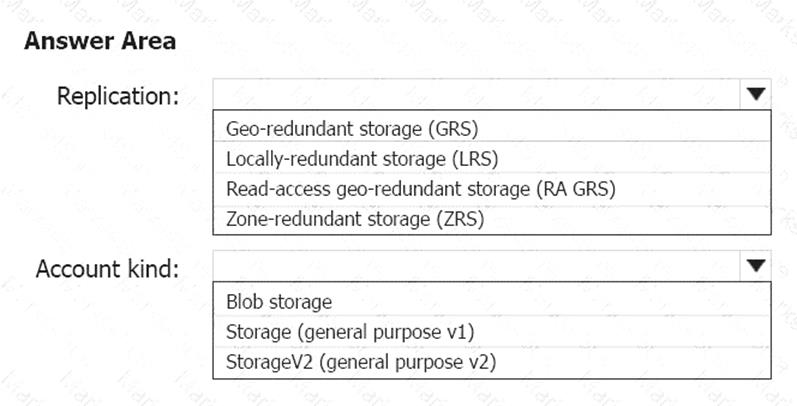
Answer:
Explanation: Box 1: Zone-redundant storage (ZRS)
Zone-redundant storage (ZRS) replicates your data synchronously across three storage clusters in a single region.
LRS would not remain available if a data center in the region fails GRS and RA GRS use asynchronous replication.
Box 2: StorageV2 (general purpose V2) ZRS only support GPv2.
References:
https://docs.microsoft.com/en-us/azure/storage/common/storage-redundancy https://docs.microsoft.com/en-us/azure/storage/common/storage-redundancy-zrs
NEW QUESTION 10
You have peering configured as shown in the following exhibit.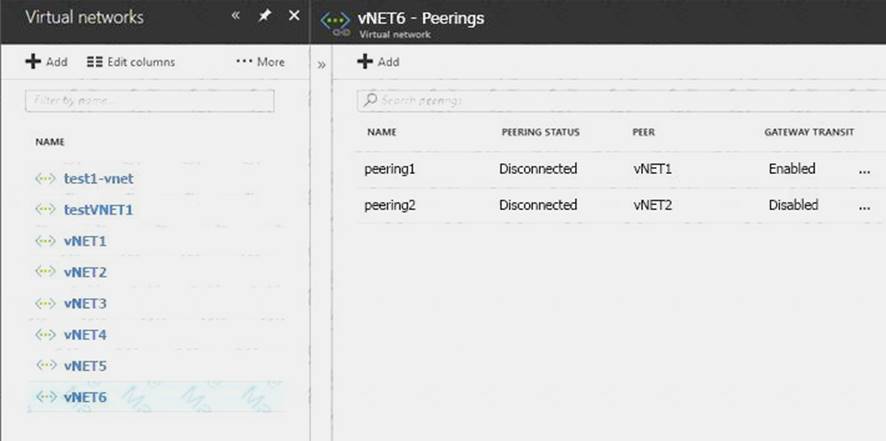
Use the drop-down menus to select the answer choice that completes each statement based on the information presented in the graphic.
NOTE: Each correct selection is worth one point.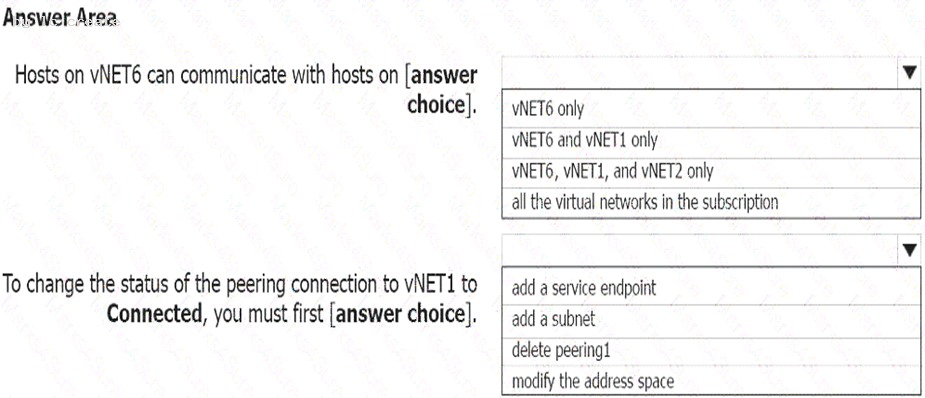
Answer:
Explanation: Box 1: vNET6 only
Box 2: Modify the address space
The virtual networks you peer must have non-overlapping IP address spaces. References:
https://docs.microsoft.com/en-us/azure/virtual-network/virtual-network-manage-peering#requirements-and-cons
NEW QUESTION 11
You have an Azure subscription that is used by four departments in your company. The subscription contains 10 resource groups. Each department uses resources in several resource groups.
You need to send a report to the finance department. The report must detail the costs for each department. Which three actions should you perform in sequence? To answer, move the appropriate actions from the list of actions to the answer area and arrange them in the correct order.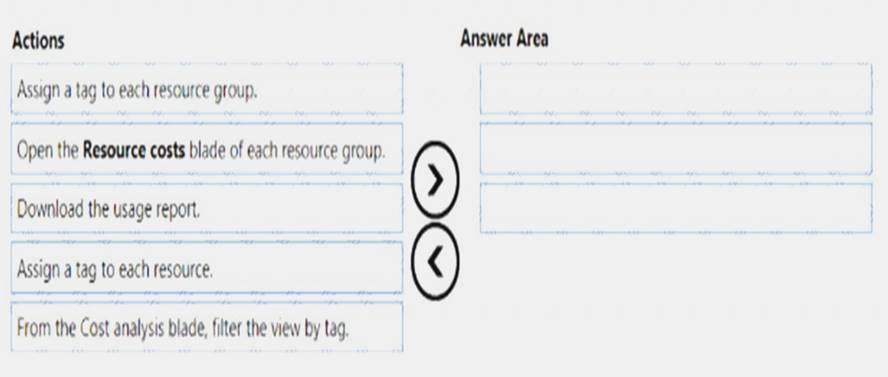
Answer:
Explanation: Box 1: Assign a tag to each resource.
You apply tags to your Azure resources giving metadata to logically organize them into a taxonomy. After you apply tags, you can retrieve all the resources in your subscription with that tag name and value. Each resource or resource group can have a maximum of 15 tag name/value pairs. Tags applied to the resource group are not inherited by the resources in that resource group.
Box 2: From the Cost analysis blade, filter the view by tag
After you get your services running, regularly check how much they're costing you. You can see the current spend and burn rate in Azure portal. Visit the Subscriptions blade in Azure portal and select a subscription. You should see the cost breakdown and burn rate in the popup blade. Click Cost analysis in the list to the left to see the cost breakdown by resource. Wait 24 hours after you add a service for the data to populate. You can filter by different properties like tags, resource group, and timespan. Click Apply to confirm the filters and Download if you want to export the view to a Comma-Separated Values (.csv) file.
Box 3: Download the usage report References:
https://docs.microsoft.com/en-us/azure/azure-resource-manager/resource-group-using-tags https://docs.microsoft.com/en-us/azure/billing/billing-getting-started
NEW QUESTION 12
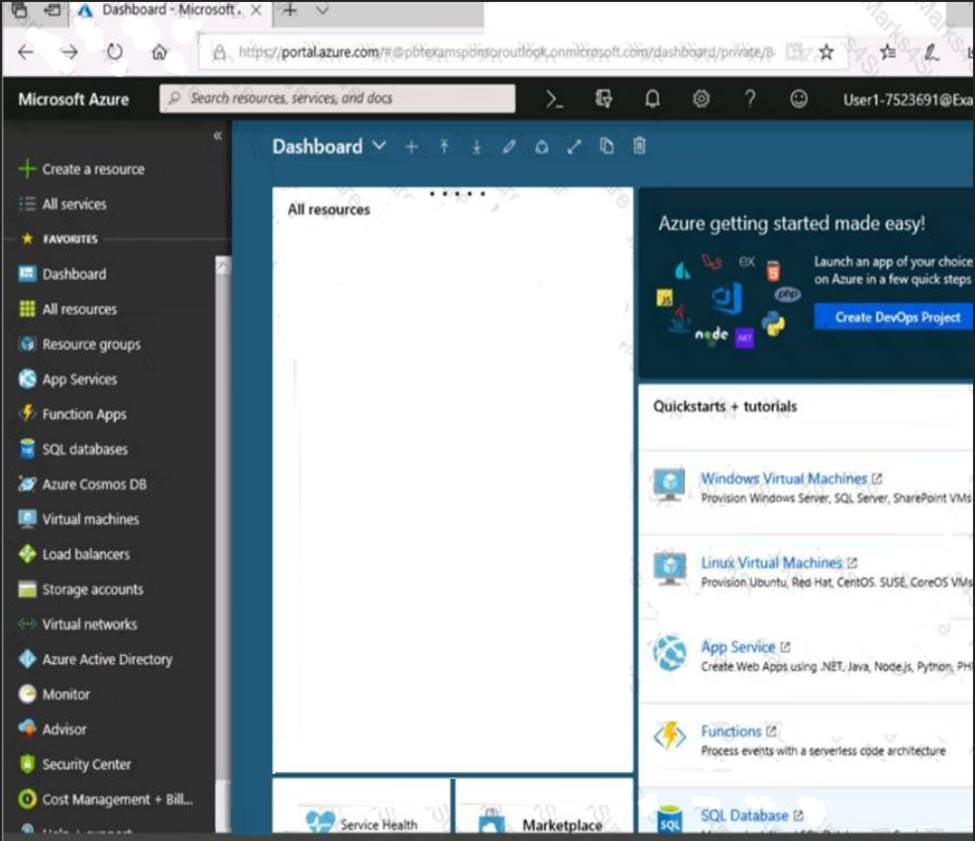
Click to expand each objective. To connect to the Azure portal, type https://portal.azure.com in the browser address bar.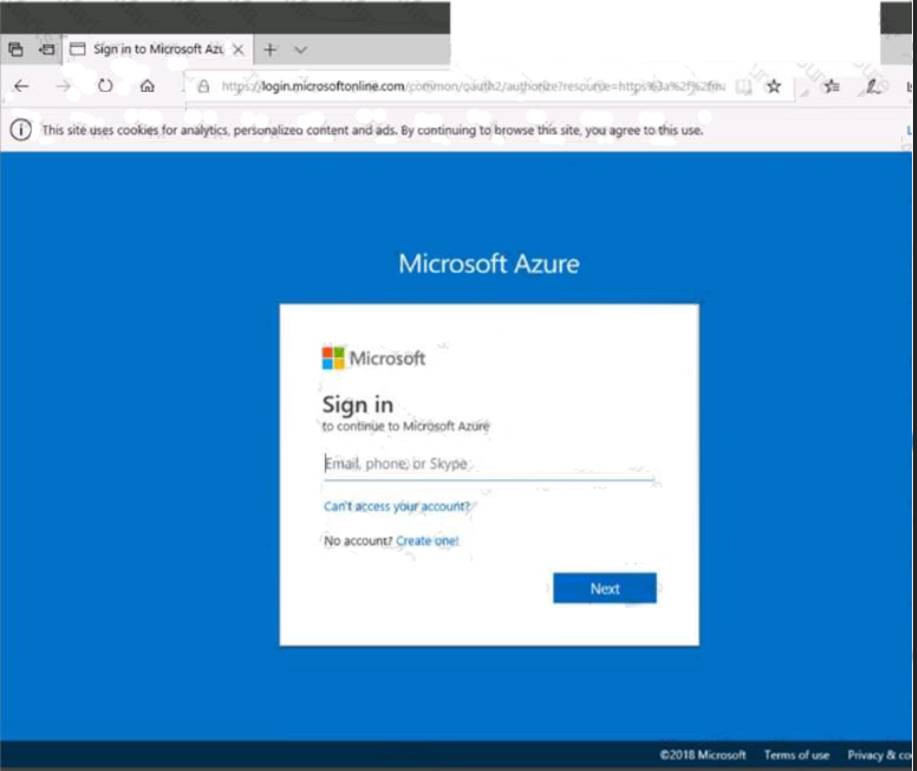
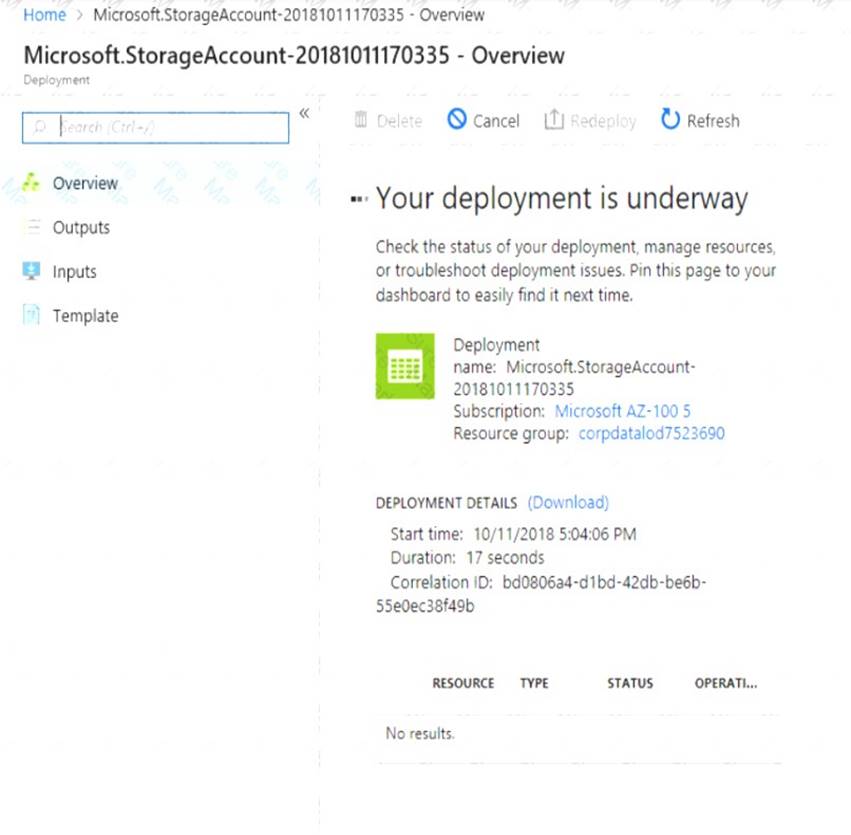
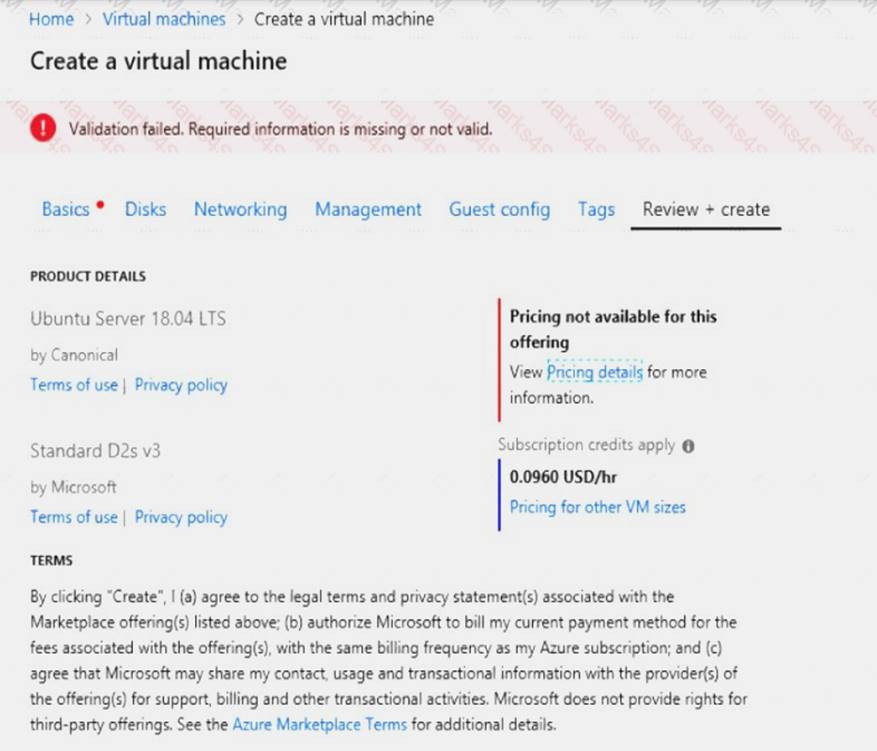
When you are finished performing all the tasks, click the ‘Next’ button.
Note that you cannot return to the lab once you click the ‘Next’ button. Scoring occur in the background while you complete the rest of the exam.
Overview
The following section of the exam is a lab. In this section, you will perform a set of tasks in a live environment. While most functionality will be available to you as it would be in a live environment, some functionality (e.g., copy and paste, ability to navigate to external websites) will not be possible by design. Scoring is based on the outcome of performing the tasks stated in the lab. In other words, it doesn’t matter how you accomplish the task, if you successfully perform it, you will earn credit for that task.
Labs are not timed separately, and this exam may have more than one lab that you must complete. You can use as much time as you would like to complete each lab. But, you should manage your time appropriately to ensure that you are able to complete the lab(s) and all other sections of the exam in the time provided.
Please note that once you submit your work by clicking the Next button within a lab, you will NOT be able to return to the lab.
To start the lab
You may start the lab by clicking the Next button.
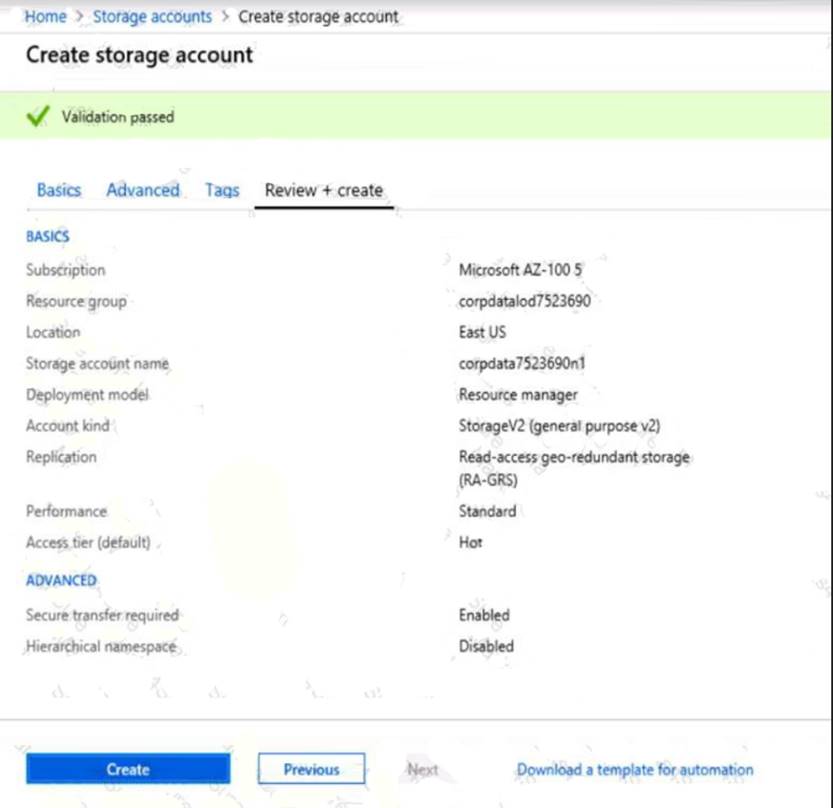
You plan to create several virtual machines in different availability zones, and then to configure the virtual machines for load balanced connections from the Internet.
You need to create an IP address resource named ip1006 to support the planned load balancing solution. The solution must minimize costs.
What should you do from the Azure portal?
Answer:
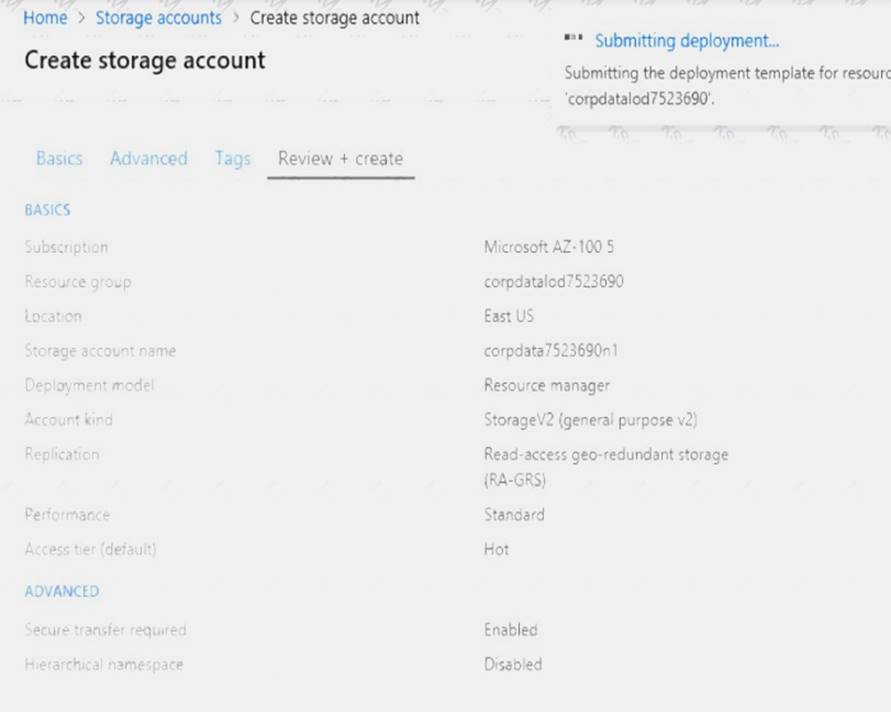
Explanation: We should create a public IP address. At the top, left corner of the portal, select + Create a resource. Enter public ip address in the Search the Marketplace box. When Public IP address appears in the search results, select it. Under Public IP address, select Create. Enter, or select values for the following settings, under Create public IP address, then select Create: Name: ip1006
SKU: Basic SKU IP Version: IPv6
IP address assignment: Dynamic Subscription: Select appropriate Resource group: Select appropriate
References: https://docs.microsoft.com/en-us/azure/virtual-network/virtual-network-public-ip-address
NEW QUESTION 13
You have an Azure subscription.
You have an on-premises virtual machine named VM1. The settings for VM1 are shown in the exhibit. (Click the Exhibit button.)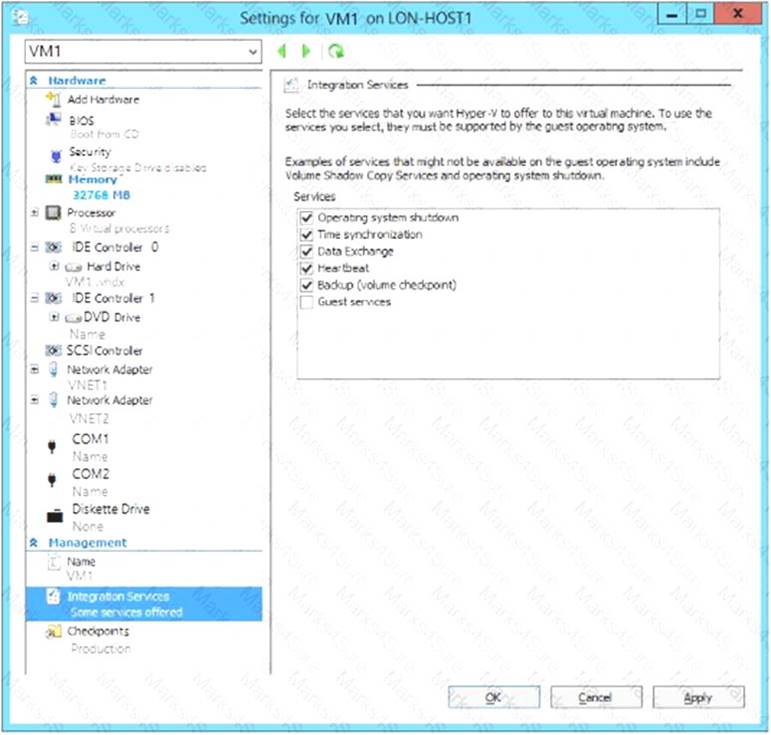
You need to ensure that you can use the disks attached to VM1 as a template for Azure virtual machines.
What should you modify on VM1?
- A. Integration Services
- B. the network adapters
- C. the memory
- D. the hard drive
- E. the processor
Answer: D
Explanation: From the exhibit we see that the disk is in the VHDX format.
Before you upload a Windows virtual machines (VM) from on-premises to Microsoft Azure, you must prepare the virtual hard disk (VHD or VHDX). Azure supports only generation 1 VMs that are in the VHD file format and have a fixed sized disk. The maximum size allowed for the VHD is 1,023 GB. You can convert a generation 1 VM from the VHDX file system to VHD and from a dynamically expanding disk to fixed-sized.
References:
https://docs.microsoft.com/en-us/azure/virtual-machines/windows/prepare-for-upload-vhd-image?toc=%2fazure
NEW QUESTION 14
You have the Azure virtual machines shown in the following table.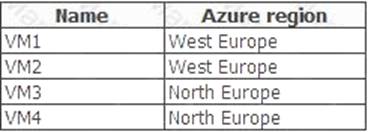
You have a Recovery Services vault that protects VM1 and VM2. You need to protect VM3 and VM4 by using Recovery Services. What should you do first?
- A. Configure the extensions for VM3 and VM4.
- B. Create a new Recovery Services vault.
- C. Create a storage account.
- D. Create a new backup policy.
Answer: B
Explanation: A Recovery Services vault is a storage entity in Azure that houses data. The data is typically copies of data, or configuration information for virtual machines (VMs), workloads, servers, or workstations. You can use Recovery Services vaults to hold backup data for various Azure services
References: https://docs.microsoft.com/en-us/azure/site-recovery/azure-to-azure-tutorial-enable-replication
NEW QUESTION 15
Note: This question is part of a series of questions that present the same scenario. Each question in the series contains a unique solution that might meet the stated goals. Some question sets might have more than one correct solution, while others might not have a correct solution.
After you answer a question in this section, you will NOT be able to return to it. As a result, these questions will not appear in the review screen.
Your company registers a domain name of contoso.com.
You create an Azure DNS zone named contoso.com, and then you add an A record to the zone for a host named www that has an IP address of 131.107.1.10.
You discover that Internet hosts are unable to resolve www.contoso.com to the 131.107.1.10 IP address.
You need to resolve the name resolution issue.
Solution: You create a PTR record for www in the contoso.com zone. Does this meet the goal?
- A. Yes
- B. No
Answer: B
Explanation: Modify the Name Server (NS) record.
References: https://docs.microsoft.com/en-us/azure/dns/dns-delegate-domain-azure-dns
NEW QUESTION 16
You have an Azure subscription that contains the resources in the following table.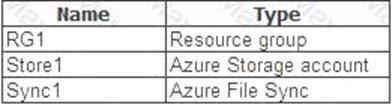
Store1 contains a file share named Data. Data contains 5,000 files.
You need to synchronize the files in Data to an on-premises server named Server1.
Which three actions should you perform? Each correct answer presents part of the solution. NOTE: Each correct selection is worth one point.
- A. Download an automation script.
- B. Create a container instance.
- C. Create a sync group.
- D. Register Server1.
- E. Install the Azure File Sync agent on Server1.
Answer: CDE
Explanation: Step 1 (E): Install the Azure File Sync agent on Server1
The Azure File Sync agent is a downloadable package that enables Windows Server to be synced with an Azure file share
Step 2 (D): Register Server1.
Register Windows Server with Storage Sync Service
Registering your Windows Server with a Storage Sync Service establishes a trust relationship between your server (or cluster) and the Storage Sync Service.
Step 3 (C): Create a sync group and a cloud endpoint.
A sync group defines the sync topology for a set of files. Endpoints within a sync group are kept in sync with each other. A sync group must contain one cloud endpoint, which represents an Azure file share and one or more server endpoints. A server endpoint represents a path on registered server.
References: https://docs.microsoft.com/en-us/azure/storage/files/storage-sync-files-deployment-guide
NEW QUESTION 17
Your company has an Azure subscription named Subscription1.
The company also has two on-premises servers named Server1 and Server2 that run Windows Server 2021. Server1 is configured as a DNS server that has a primary DNS zone named adatum.com. Adatum.com contains 1,000 DNS records.
You manage Server1 and Subscription1 from Server2. Server2 has the following tools installed: The DNS Manager console Azure PowerShell Azure CLI 2.0
You need to move the adatum.com zone to Subscription1. The solution must minimize administrative effort. What should you use?
- A. Azure PowerShell
- B. Azure CLI
- C. the Azure portal
- D. the DNS Manager console
Answer: B
Explanation: Azure DNS supports importing and exporting zone files by using the Azure command-line interface (CLI). Zone file import is not currently supported via Azure PowerShell or the Azure portal.
References: https://docs.microsoft.com/en-us/azure/dns/dns-import-export
NEW QUESTION 18
You have an Azure virtual machine named VM1 that you use for testing. VM1 is protected by Azure Backup. You delete VM1.
You need to remove the backup data stored for VM1. What should you do first?
- A. Modify the backup policy.
- B. Delete the Recovery Services vault.
- C. Stop the backup.
- D. Delete the storage account.
Answer: A
Explanation: Azure Backup provides backup for virtual machines — created through both the classic deployment model and the Azure Resource Manager deployment model — by using custom-defined backup policies in a Recovery Services vault.
With the release of backup policy management, customers can manage backup policies and model them to meet their changing requirements from a single window. Customers can edit a policy, associate more virtual machines to a policy, and delete unnecessary policies to meet their compliance requirements.
NEW QUESTION 19
You have an availability set named AS1 that contains three virtual machines named VM1, VM2, and VM3. You attempt to reconfigure VM1 to use a larger size. The operation fails and you receive an allocation failure message.
You need to ensure that the resize operation succeeds.
Which three actions should you perform in sequence? To answer, move the appropriate actions from the list of actions to the answer area and arrange them in the correct order.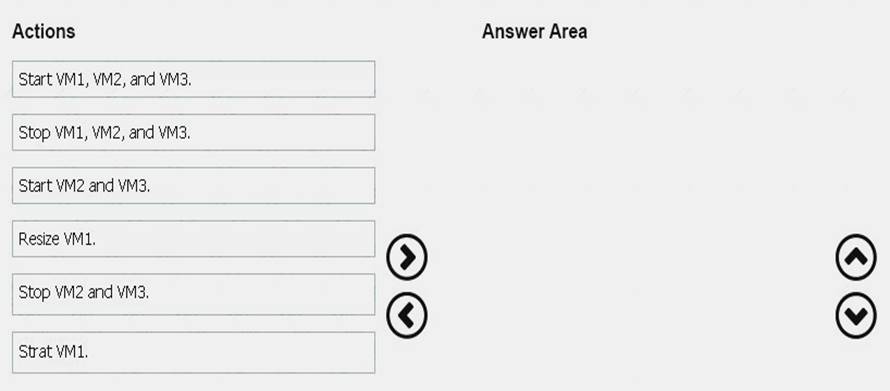
Answer:
Explanation: 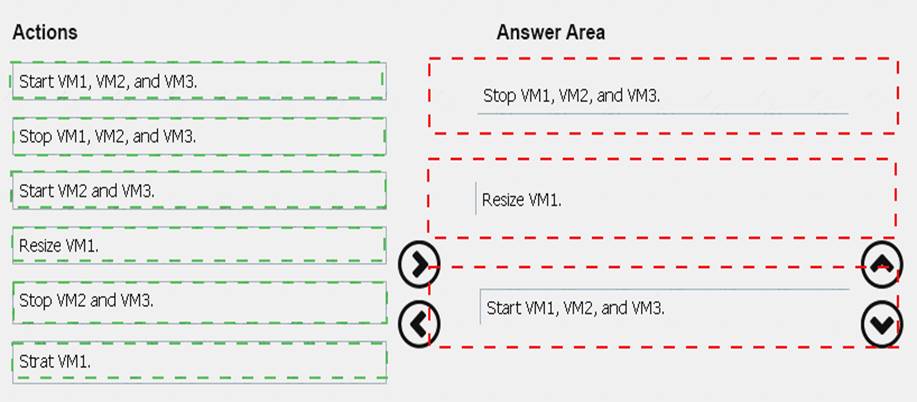
NEW QUESTION 20
Note: This question is part of a series of questions that present the same scenario. Each question in the series contains a unique solution that might meet the stated goals. Some question sets might have more than one correct solution, while others might not have a correct solution.
After you answer a question in this section, you will NOT be able to return to it. As a result, these questions will not appear in the review screen.
You have an Azure subscription named Subscription1. Subscription1 contains a resource group named RG1. RG1 contains resources that were deployed by using templates.
You need to view the date and time when the resources were created in RG1.
Solution: From the Subscriptions blade, you select the subscription, and then click Programmatic deployment. Does this meet the goal?
- A. Yes
- B. No
Answer: B
100% Valid and Newest Version AZ-100 Questions & Answers shared by Surepassexam, Get Full Dumps HERE: https://www.surepassexam.com/AZ-100-exam-dumps.html (New 106 Q&As)
- Microsoft 70-333 Study Guides 2021
- The Secret of Microsoft 70-488 vce
- A Review Of Free 70-533 exam dumps
- Abreast Of The Times Designing An Azure Data Solution DP-201 Free Exam Questions
- Microsoft 70-537 Dumps 2021
- Microsoft 70-475 Braindumps 2021
- Microsoft AZ-900 Study Guides 2021
- A Review Of Best Quality 70-494 practice test
- Refined 98-366 Bible 2021
- Top Quality Windows Server 70-414 practice test