

AZ-120 Exam Questions - Online Test
AZ-120 Premium VCE File

150 Lectures, 20 Hours

Master the AZ-120 Planning and Administering Microsoft Azure for SAP Workloads content and be ready for exam day success quickly with this Passleader AZ-120 real exam. We guarantee it!We make it a reality and give you real AZ-120 questions in our Microsoft AZ-120 braindumps.Latest 100% VALID Microsoft AZ-120 Exam Questions Dumps at below page. You can use our Microsoft AZ-120 braindumps and pass your exam.
Microsoft AZ-120 Free Dumps Questions Online, Read and Test Now.
NEW QUESTION 1
You are deploying an SAP environment on Azure that will use an SAP HANA database server.
You provision an Azure virtual machine for SAP HANA by using the M64s virtual machine SKU.
You need to set the swap space by using the Microsoft Azure Linux Agent (waagent) configuration file. Which two settings should you configure? Each correct answer presents part of the solution.
NOTE: Each correct selection is worth one point.
- A. ResourceDisk.EnableSwapEncryption=n
- B. AutoUpdate.Enabled=n
- C. ResourceDisk.SwapSizeMB=229376
- D. ResourceDisk.EnableSwap=y
Answer: CD
Explanation:
To create a swap file in the directory that's defined by the ResourceDisk.MountPoint parameter, you can update the /etc/waagent.conf file by setting the following three parameters:
ResourceDisk.Format=y ResourceDisk.EnableSwap=y ResourceDisk.SwapSizeMB=xx References:
https://support.microsoft.com/en-us/help/4010058/how-to-add-a-swap-file-in-linux-azure-virtual-machines
NEW QUESTION 2
You plan to migrate an SAP HANA instance to Azure.
You need to gather CPU metrics from the last 24 hours from the instance. Solution: You use Monitoring from the SAP HANA Cockpit.
Does this meet the goal?
- A. Yes
- B. No
Answer: A
Explanation:
The SAP HANA cockpit provides a single point of access to a range of SAP HANA administration and monitoring tasks. It is used to monitor and ensure the overall health of the system.
The HANA Monitoring dashboard also visualizes key HANA Metrics of SAP HANA system. Reference:
https://developers.sap.com/tutorials/dt-monitoring-hana-part1.html https://help.sap.com/viewer/afa922439b204e9caf22c78b6b69e4f2/2.10.0.0/en-US https://www.hanatutorials.com/p/hana-monitoring-dashboard.html
NEW QUESTION 3
You deploy SAP HANA by using SAP HANA on Azure (Large Instances).
For each of the following statements, select Yes if the statement is true. Otherwise, select No.
NOTE: Each correct selection is worth one point.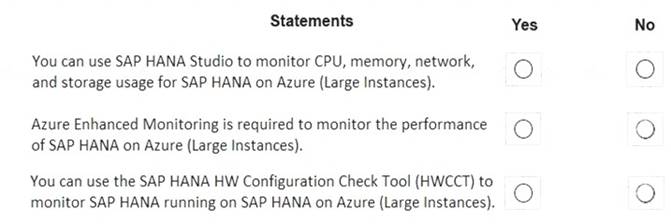
- A. Mastered
- B. Not Mastered
Answer: A
Explanation:
Box 1: No
Box 2: Yes
The SAP Azure Enhanced Monitoring Extension allows for collecting diagnostic data including OS and Application performance counters from Azure VMs running SAP workloads.
Box 3: No References:
http://www.deployazure.com/compute/virtual-machines/sap-azure-enhanced-monitoring-extension/
NEW QUESTION 4
You are building an SAP environment by using Azure Resource Manager templates. The SAP environment will use Linux virtual machines.
You need to correlate the LUN of the data disks in the template to the volume of the virtual machines. Which command should you run/
- A. Is /dev/ disk/azure/root
- B. Is /dev/ disk/azure/scsil
- C. Tree /dev/ disk/azure/root
- D. Tree /dev/disk/azure/resource
Answer: C
NEW QUESTION 5
You need to connect SAP HANA on Azure (Large Instances) to an Azure Log Analytics workspace.
Which four actions should you perform in sequence? To answer, move the appropriate actions from the list of actions to the answer area and arrange them in the correct order.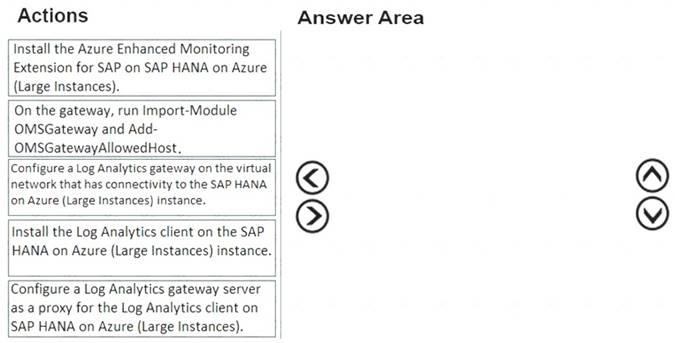
- A. Mastered
- B. Not Mastered
Answer: A
Explanation:
Step 1: Install the Azure Enhanced Monitoring.
The SAP Azure Enhanced Monitoring Extension allows for collecting diagnostic data including OS and Application performance counters from Azure VMs running SAP workloads.
Step 2: Install the Log Analytics client on the SAP HANA on Azure (Large Instances) instance. Step 3: Configure a Log Analytics gateway on the virtual network.
Step 4: On the gateway, run. References:
http://www.deployazure.com/compute/virtual-machines/sap-azure-enhanced-monitoring-extension/
https://docs.microsoft.com/en-us/azure/azure-monitor/platform/gateway
NEW QUESTION 6
You plan to deploy an SAP environment on Azure.
You plan to store all SAP connection strings securely in Azure Key Vault without storing credentials on the Azure virtual machines that host SAP.
What should you configure to allow the virtual machines to access the key vault?
- A. Azure Active Directory (Azure AD) Privilege Identity Manager (PIM)
- B. role-based access control (RBAC)
- C. a Managed Service Identity (MSI)
- D. the Custom Script Extension
Answer: C
Explanation:
To reference a credential stored in Azure Key Vault, you need to:
*1. Retrieve data factory managed identity
*2. Grant the managed identity access to your Azure Key Vault
*3. Create a linked service pointing to your Azure Key Vault.
*4. Create data store linked service, inside which reference the corresponding secret stored in key vault.
References:
https://docs.microsoft.com/bs-latn-ba/azure/data-factory/store-credentials-in-key-vault
NEW QUESTION 7
Note: This question is part of a series of questions that present the same scenario. Each question in the series contains a unique solution that might meet the stated goals. Some question sets might have more than one correct solution, while others might not have a correct solution.
After you answer a question in this section, you will NOT be able to return to it. As a result, these
questions will not appear in the review screen.
You have a complex SAP environment that has both ABAP- and Java-based systems. The current on-premises landscapes are based on SAP NetWeaver 7.0 (Unicode and Non-Unicode) running on Windows Server and Microsoft SQL Server.
You need to migrate the SAP environment to a HANA-certified Azure environment.
Solution: You upgrade to SAP NetWeaver 7.4, and then you migrate SAP to Azure by using Azure Site Recovery.
Does this meet the goal?
- A. Yes
- B. No
Answer: A
Explanation:
We need upgrade to SAP NetWeaver 7.4 before the migration. Then Azure Site Recovery is used for the migration to Azure.
Reference:
https://docs.microsoft.com/en-us/azure/site-recovery/vmware-azure-architecture
NEW QUESTION 8
You need to ensure that you can receive technical support to meet the technical requirements. What should you deploy to Azure?
- A. SAP Landscape Management (LaMa)
- B. SAP Gateway
- C. SAP Web Dispatcher
- D. SAPRouter
Answer: A
Explanation:
Scenario: Ensure that SAP can provide technical support for all the SAP landscapes deployed to Azure. References:
https://blogs.sap.com/2021/07/22/sap-landscape-management-on-microsoft-azure-part-1/
NEW QUESTION 9
You are planning high availability for an SAP environment on Azure. The SAP environment will use datacenters in to different zones.
Testing shows that the latency between the two zones supports synchronous DBMS replication.
You need to design a solution to ensure that SAP services are available if an Azure datacenter within a zone fails. The solution must meet the following requirements:
* Provide automatic failover
* Minimize costs
Which high availability configuration meet the requirements?
- A. Azure Availability Zones with an active/passive deployment
- B. Azure Site Recovery
- C. Azure Availability Sets with active/passive clustering
- D. Azure Availability Sets with active/active clustering
Answer: D
NEW QUESTION 10
You have an SAP environment that is managed by using VMware vCenter. You plan to migrate the SAP environment to Azure.
You need to gather information to identify which compute resources are required in Azure. What should you use to gather the information?
- A. Azure Migrate and SAP EarlyWatch Alert reports
- B. Azure Site Recovery and SAP Quick Sizer
- C. SAP Quick Sizer and SAP HANA system replication
- D. Azure Site Recovery Deployment Planner and SAP HANA Cockpit
Answer: A
Explanation:
Azure Migrate is a Microsoft service that helps an enterprise assess how its on-premises workloads will perform, and how much they will cost to host, in the Azure public cloud.
An enterprise can use Azure Migrate to discover information about the VMware VMs running within its own data center, including CPU and memory usage, as well as performance history.
SAP EarlyWatch Alert (EWA) is a monitoring service for SAP customers, to monitor SAP systems in the solution landscape.
NEW QUESTION 11
You are migrating SAP to Azure. The ASCS application servers are in one Azure zone, and the SAP database server in in a different Azure zone. ASCS/ERS is configured for high availability.
During performance testing, you discover increased response times in Azure, even though the Azure environment has better computer and memory configurations than the on-premises environment. During the initial analysis, you discover an increased wait time for Enqueue.
What are three possible causes of the increased wait time? Each correct answer presents a complete solution.
NOTE: Each correct selection is worth one point.
- A. a missing Enqueue profile
- B. disk I/O during Enqueue backup operations
- C. misconfigured load balancer rules and health check probes for Enqueue and ASCS
- D. active Enqueue replication
- E. network latency between the database server and the SAP application servers
Answer: CDE
Explanation:
E: The network latency across Availability Zones is not the same in all Azure regions. In some cases, you can deploy and run the SAP application layer across different zones because the network latency from one zone to the active DBMS VM is acceptable. But in some Azure regions, the latency between the active DBMS VM and the SAP application instance, when deployed in different zones, might not be acceptable for SAP business processes.
References:
https://docs.microsoft.com/en-us/azure/virtual-machines/workloads/sap/sap-ha-availability-zones
NEW QUESTION 12
Litware is evaluating whether to add high availability after the migration? What should you recommend to meet the technical requirements?
- A. SAP HANA system replication and Azure Availability Sets
- B. Azure virtual machine auto-restart with SAP HANA service auto-restart.
- C. Azure Site Recovery
Answer: A
NEW QUESTION 13
You have a n SAP environment on Azure.
Your on-premises network uses a 1-Gbps ExpresRoute circuit to connect to Azure Private peering is enabled on the circuit. The default route (0.0.0.0/0) from the on-premises network is advertised
You need to resolve the issue without modifying the ExpresRoute circuit. The solution must minimize administrative effort. What should you do?
- A. Create a user-defined route tint redirects traffic to the Blob storage.
- B. Create an application security group.
- C. Change the backup solution to use a third-party software that can write to the Blob storage.
- D. Enable virtual network service endpoints.
Answer: A
NEW QUESTION 14
You have an SAP production landscape on-premises and an SAP development landscape on Azure.
You deploy a network virtual appliance to act as a firewall between the Azure subnet and the on-premises network.
Solution: You deploy an Azure Standard Load balancer. Does this meet the goal?
- A. Yes
- B. No
Answer: A
NEW QUESTION 15
For each of the following statements, select Yes if the statement is true. Otherwise, select No.
NOTE: Each correct selection is worth one point.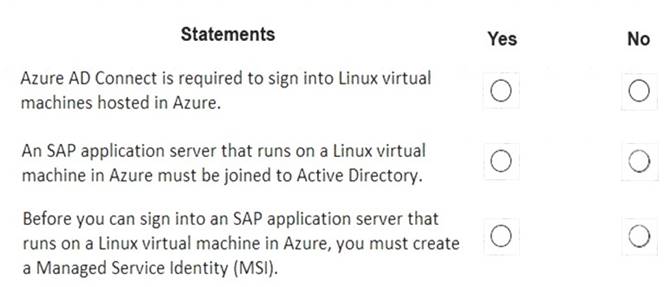
- A. Mastered
- B. Not Mastered
Answer: A
Explanation:
Box 1: No
To log in to a Linux VM with Azure AD credentials, install the Azure Active Directory login VM extension. Note: Azure AD Connect is the Microsoft tool designed to meet and accomplish your hybrid identity goals. Box 2: Yes
If you deploy SAP VMs in a cross-premises scenario, where on-premises Active Directory and DNS are extended in Azure, it is expected that the VMs are joining an on-premises domain.
Box 3: No
References:
https://docs.microsoft.com/en-us/azure/virtual-machines/workloads/sap/deployment-guide
NEW QUESTION 16
You need to recommend a solution to reduce the cost of the SAP non-production landscapes after the migration.
What should you include in the recommendation?
- A. Deallocate virtual machines when not In use.
- B. Migrate the SQL Server databases to Azure SQL Data Warehouse.
- C. Configure scaling of Azure App Service.
- D. Deploy non-production landscapes to Azure Devlest Labs.
Answer: D
Explanation:
Relevant use cases Dev/test environments for SAP workloads on Azure.
Noncritical SAP nonproduction workloads (such sandbox, development, test, and quality assurance). Noncritical SAP business workloads.
References:
https://docs.microsoft.com/en-us/azure/architecture/example-scenario/apps/sap-dev-test
NEW QUESTION 17
You deploy on SAP environment on Azure.
You need to monitor the performance of the SAP NetWeaver environment by using the Azure Enhanced Monitoring Extension for
What should you do first?
- A. From Azure CLI, install the Linux Diagnostic Extension.
- B. From the Azure portal, enable the Azure Network Watcher Agent.
- C. From the Azure portal, enable the Custom Script Extension.
- D. From Azure CL
- E. run the az v aem m set command.
Answer: B
NEW QUESTION 18
You are evaluating which migration method Litware can implement based on the current environment and the business goals.
Which migration method will cause the least amount of downtime?
- A. Use the Database migration Option (DMO) to migrate to SAP HANA and Azure During the samemaintenance window.
- B. Use Near-Zero Downtime (NZDT) to migrate to SAP HANA and Azure during the same maintenance window.
- C. Migrate SAP to Azure, and then migrate SAP ECC to SAP Business Suite on HANA.
- D. Migrate SAP ECC to SAP Business Suite on HANA an the migrate SAP to Azure.
Answer: A
Explanation:
The SAP Database Migration Option (DMO) with System Move option of SUM, used as part of the migration allows customer the options to perform the migration in a single step, from source system on-premises, or to the target system residing in Microsoft Azure, minimizing overall downtime.
References:
https://blogs.sap.com/2021/10/05/your-sap-on-azure-part-2-dmo-with-system-move/
NEW QUESTION 19
Note: This question is part of a series of questions that present the same scenario. Each question in the series contains a unique solution that might meet the stated goals. Some question sets might have more
than one correct solution, while others might not have a correct solution.
After you answer a question in this section, you will NOT be able to return to it. As a result, these questions will not appear in the review screen.
You have a complex SAP environment that has both ABAP- and Java-based systems. The current on-premises landscapes are based on SAP NetWeaver 7.0 (Unicode and Non-Unicode) running on Windows Server and Microsoft SQL Server.
You need to migrate the SAP environment to a HANA-certified Azure environment.
Solution: You migrate SAP to Azure by using Azure Site Recovery, and then you upgrade to SAP NetWeaver 7.4.
Does this meet the goal?
- A. Yes
- B. No
Answer: B
Explanation:
We need upgrade to SAP NetWeaver 7.4 before the migration. Reference:
https://docs.microsoft.com/en-us/azure/site-recovery/vmware-azure-architecture
NEW QUESTION 20
You have an Azure alert rule and action group as shown in the following exhibit.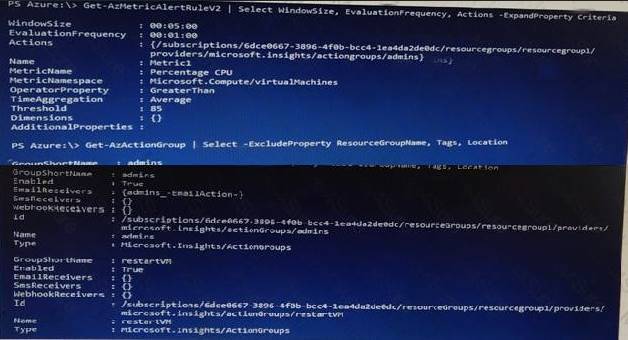
Use the drop-down menus to select the answer choice that completes each statement based on the information presented in the graphic.
NOTE: Each correct selection is worth one point.
- A. Mastered
- B. Not Mastered
Answer: A
Explanation: 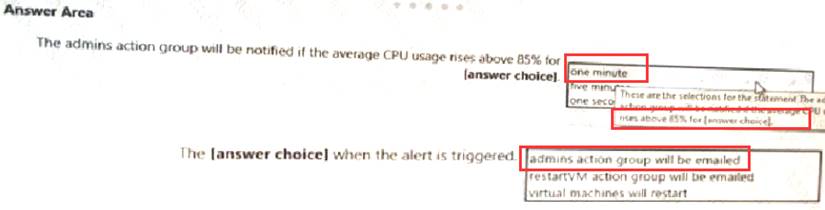
NEW QUESTION 21
This question requires that you evaluate the underlined text to determine if it is correct.
When deploying SAP HANA to an Azure virtual machine, you can enable Write Accelerator to reduce the latency between the SAP application servers and the database layer.
Instructions: Review the underlined text. If it makes the statement correct, select “No change is needed”. If the statement is incorrect, select the answer choice that makes the statement correct.
- A. No change is needed
- B. install the Mellanox driver
- C. start the NIPING service
- D. enable Accelerated Networking
Answer: D
Explanation:
To further reduce network latency between Azure VMs, we [Microsoft] recommend that you choose Azure Accelerated Networking. Use it when you deploy Azure VMs for an SAP workload, especially for the SAP application layer and the SAP DBMS layer.
NEW QUESTION 22
You plan to migrate an SAP environment to Azure.
You need to create a design to facilitate end-user access to SAP applications over the Internet, while
restricting user access to the virtual machines of the SAP application servers. What should you include in the design?
- A. Configure a public IP address for each SAP application server
- B. Deploy an internal Azure Standard Load Balancer for incoming connections
- C. Use an SAP Web Dispatcher to route all incoming connections
- D. Configure point-to-site VPN connections for each user
Answer: C
Explanation:  A public internet user can reach the SAP Web-Dispatcher over port 443
 The SAP Web-Dispatcher can reach the SAP Application server over port 443 The App Subnet accepts traffic on port 443 from 10.0.0.0/24 The SAP Application server sends traffic on port 30015 to the SAP DB server The DB subnet accepts traffic on port 30015 from 10.0.1.0/24. Public Internet Access is blocked on both App Subnet and DB Subnet.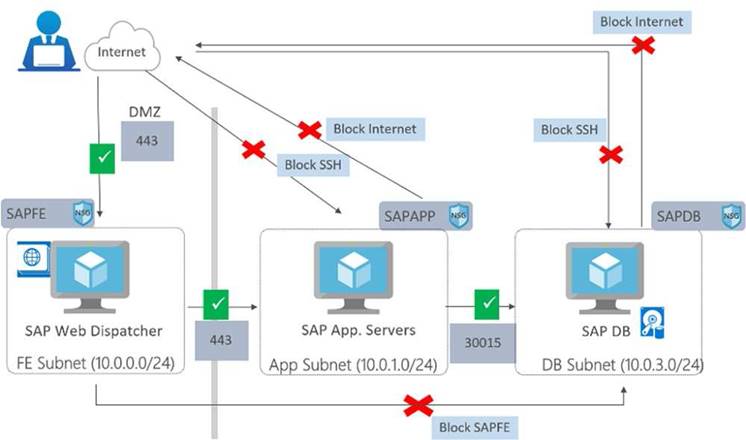
References:
https://azure.microsoft.com/en-in/blog/sap-on-azure-architecture-designing-for-security/
NEW QUESTION 23
You deploy an SAP environment on Azure.
Your company has a Service Level Agreement (SLA) of 99.99% for SAP. You implement Azure Availability Zones that have the following components:
* Redundant SAP application servers
* ASCS/ERS instances that use a failover cluster
* Database high availability that has a primary instance and a secondary instance
You need to validate the load distribution to the application servers. What should you use?
- A. SAP Solution Manager
- B. Azure Monitor
- C. SAPControl
- D. SAP Web Dispatcher
Answer: D
Explanation:
Load balancers. These are used to distribute traffic to virtual machines in the application-tier subnet. For high availability, use the built-in SAP Web Dispatcher, Azure Load Balancer, or network appliances, depending on the traffic type (such as HTTP or SAPGUI) or the required network services, such as Secure Sockets Layer (SSL) termination.
Reference:
https://docs.microsoft.com/en-us/azure/architecture/reference-architectures/sap/sap-netweaver
NEW QUESTION 24
......
P.S. Passcertsure now are offering 100% pass ensure AZ-120 dumps! All AZ-120 exam questions have been updated with correct answers: https://www.passcertsure.com/AZ-120-test/ (108 New Questions)
- 10 Tips For Improved 70-488 practice test
- Microsoft AZ-100 Free Practice Questions 2021
- The Most up-to-date Guide To 70-532 vce
- The Secret of Microsoft 70-462 exam
- Microsoft AZ-220 Guidance 2021
- Microsoft 70-744 Exam Questions and Answers 2021
- A Review Of Actual 70-412 examcollection
- Validated 70-742 Braindumps 2021
- Replace Microsoft 70-410 exam question
- Top Quality 70-640 Exam Dumps 2021