

AZ-204 Exam Questions - Online Test
AZ-204 Premium VCE File

150 Lectures, 20 Hours

It is more faster and easier to pass the Microsoft AZ-204 exam by using Exact Microsoft Developing Solutions for Microsoft Azure (beta) questuins and answers. Immediate access to the Refresh AZ-204 Exam and find the same core area AZ-204 questions with professionally verified answers, then PASS your exam with a high score now.
Microsoft AZ-204 Free Dumps Questions Online, Read and Test Now.
NEW QUESTION 1
A company is developing a solution that allows smart refrigerators to send temperature information to a central location. You have an existing Service Bus.
The solution must receive and store messages until they can be processed. You create an Azure Service Bus instance by providing a name, pricing tier, subscription, resource group, and location.
You need to complete the configuration.
Which Azure CLI or PowerShell command should you run?
- A. Option A
- B. Option B
- C. Option C
- D. Option D
Answer: B
Explanation:
A service bus instance has already been created (Step 2 below). Next is step 3, Create a Service Bus queue. Note:
Steps:
Step 1: # Create a resource group resourceGroupName="myResourceGroup"
az group create --name $resourceGroupName --location eastus
Step 2: # Create a Service Bus messaging namespace with a unique name namespaceName=myNameSpace$RANDOM
az servicebus namespace create --resource-group $resourceGroupName --name $namespaceName --location eastus
Step 3: # Create a Service Bus queue
az servicebus queue create --resource-group $resourceGroupName --namespace-name $namespaceName
--name BasicQueue
Step 4: # Get the connection string for the namespace
connectionString=$(az servicebus namespace authorization-rule keys list --resource-group
$resourceGroupName --namespace-name $namespaceName --name RootManageSharedAccessKey --query primaryConnectionString --output tsv)
References:
https://docs.microsoft.com/en-us/azure/service-bus-messaging/service-bus-quickstart-cli
NEW QUESTION 2
You are developing an ASP.NET Core Web API web service that uses Azure Application Insights to monitor performance and track events.
You need to enable logging and ensure that log messages can be correlated to events tracked by Application Insights.
How should you complete the code? To answer, drag the appropriate code segments to the correct locations. Each code segment may be used once, more than once, or not at all. You may need to drag the split bar between panes or scroll to view content.
NOTE: Each correct selection is worth one point.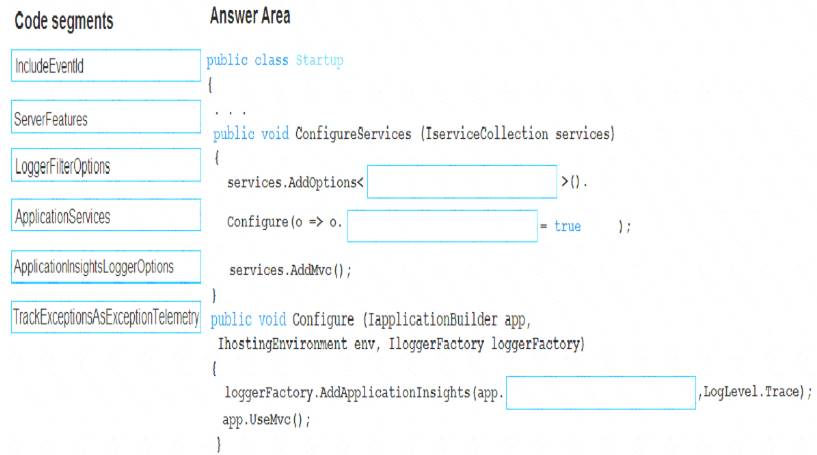
- A. Mastered
- B. Not Mastered
Answer: A
Explanation:
Box 1: ApplicationInsightsLoggerOptions
If you want to include the EventId and EventName properties, then add the following to the ConfigureServices method:
services AddOptions<ApplicationInsightsLoggerOptions>() Configure(o => o.IncludeEventId = true);
Box 2: IncludeEventID
Box 3: ApplicationServices
In Asp.Net core apps it turns out that trace logs do not show up in Application Insights out of the box. We need to add the following code snippet to our Configure method in Startup.cs:
loggerFactory.AddApplicationInsights(app.ApplicationServices, logLevel); References:
https://blog.computedcloud.com/enabling-application-insights-trace-logging-in-asp-net-core/
NEW QUESTION 3
Note: This question is part of a series of questions that present the same scenario. Each question in the series contains a unique solution that might meet the stated goals. Some question sets might have more than one correct solution, while others might not have a correct solution.
After you answer a question in this section, you will NOT be able to return to it. As a result, these questions will not appear in the review screen.
You are developing an Azure solution to collect point-of-sale (POS) device data from 2,000 stores located throughout the world. A single device can produce 2 megabytes (MB) of data every 24 hours. Each store location has one to five devices that send data.
You must store the device data in Azure Blob storage. Device data must be correlated based on a device identifier. Additional stores are expected to open in the future.
You need to implement a solution to receive the device data.
Solution: Provision an Azure Service Bus. Configure a topic to receive the device data by using a correlation filter.
Does the solution meet the goal?
- A. Yes
- B. No
Answer: A
Explanation:
A message is raw data produced by a service to be consumed or stored elsewhere. The Service Bus is for high-value enterprise messaging, and is used for order processing and financial transactions.
Reference:
https://docs.microsoft.com/en-us/azure/event-grid/compare-messaging-services
NEW QUESTION 4
Note: This question is part of a series of questions that present the same scenario. Each question in the series contains a unique solution that might meet the stated goals. Some question sets might have more than one correct solution, while others might not have a correct solution.
After you answer a question in this section, you will NOT be able to return to it. As a result, these questions will not appear in the review screen.
You are developing an Azure solution to collect point-of-sale (POS) device data from 2,000 stores located throughout the world. A single device can produce 2 megabytes (MB) of data every 24 hours. Each store location has one to five devices that send data.
You must store the device data in Azure Blob storage. Device data must be correlated based on a device identifier. Additional stores are expected to open in the future.
You need to implement a solution to receive the device data.
Solution: Provision an Azure Notification Hub. Register all devices with the hub. Does the solution meet the goal?
- A. Yes
- B. No
Answer: B
Explanation:
Instead use an Azure Service Bus, which is used order processing and financial transactions.
Reference:
https://docs.microsoft.com/en-us/azure/event-grid/compare-messaging-services
NEW QUESTION 5
You are implementing a software as a service (SaaS) ASP.NET Core web service that will run as an Azure Web App. The web service will use an on-premises SQL Server database for storage. The web service also includes a WebJob that processes data updates. Four customers will use the web service. Each instance of the WebJob processes data for a single customer and must run as a singleton instance. Each deployment must be tested by using deployment slots prior to serving production data. Azure costs must be minimized. Azure resources must be located in an isolated network. You need to configure the App Service plan for the Web App.
How should you configure the App Service plan? To answer, select the appropriate settings in the answer area.
NOTE: Each correct selection is worth one point.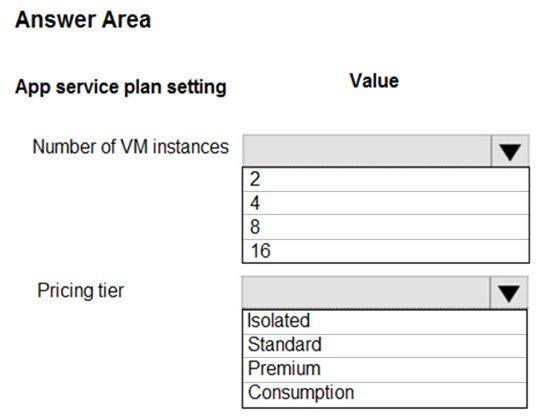
- A. Mastered
- B. Not Mastered
Answer: A
Explanation:
Number of VM instances: 4
You are not charged extra for deployment slots. Pricing tier: Isolated
The App Service Environment (ASE) is a powerful feature offering of the Azure App Service that gives network isolation and improved scale capabilities. It is essentially a deployment of the Azure App Service into a subnet of a customer’s Azure Virtual Network (VNet).
References:
https://azure.microsoft.com/sv-se/blog/announcing-app-service-isolated-more-power-scale-and-ease-of-use/
NEW QUESTION 6
You are developing a project management service by using ASP.NET. The service hosts conversations, files, to-do lists, and a calendar that users can interact with at any time.
The application uses Azure Search for allowing users to search for keywords in the project data.
You need to implement code that creates the object which is used to create indexes in the Azure Search service.
Which two objects should you use? Each correct answer presents part of the solution. NOTE: Each correct selection is worth one point.
- A. SearchService
- B. SearchlndexCIient
- C. SearchServiceClient
- D. SearchCredentials
Answer: BC
Explanation:
The various client libraries define classes like Index, Field, and Document, as well as operations like Indexes.Create and Documents.Search on the SearchServiceClient and SearchIndexClient classes.
Example:
The sample application we'll be exploring creates a new index named "hotels", populates it with a few documents, then executes some search queries. Here is the main program, showing the overall flow:
/ This sample shows how to delete, create, upload documents and query an index static void Main(string[] args)
{
IConfigurationBuilder builder = new ConfigurationBuilder().AddJsonFile("appsettings.json"); IConfigurationRoot configuration = builder.Build();
SearchServiceClient serviceClient = CreateSearchServiceClient(configuration); Console.WriteLine("{0}", "Deleting index...n"); DeleteHotelsIndexIfExists(serviceClient);
Console.WriteLine("{0}", "Creating index...n"); CreateHotelsIndex(serviceClient);
ISearchIndexClient indexClient = serviceClient.Indexes.GetClient("hotels"); References:
https://docs.microsoft.com/en-us/azure/search/search-howto-dotnet-sdk
NEW QUESTION 7
You are developing an ASP.NET Core website that can be used to manage photographs which are stored in Azure Blob Storage containers.
Users of the website authenticate by using their Azure Active Directory (Azure AD) credentials.
You implement role-based access control (RBAC) role permission on the containers that store photographs. You assign users to RBAC role.
You need to configure the website’s Azure AD Application so that user’s permissions can be used with the Azure Blob containers.
How should you configure the application? To answer, drag the appropriate setting to the correct location. Each setting may be used once, more than once, or not at all. You may need to drag the split bar between panes or scroll to view content.
NOTE: Each correct selection is worth one point.
- A. Mastered
- B. Not Mastered
Answer: A
Explanation:
Box 1: user_impersonation
Box 2: delegated Example:
* 1. Select the API permissions section
* 2. Click the Add a permission button and then: Ensure that the My APIs tab is selected
* 3. In the list of APIs, select the API TodoListService-aspnetcore.
* 4. In the Delegated permissions section, ensure that the right permissions are checked: user_impersonation. 5.Select the Add permissions button.
Box 3: delegated Example
* 1. Select the API permissions section
* 2. Click the Add a permission button and then, Ensure that the Microsoft APIs tab is selected
* 3. In the Commonly used Microsoft APIs section, click on Microsoft Graph
* 4. In the Delegated permissions section, ensure that the right permissions are checked: User.Read. Use the search box if necessary.
* 5. Select the Add permissions button References:
https://docs.microsoft.com/en-us/samples/azure-samples/active-directory-dotnet-webapp-webapi-openidconnect
NEW QUESTION 8
Note: This question is part of a series of questions that present the same scenario. Each question in the series contains a unique solution that might meet the stated goals. Some question sets might have more than one correct solution, while others might not have a correct solution.
After you answer a question in this section, you will NOT be able to return to it. As a result, these questions will not appear in the review screen.
You develop a software as a service (SaaS) offering to manage photographs. Users upload photos to a web service which then stores the photos in Azure Storage Blob storage. The storage account type is
General-purpose V2.
When photos are uploaded, they must be processed to produce and save a mobile-friendly version of the image. The process to produce a mobile-friendly version of the image must start in less than one minute.
You need to design the process that starts the photo processing.
Solution: Convert the Azure Storage account to a BlockBlobStorage storage account. Does the solution meet the goal?
- A. Yes
- B. No
Answer: B
Explanation:
Not necessary to convert the account, instead move photo processing to an Azure Function triggered from the blob upload..
Azure Storage events allow applications to react to events. Common Blob storage event scenarios include image or video processing, search indexing, or any file-oriented workflow.
Note: Only storage accounts of kind StorageV2 (general purpose v2) and BlobStorage support event integration. Storage (general purpose v1) does not support integration with Event Grid.
Reference:
https://docs.microsoft.com/en-us/azure/storage/blobs/storage-blob-event-overview
NEW QUESTION 9
You are validating the configuration of an Azure Search indexer.
The service has been configured with an indexer that uses the Import Data option. The index is configured using options as shown in the Index Configuration exhibit. (Click the Index Configuration tab.)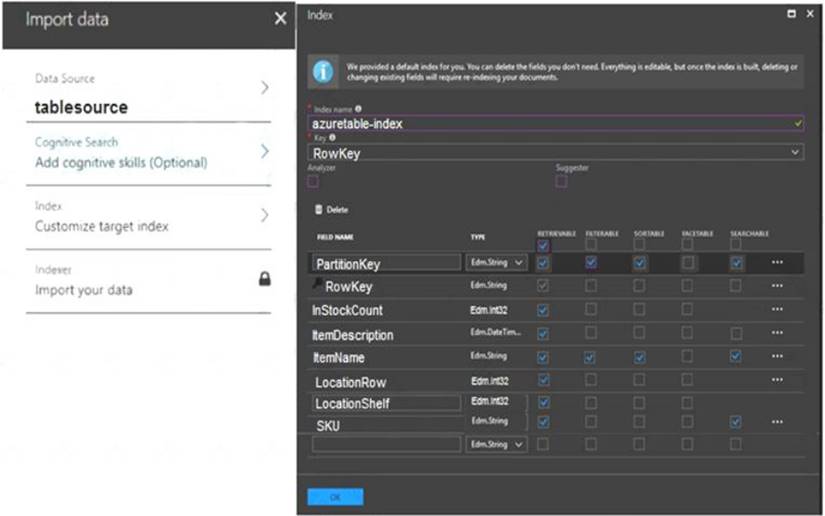
You use an Azure table as the data source for the import operation. The table contains three records with item inventory data that matches the fields in the Storage data exhibit. These records were imported when the index was created. (Click the Storage Data tab.) When users search with no filter, all three records are displayed.
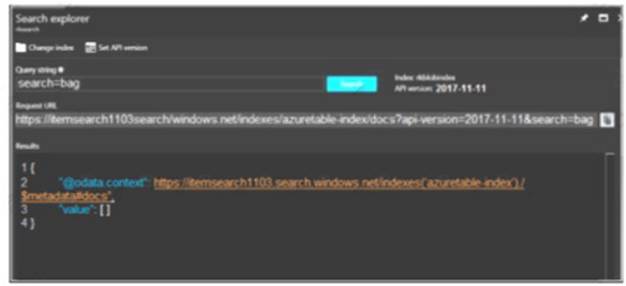
When users search for items by description, Search explorer returns no records. The Search Explorer exhibit shows the query and results for a test. In the test, a user is trying to search for all items in the table that have a description that contains the word bag. (Click the Search Explorer tab.)
You need to resolve the issue.
For each of the following statements, select Yes if the statement is true. Otherwise, select No. NOTE: Each correct selection is worth one point.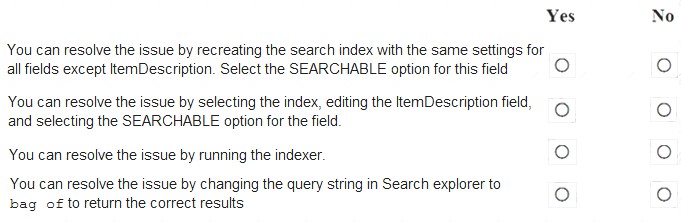
- A. Mastered
- B. Not Mastered
Answer: A
Explanation:
Box 1: Yes
The ItemDescription field in not searchable. Box 2: No
The ItemDescription field in not searchable, but we would need to recreate the index. Box 3: Yes
An indexer in Azure Search is a crawler that extracts searchable data and metadata from an external Azure data source and populates an index based on field-to-field mappings between the index and your data source. This approach is sometimes referred to as a 'pull model' because the service pulls data in without you having to write any code that adds data to an index.
Box 4: No References:
https://docs.microsoft.com/en-us/azure/search/search-what-is-an-index https://docs.microsoft.com/en-us/azure/search/search-indexer-overview
NEW QUESTION 10
You plan to create a Docker image that runs as ASP.NET Core application named ContosoApp. You have a setup script named setupScript.ps1 and a series of application files including ContosoApp.dll.
You need to create a Dockerfile document that meets the following requirements:
•Call setupScript.ps1 when the container is built.
•Run ContosoApp.dll when the container starts.
The Docker document must be created in the same folder where ContosoApp.dll and setupScript.ps1 are stored.
Which four commands should you use to develop the solution? To answer, move the appropriate commands from the list of commands to the answer area and arrange them in the correct order.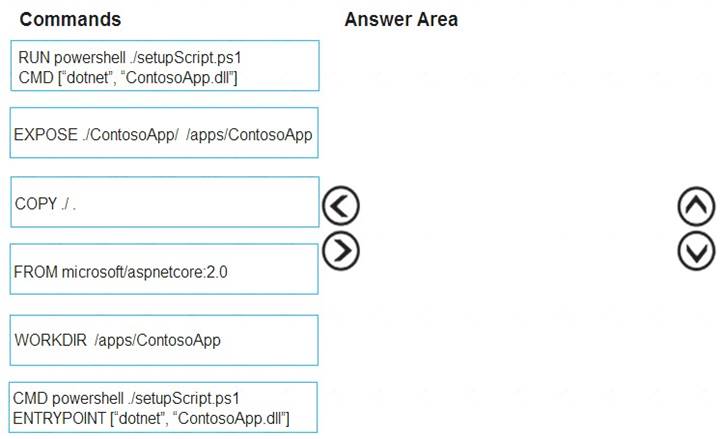
- A. Mastered
- B. Not Mastered
Answer: A
Explanation:
Step 1: WORKDIR /apps/ContosoApp Step 2: COPY ./The Docker document must be created in the same folder where ContosoApp.dll and setupScript.ps1 are stored.
Step 3: EXPOSE ./ContosApp/ /app/ContosoApp Step 4: CMD powershell ./setupScript.ps1 ENTRYPOINT ["dotnet", "ContosoApp.dll"]
You need to create a Dockerfile document that meets the following requirements:  Call setupScript.ps1 when the container is built. Run ContosoApp.dll when the container starts. References:
https://docs.microsoft.com/en-us/azure/app-service/containers/tutorial-custom-docker-image
NEW QUESTION 11
You have a web service that is used to pay for food deliveries. The web service uses Azure Cosmos DB as the data store.
You plan to add a new feature that allows users to set a tip amount. The new feature requires that a property named tip on the document in Cosmos DB must be present and contain a numeric value.
There are many existing websites and mobile apps that use the web service that will not be updated to set the tip property for some time.
How should you complete the trigger?
NOTE: Each correct selection is worth one point.
- A. Mastered
- B. Not Mastered
Answer: A
Explanation:
Box 1: getContext().getRequest(); Box 2: if(isNaN(i)["tip"] ..
In JavaScript, there are two ways to check if a variable is a number :
isNaN() – Stands for “is Not a Number”, if variable is not a number, it return true, else return false. typeof – If variable is a number, it will returns a string named “number”.
Box 3:r.setBody(i);
// update the item that will be created References:
https://docs.microsoft.com/bs-latn-ba/azure/cosmos-db/how-to-write-stored-procedures-triggers-udfs
https://mkyong.com/javascript/check-if-variable-is-a-number-in-javascript/
NEW QUESTION 12
You develop a website. You plan to host the website in Azure. You expect the website to experience high traffic volumes after it is published. You must ensure that the website remains available and responsive while minimizing cost. You need to deploy the website. What should you do?
- A. Deploy the website to an App Service that uses the Shared service tie
- B. Configure the App Service plan to automatically scale when the CPU load is high.
- C. Deploy the website to a virtual machin
- D. Configure the virtual machine to automatically scale when the CPU load is high.
- E. Deploy the website to an App Service that uses the Standard service tie
- F. Configure the App Service plan to automatically scale when the CPU load is high.
- G. Deploy the website to a virtual machin
- H. Configure a Scale Set to increase the virtual machine instance count when the CPU load
Answer: C
Explanation:
Windows Azure Web Sites (WAWS) offers 3 modes: Standard, Free, and Shared.
Standard mode carries an enterprise-grade SLA (Service Level Agreement) of 99.9% monthly, even for sites with just one instance.
Standard mode runs on dedicated instances, making it different from the other ways to buy Windows Azure Web Sites.
NEW QUESTION 13
You need to correct the VM issues.
Which tools should you use? To answer, select the appropriate options in the answer area.
NOTE: Each correct selection is worth one point.
- A. Mastered
- B. Not Mastered
Answer: A
Explanation:
Backup and Restore: Azure Backup
Scenario: The VM is critical and has not been backed up in the past. The VM must enable a quick restore from a 7-day snapshot to include in-place restore of disks in case of failure.
In-Place restore of disks in IaaS VMs is a feature of Azure Backup. Performance: Accelerated Networking
Scenario: The VM shows high network latency, jitter, and high CPU utilization.
Accelerated networking enables single root I/O virtualization (SR-IOV) to a VM, greatly improving its networking performance. This high-performance path bypasses the host from the datapath, reducing latency, jitter, and CPU utilization, for use with the most demanding network workloads on supported VM types.
References:
https://azure.microsoft.com/en-us/blog/an-easy-way-to-bring-back-your-azure-vm-with-in-place-restore/
NEW QUESTION 14
Note: This question is part of a series of questions that present the same scenario. Each question in the series contains a unique solution. Determine whether the solution meets the stated goals.
You are developing and deploying several ASP.Net web applications to Azure App Service. You plan to save session state information and HTML output. You must use a storage mechanism with the following requirements:
•Share session state across all ASP.NET web applications
•Support controlled, concurrent access to the same session state data for multiple readers and a single writer
•Save full HTTP responses for concurrent requests You need to store the information.
Proposed Solution: Deploy and configure Azure Cache for Redis. Update the web applications.
.
Does the solution meet the goal?
- A. Yes
- B. No
Answer: B
NEW QUESTION 15
Your company has several websites that use a company logo image. You use Azure Content Delivery Network (CDN) to store the static image.
You need to determine the correct process of how the CDN and the Point of Presence (POP) server will distribute the image and list the items in the correct order.
In which order do the actions occur? To answer, move all actions from the list of actions to the answer area and arrange them in the correct order.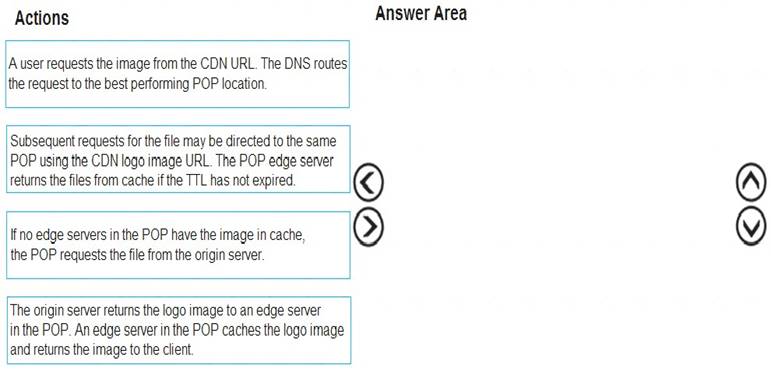
- A. Mastered
- B. Not Mastered
Answer: A
Explanation:
Step 1: A user requests the image..
A user requests a file (also called an asset) by using a URL with a special domain name, such as <endpoint name>.azureedge.net. This name can be an endpoint hostname or a custom domain. The DNS routes the request to the best performing POP location, which is usually the POP that is geographically closest to the user.
Step 2: If no edge servers in the POP have the..
If no edge servers in the POP have the file in their cache, the POP requests the file from the origin server. The origin server can be an Azure Web App, Azure Cloud Service, Azure Storage account, or any publicly accessible web server.
Step 3: The origin server returns the..
The origin server returns the file to an edge server in the POP.
An edge server in the POP caches the file and returns the file to the original requestor (Alice). The file remains cached on the edge server in the POP until the time-to-live (TTL) specified by its HTTP headers expires. If the origin server didn't specify a TTL, the default TTL is seven days.
Step 4: Subsequent requests for..
Additional users can then request the same file by using the same URL that the original user used, and can also be directed to the same POP.
If the TTL for the file hasn't expired, the POP edge server returns the file directly from the cache. This process results in a faster, more responsive user experience.
References:
https://docs.microsoft.com/en-us/azure/cdn/cdn-overview
NEW QUESTION 16
You are developing a mobile instant messaging app for a company. The mobile app must meet the following requirements:
• Support offline data sync.
• Update the latest messages during normal sync cycles. You need to implement Offline Data Sync.
Which two actions should you perform? Each conn I answer presents part of the solution. NOTE: Each correct selection is worth one point.
- A. Retrieve records from Offline Data Sync on every call to the PullAsync method.
- B. Retrieve records from Offline Data Sync using an Incremental Sync.
- C. Push records to Offline Data Sync using an Incremental Sync.
- D. Return the updatedAt column from the Mobile Service Backend and implement sorting by using the column.
- E. Return the updatedAt column from the Mobile Service Backend and implement sorting by the message id.
Answer: BE
Explanation:
B: Incremental Sync: the first parameter to the pull operation is a query name that is used only on the client. If you use a non-null query name, the Azure Mobile SDK performs an incremental sync. Each time a pull operation returns a set of results, the latest updatedAt timestamp from that result set is stored in the SDK local system tables. Subsequent pull operations retrieve only records after that timestamp.
E (not D): To use incremental sync, your server must return meaningful updatedAt values and must also support sorting by this field. However, since the SDK adds its own sort on the updatedAt field, you cannot use a pull query that has its own orderBy clause.
References:
https://docs.microsoft.com/en-us/azure/app-service-mobile/app-service-mobile-offline-data-sync
NEW QUESTION 17
You need to configure Azure App Service to support the REST API requirements.
Which values should you use? To answer, select the appropriate options in the answer area.
NOTE: Each correct selection is worth one point.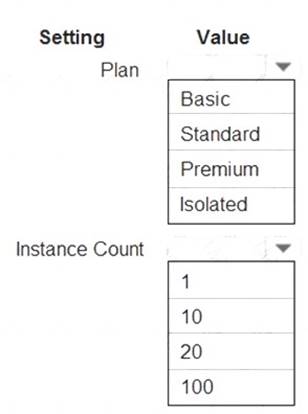
- A. Mastered
- B. Not Mastered
Answer: A
Explanation:
Plan: Standard
Standard support auto-scaling Instance Count: 10
Max instances for standard is 10. Scenario:
The REST API’s that support the solution must meet the following requirements: Allow deployment to a testing location within Azure while not incurring additional costs. Automatically scale to double capacity during peak shipping times while not causing application downtime.Minimize costs when selecting an Azure payment model. References:
https://azure.microsoft.com/en-us/pricing/details/app-service/plans/
NEW QUESTION 18
You have an Azure Batch project that processes and converts files and stores the files in Azure storage. You are developing a function to start the batch job.
You add the following parameters to the function.
You must ensure that converted files are placed in the container referenced by the outputContainerSasUrl parameter. Files which fail to convert are places in the container referenced by the failedContainerSasUrl parameter.
You need to ensure the files are correctly processed.
How should you complete the code segment? To answer, select the appropriate options in the answer area. NOTE: Each correct selection is worth one point.

- A. Mastered
- B. Not Mastered
Answer: A
Explanation:
Box 1: CreateJob
Box 2: TaskSuccess
TaskSuccess: Upload the file(s) only after the task process exits with an exit code of 0.
Incorrect: TaskCompletion: Upload the file(s) after the task process exits, no matter what the exit code was. Box 3: TaskFailure
TaskFailure:Upload the file(s) only after the task process exits with a nonzero exit code. Box 4: OutputFiles
To specify output files for a task, create a collection of OutputFile objects and assign it to the CloudTask.OutputFiles property when you create the task.
References:
https://docs.microsoft.com/en-us/dotnet/api/microsoft.azure.batch.protocol.models.outputfileuploadcondition https://docs.microsoft.com/en-us/azure/batch/batch-task-output-files
NEW QUESTION 19
A company is developing a Java web app. The web app code is hosted in a GitHub repository located at https://github.com/Contoso/webapp.
The web app must be evaluated before it is moved to production. You must deploy the initial code release to a deployment slot named staging.
You need to create the web app and deploy the code.
How should you complete the commands? To answer, select the appropriate options in the answer area. NOTE: Each correct selection is worth one point.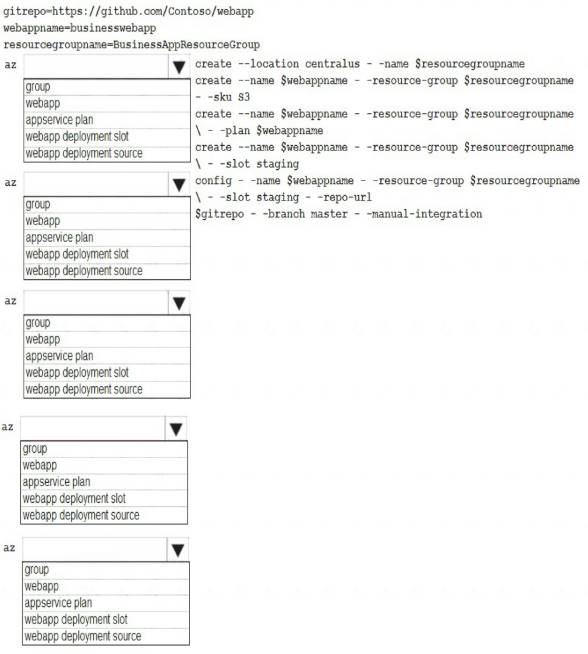
- A. Mastered
- B. Not Mastered
Answer: A
Explanation:
Box 1: group
# Create a resource group.
az group create --location westeurope --name myResourceGroup
Box 2: appservice plan
# Create an App Service plan in STANDARD tier (minimum required by deployment slots). az appservice plan create --name $webappname --resource-group myResourceGroup --sku S1 Box 3: webapp
# Create a web app.
az webapp create --name $webappname --resource-group myResourceGroup
--plan $webappname
Box 4: webapp deployment slot
#Create a deployment slot with the name "staging".
az webapp deployment slot create --name $webappname --resource-group myResourceGroup
--slot staging
Box 5: webapp deployment source
# Deploy sample code to "staging" slot from GitHub.
az webapp deployment source config --name $webappname --resource-group myResourceGroup
--slot staging --repo-url $gitrepo --branch master --manual-integration References:
https://docs.microsoft.com/en-us/azure/app-service/scripts/cli-deploy-staging-environment
NEW QUESTION 20
Note: This question is part of a series of questions that present the same scenario. Each question in the series contains a unique solution that might meet the stated goals. Some question sets might have more than one correct solution, while others might not have a correct solution.
After you answer a question in this section, you will NOT be able to return to it. As a result, these questions will not appear in the review screen.
Margie’s Travel is an international travel and bookings management service. The company is expanding into restaurant bookings. You are tasked with implementing Azure Search for the restaurants listed in their solution You create the index in Azure Search.
You need to import the restaurant data into the Azure Search service by using the Azure Search NET SDK. Solution:
* 1 Create a SearchlndexClient object to connect to the search index
* 2. Create an IndexBatch that contains the documents which must be added.
* 3. Call the Documents.Index method of the SearchIndexClient and pass the IndexBatch..
Does the solution meet the goal?
- A. Yes
- B. No
Answer: A
Explanation:
* 1. The index needs to be populated. To do this, we will need a SearchIndexClient. There are two ways to obtain one: by constructing it, or by calling Indexes.GetClient on the SearchServiceClient. Here we will use the first method.
* 2. Create the indexBatch with the documents Something like:
var hotels = new Hotel[];
{
new Hotel()
{
HotelId = "3",
BaseRate = 129.99,
Description = "Close to town hall and the river"
}
};
…
var batch = IndexBatch.Upload(hotels);
* 3. The next step is to populate the newly-created index Example:
var batch = IndexBatch.Upload(hotels); try
{
indexClient.Documents.Index(batch);
}
References:
https://docs.microsoft.com/en-us/azure/search/search-howto-dotnet-sdk
NEW QUESTION 21
You are developing a back-end Azure App Service that scales based on the number of messages contained in a Service Bus queue.
A rule already exists to scale up the App Service when the average queue length of unprocessed and valid queue messages is greater than 1000.
You need to add a new rule that will continuously scale down the App Service as long as the scale up condition is not met.
How should you configure the Scale rule? To answer, select the appropriate options in the answer area. NOTE: Each correct selection is worth one point.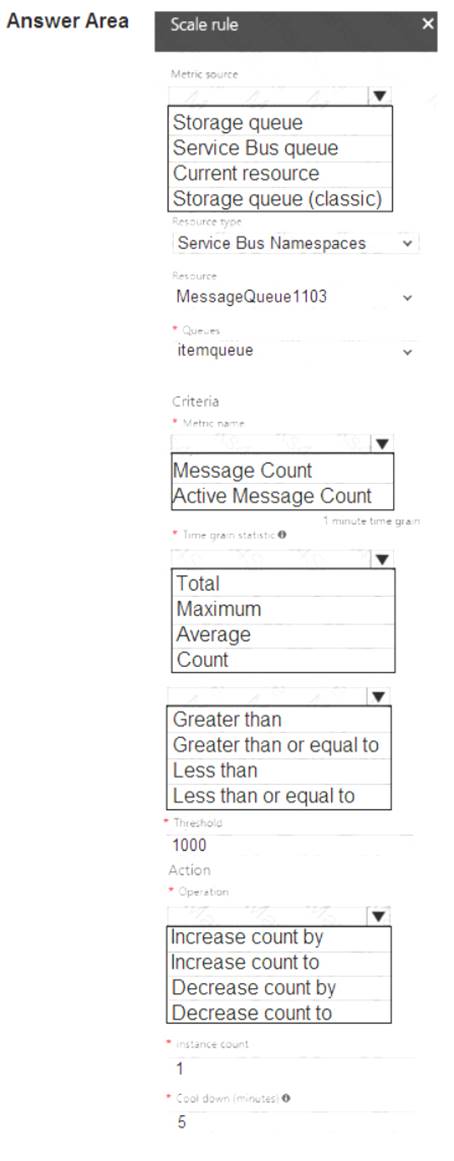
- A. Mastered
- B. Not Mastered
Answer: A
Explanation:
Box 1: Service bus queue
You are developing a back-end Azure App Service that scales based on the number of messages contained in a Service Bus queue.
Box 2: ActiveMessage Count
ActiveMessageCount: Messages in the queue or subscription that are in the active state and ready for delivery. Box 3: Count
Box 4: Less than or equal to
You need to add a new rule that will continuously scale down the App Service as long as the scale up condition is not met.
Box 5: Decrease count by
NEW QUESTION 22
......
100% Valid and Newest Version AZ-204 Questions & Answers shared by Certleader, Get Full Dumps HERE: https://www.certleader.com/AZ-204-dumps.html (New 135 Q&As)
- Microsoft 70-735 Braindumps 2021
- The Secret of Microsoft 70-488 pdf
- Up To Date PL-900 Software 2021
- The Rebirth Guide To DP-900 Actual Test
- Down to date Microsoft 70-697 exam dumps
- Realistic 70-742 Free Practice Questions 2021
- Approved Mb-300 Pdf 2021
- Far Out AZ-104 Free Demo 2021
- Simulation 70-762 Exam Dumps 2021
- All About Actual 70-488 braindumps