

PL-900 Exam Questions - Online Test
PL-900 Premium VCE File

150 Lectures, 20 Hours

Proper study guides for Replace Microsoft Microsoft Power Platform Fundamentals certified begins with Microsoft PL-900 preparation products which designed to deliver the Practical PL-900 questions by making you pass the PL-900 test at your first time. Try the free PL-900 demo right now.
Online Microsoft PL-900 free dumps demo Below:
NEW QUESTION 1
A company uses Dynamics 365 Supply Chain Management.
When a sales order is created for one of the customers that a specific user manages, a Microsoft Outlook task must be created to remind the user to perform any follow up activities that are required.
You need to implement the functionality to create Outlook tasks.
Which two features should you use? Each correct answer presents part of the solution.
NOTE: Each correct selection is worth one point.
- A. AI Builder
- B. Power Apps
- C. Business Events
- D. Microsoft Flow
- E. Common Data Service
Answer: CD
Explanation:
Business events in Microsoft Power Automate
Business events can be consumed in Microsoft Power Automate via the application connector. The connector has a trigger that is named when a business event occurs. This trigger can be used to subscribe to any of the business events that are available in the target instance of the application.
NEW QUESTION 2
A company plans to use Power Apps to connect to a series of custom services. There are no connectors available for the custom services.
For each of the following statements, select Yes if the statement is true. Otherwise, select No.
NOTE: Each correct selection is worth one point.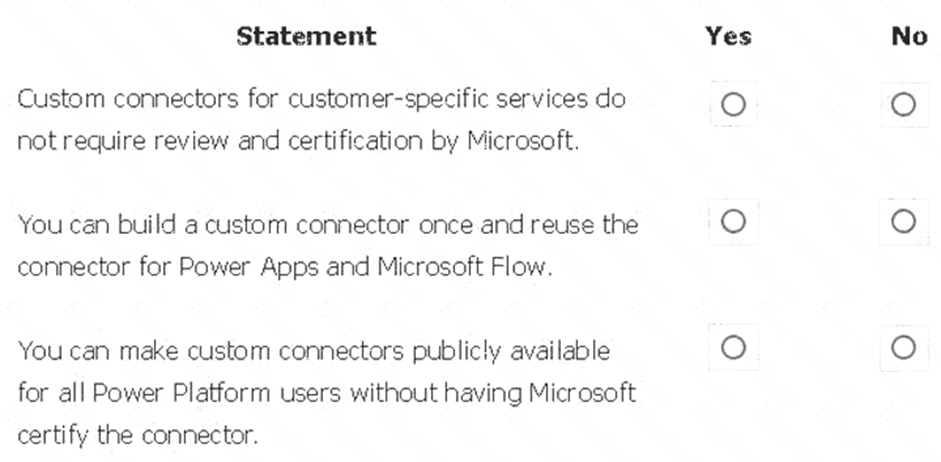
- A. Mastered
- B. Not Mastered
Answer: A
Explanation:
Box 1: Yes
Only if you would like to share your connector with all users of Logic Apps, Microsoft Flow, and PowerApps, you can submit your connector for Microsoft certification. Microsoft will review your connector.
Box 2: Yes
Connectors created in Microsoft Flow are available in PowerApps. Likewise, connectors created in PowerApps are available in Microsoft Flow.
Box 3: No
If you would like to share your connector with all users of Logic Apps, Microsoft Flow, and PowerApps, you can submit your connector for Microsoft certification. Microsoft will review your connector.
NEW QUESTION 3
You are new to working with Microsoft Flow. You create a flow that extracts birth dates for users and then sends a birthday greeting email to users on their birthday.
The flow does not properly extract birth dates. Where should you make changes?
- A. Connectors
- B. Expression
- C. Templates
Answer: A
Explanation:
Select the new Date Time connector. There you will see all of the actions, which help you to convert time zones to format them for local time in an email, add or subtract times, or just get the current time.
NEW QUESTION 4
A company plans to use Microsoft Flow to automate tasks.
Match each flow type to its function. To answer, drag the appropriate flow type from the column on the left to its description on the right. Each option may be used once, more than once, or not at all.
NOTE: Each correct match is worth one point.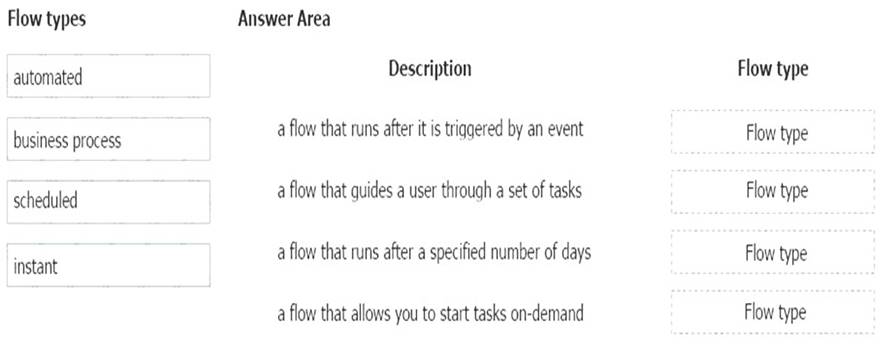
- A. Mastered
- B. Not Mastered
Answer: A
Explanation:
Box 1: automated
Automated flows start with an event or trigger, such as an email being received. These also support a multitude of actions in the 200+ Flow connectors.
Box 2: business process
The business process flow that creates stages or screens that enforce a certain sequence of steps. It collects data from users for each step in the stage and can kick off automated workflows.
Box 3: scheduled
Scheduled flows run regular reports that are sent out to a team and summarize everything that’s happened in the past week. This includes everything from simple daily scheduling to more complex scheduling like “every 3rd Monday.”
Box 4: instant
An instant flow is triggered when you click a button inside of the Flow mobile app, SharePoint, Dynamics, PowerApps, or Excel that passes context directly into your flow.
Note: There are four different Flow types that you can choose from when starting out. You can create a scheduled flow, automated flow, instant flow, or a business process flow.
NEW QUESTION 5
You need to explain the major components of the Common Data Model (CDM) and their functions. Match each term to its definition.
Instructions: To answer, drag the appropriate term from the column on the left to its definition on the right. Each term may be used once, more than once, or not at all. Each correct match is worth one point.
NOTE: Each correct selection is worth one point.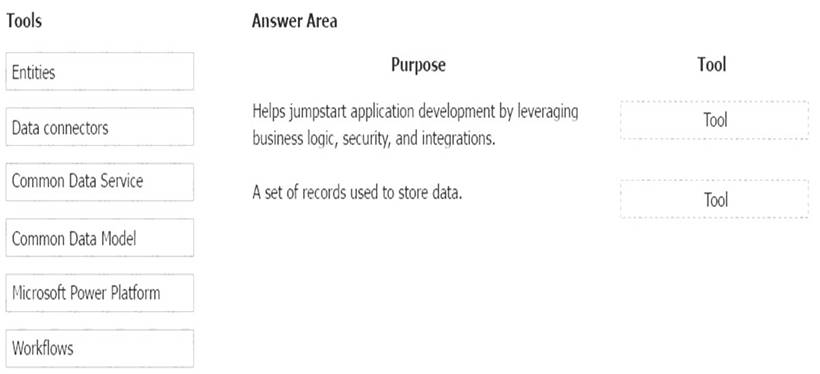
- A. Mastered
- B. Not Mastered
Answer: A
Explanation:
Box 1: Microsoft Power Platform
Power Platform combines the robust power of PowerApps, PowerBI, and Microsoft Flow into one powerful business application platform – providing quick and easy app building and data insights. Each component of the Microsoft Power Platform is built on the Common Data Service for Apps. Each component is dynamic by itself, but brilliant and masterful when combined.
The Microsoft Power platform brings all your data together into a common data model. Box 2: Entities
An entity is a set of records used to store data, similar to how a table stores data within a database.
NEW QUESTION 6
This question requires that you evaluate the BOLD text to determine if it is correct.
A company requires that service representatives schedule customer visits every six months. Each service representative is required to enter a scheduled task for the next checkup as they are leaving a client site. A service representative wants to automate task entry by creating a business process flow that can be initiated from the service call screen on a phone.
Review the underlined text. If it makes the statement correct, select “No change is needed.” If the statement is incorrect, select the answer choice that makes the statement correct.
- A. No change is needed.
- B. a scheduled
- C. an instant
- D. an action
Answer: D
Explanation:
Note: Create a flow (see step 6 below)
1). Sign in to PowerApps.
2). In the left navigation bar, select Business logic, and then select Flows.
3). In the upper-left corner of the My Flows page, select New, and then select Create from blank.
4). Option to create a flow without using a template
Near the bottom of the page that appears, select Search hundreds of connections and triggers.
5). In the search box, type PowerApps, and then select the PowerApps icon.
6). Create a PowerApps trigger
7). On the next page, select the PowerApps icon again, and then select New step.
8). In the box that says Search connectors and actions, specify an action for your flow, as in this example: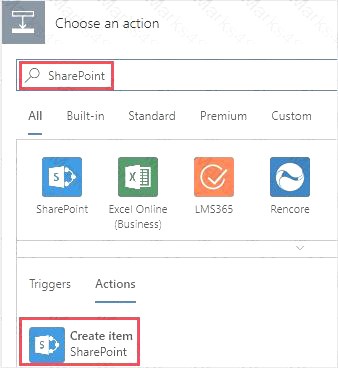
NEW QUESTION 7
A company uses a third party application and an approval process via email. At the end of the month, the IT department enters the data into Microsoft Excel to create pivot charts.
The Excel pivot charts must use the same data source as Dynamics 365 Field Service to generate charts and reports.
You need to recommend a solution.
What should you recommend? To answer, select the appropriate configuration in the answer area.
NOTE: Each correct selection is worth one point.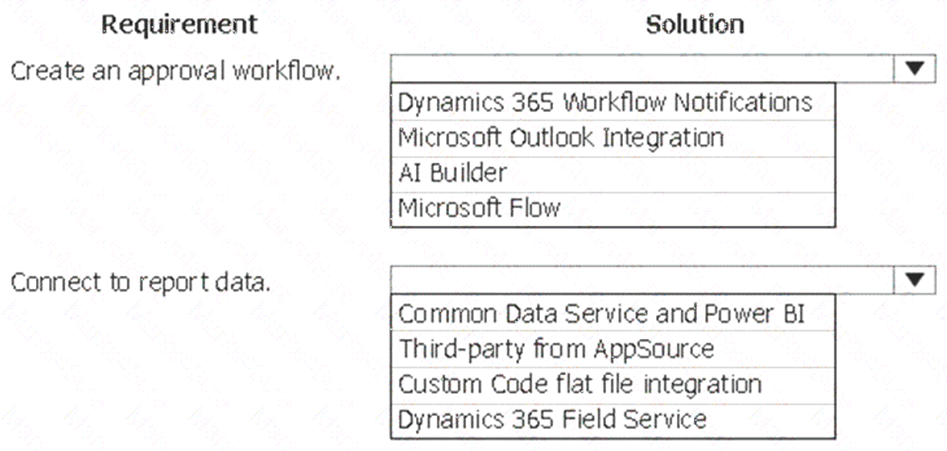
- A. Mastered
- B. Not Mastered
Answer: A
Explanation:
Box 1: Dynamics 365 Workflow notifications
You can configure the system to send email messages to users when workflow-related events occur. Note: Go to Navigation pane > Modules > System administration > Users > Users. In the list, find and select the desired record. On the Action pane, click User options. Click the Workflow tab. Make sure that the Notifications section is expanded. In the Notifications section, you can specify how you want the user to be notified about workflow-related events.
Box 2: Dynamics 365 Field Service
Supply Chain Management enables synchronization of business processes between Dynamics 365 Supply Chain Management and Dynamics 365 Field Service. The integration scenarios are configured by using extensible Data integrator templates and Common Data Service to enable the synchronization of business processes. Standard templates can be used to create custom integration projects, where additional standard and custom fields and entities can be mapped to adjust the integration and meet specific business needs.
NEW QUESTION 8
A company is building a Power Apps portal.
You need to select out-of-the-box portal types to meet the company's requirements.
Which portal types should you use? To answer, drag the appropriate portal types to the correct requirements. Each portal type may be used once, more than once, or not at all. You may need to drag the split bar between panes or scroll to view content.
NOTE: Each correct selection is worth one point.
- A. Mastered
- B. Not Mastered
Answer: A
Explanation:
Box 1: Partner portal
A partner portal allows every organization with resellers, distributors, suppliers, or partners to have real-time access to every stage of shared activities.
Box 2: Community portal
A community portal leverages peer-to-peer interactions between customers and experts to organically grow the catalog of available knowledge from knowledge base articles, forums, and blogs as well as providing feedback through comments and ratings.
NEW QUESTION 9
A user is creating their first canvas app in Power Apps.
The user does not know what types of controls they can include. You need to recommend solutions for the user.
Which types of controls would you recommend using in Power Apps? To answer, select the appropriate control in the dialog box in the answer area.
NOTE: Each correct selection is worth one point.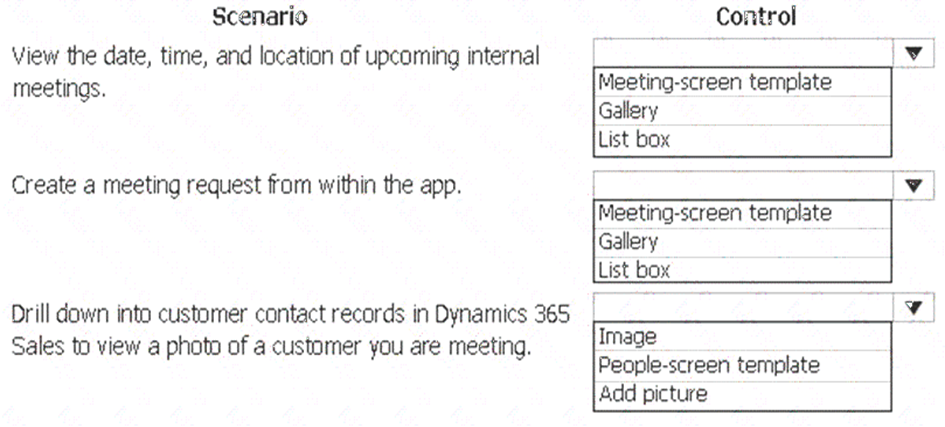
- A. Mastered
- B. Not Mastered
Answer: A
Explanation:
Box 1: Gallery
A Gallery control can show multiple records from a data source, and each record can contain multiple types of data. For example, a Gallery control can show multiple contacts with each item showing contact information that includes a name, an address, and a phone number for each contact.
Box 2: Meeting-screen template
In a canvas app, add a meeting screen that lets users create and send meeting requests from their Office 365 Outlook accounts. Users can search for attendees in their org and add external email addresses. If your tenant has meeting rooms built into Outlook, users can select a location as well.
Box 3: Image
If you add one or more Image controls to your app, you can show individual images that aren't part of a data set, or you can incorporate images from records in data sources.
NEW QUESTION 10
A business is evaluating AI Builder. Which actions can you perform?
For each of the following statements, select Yes if the statement is true. Otherwise, select No. NOTE: Each correct selection is worth one point.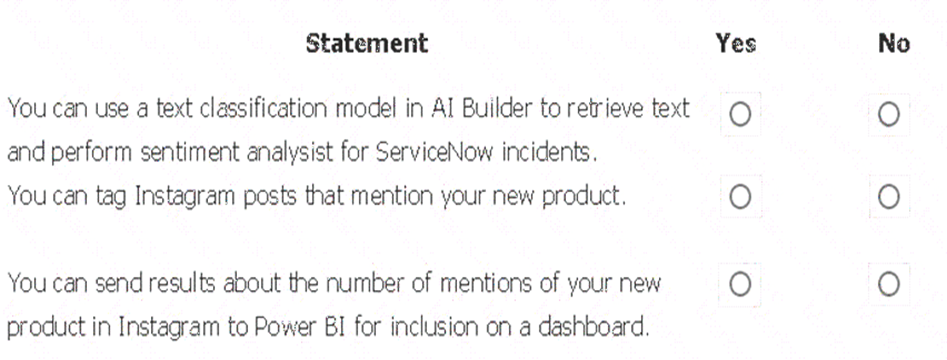
- A. Mastered
- B. Not Mastered
Answer: A
Explanation: 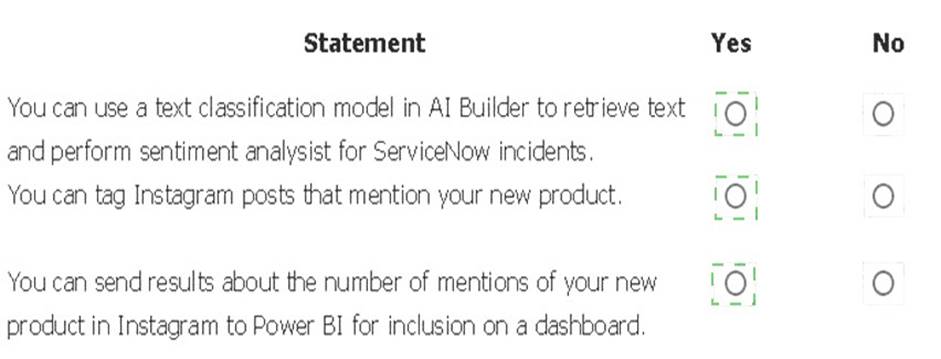
NEW QUESTION 11
You plan to use Microsoft Flow to monitor what people are saying about your company's products. You store the feedback for research and development purposes.
You need to recommend Flow components to use for the solution.
To answer, drag the appropriate components to the correct requirements. Each component may be used once, more than once, or not at all. You may need to drag the split bar between panes or scroll to view content.
NOTE: Each correct selection is worth one point.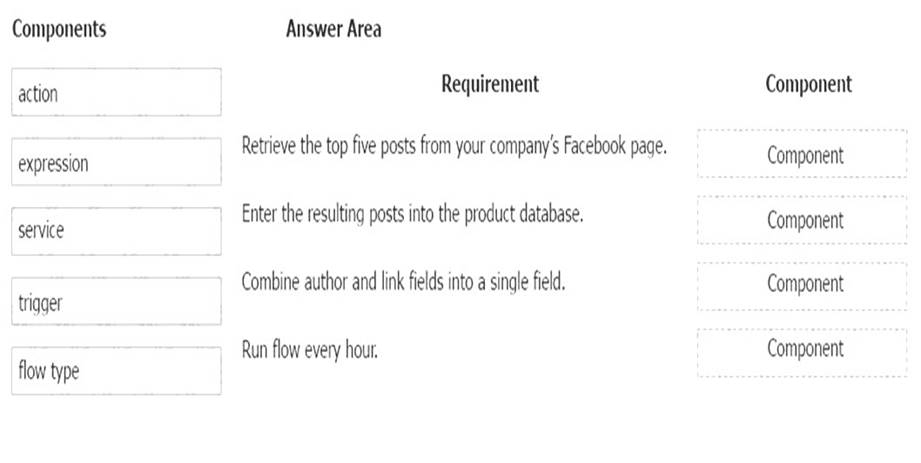
- A. Mastered
- B. Not Mastered
Answer: A
Explanation:
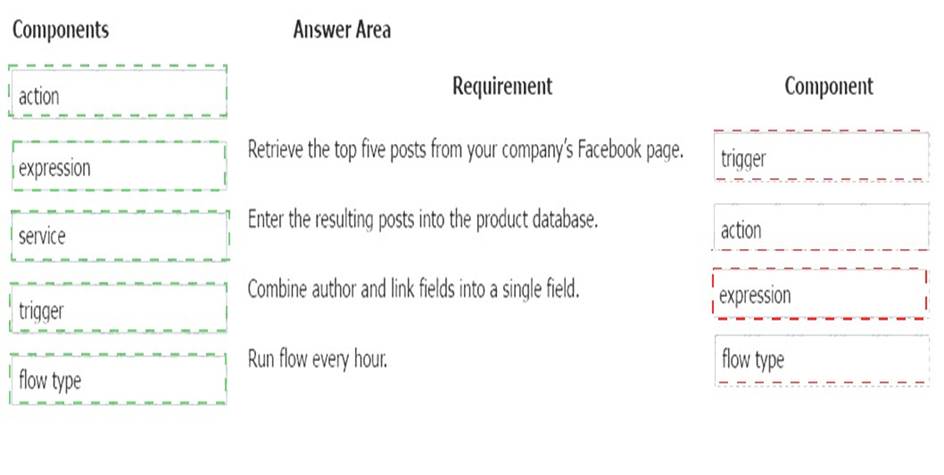
Box 1: Trigger
A trigger is something that triggers or starts the workflow. It could be a new file uploaded to a document library, a new item created in the list or an email sent to your Inbox – something that will start (kick-off the workflow).
There are two types of triggers: Automatic trigger is pre-programmed into the workflow based on a certain rule (i.e. new document or item created, email sent, etc.) Manual Trigger is a trigger initiated by a user. Unlike with automatic trigger above, the workflow will only start when initiated manually by the end user (for example, from the Document Library for a selected file). Manual trigger is only supported for certain types of workflows (i.e. Get feedback from your manager for the selected file)
Box 2: action
An action is something that occurs as a result of the workflow. Box 3: expression
Sometimes users just need to do basic operations like getting the current time, adding numbers together, or replacing a part of a string of text. That’s possible inline in any flow action. Microsoft Flow leverages the same Workflow Definition Language used by Azure Logic apps. For new users who are unfamiliar with the expression language, there is an inline help experience that shows how to use each expression as they build out their flow.
Box 4: flow type
There are four different Flow types that you can choose from when starting out. You can create a scheduled flow, automated flow, instant flow, or a business process flow.
NEW QUESTION 12
A company manages a chain of retail stores. The company stores a list of retail store names and numbers in one Power BI table. The company stores sales transaction data including a transaction ID in another table.
The transaction ID includes the store number.
You need to show the store name for all retail transactions in all Power BI reports. Which tool should you use?
- A. Query Editor
- B. Power BI Service
- C. Microsoft Excel
- D. Data Connector
Answer: A
Explanation:
Power BI Desktop comes with Query Editor, where you can connect to one or many data sources, shape and transform the data to meet your needs, then load that model into Power BI Desktop.
NEW QUESTION 13
A rapidly growing company wants to empower users to build apps, automate business processes, and analyze data without requiring I expertise or development skills and without increasing IT expenses and dependencies.
You need to recommend tools so that users can accomplish specific tasks.
Which tools should you recommend? To answer, select the appropriate options in the answer area. NOTE: Each correct selection is worth one point.
- A. Mastered
- B. Not Mastered
Answer: A
Explanation:
Box 1: Microsoft Flow
Microsoft Flow, now called Power Automate, is cloud-based software that allows employees to create and automate workflows and tasks across multiple applications and services without help from developers.
Box 2: Power Apps
PowerApps is a suite of apps, services, connectors and data platform that provides a rapid application development environment to build custom apps for your business needs.
Box 3: Power BI
Power BI is a business analytics solution that lets youvisualizeyour data and share insights across your organization, or embed them in your app or website. Connect to hundreds of data sources and bring your data to life with live dashboards and reports.
NEW QUESTION 14
You are creating a model-driven Power Apps app. You want to ensure that the app can be used by individuals who have vision impairments.
For each of the following statements, select Yes if the statement is true. Otherwise, select No. NOTE: Each correct selection is worth one point.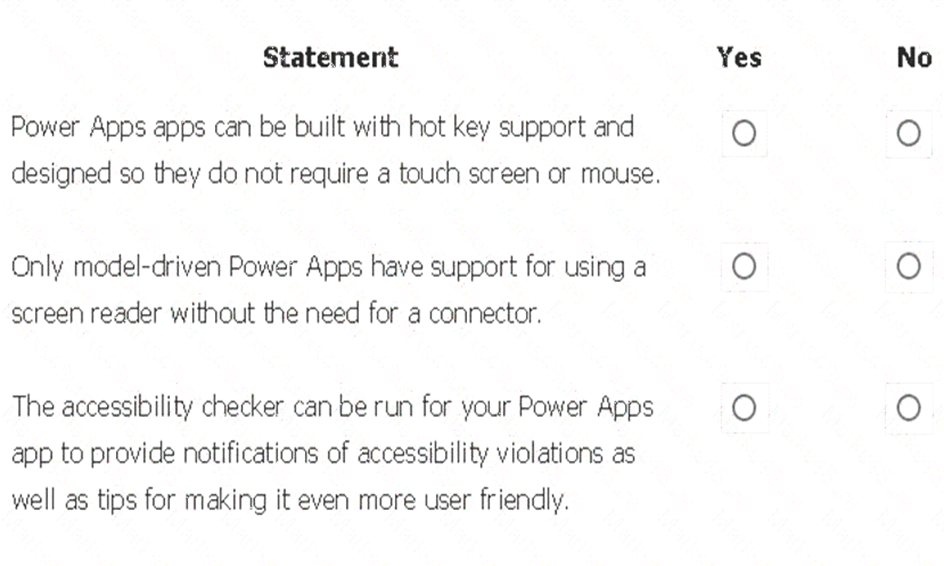
- A. Mastered
- B. Not Mastered
Answer: A
Explanation:
Box 1: Yes
You can use keyboard shortcuts in PowerApps. Keyboard shortcuts give you an alternate way to do common tasks instead of using your mouse or tapping with your finger. They help in seamless navigation of the interface.
Box 2: No
The following software combinations are the supported recommendations for consuming PowerApps with a screen reader:
Windows: Microsoft Edge / Narrator macOS: Safari / VoiceOver Android: PowerApps app / Talkback iOS: PowerApps app / VoiceOver
Box 3: Yes
Users who have vision, hearing, or other impairments can use your canvas app more easily and successfully if you consider accessibility as you design how the app looks and behaves. If you're not sure how to make your app more accessible, you can run the Accessibility checker in PowerApps Studio. This tool not only finds potential accessibility issues but also explains why each might be a potential problem for users who have a specific disability and offers suggestions on how to resolve each issue. The Accessibility checker detects screen-reader and keyboard issues for you, and you can find information about how to fix color-contrast issues by using accessible colors.
NEW QUESTION 15
You create a user-owned custom entity by using Common Data Service.
For each of the following statements, select Yes if the statement is true. Otherwise, select No. NOTE: Each correct selection is worth one point.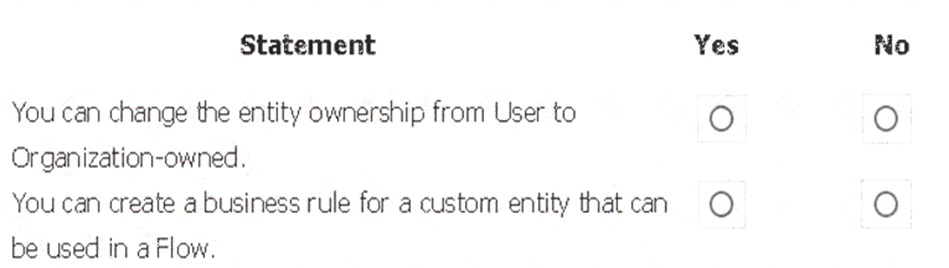
- A. Mastered
- B. Not Mastered
Answer: A
Explanation:
Box 1: No
Common Data Service supports two types of record ownership. Organization owned, and User or Team owned. This is a choice that happens at the time the entity is created and can’t be changed.
Box 2: Yes
By combining conditions and actions, you can do any of the following with business rules: Set field values
Clear field values
Set field requirement levels Show or hide fields
Enable or disable fields
Validate data and show error messages
Create business recommendations based on business intelligence.
NEW QUESTION 16
A large retail company implements Power Apps, Microsoft Flow, and the Common Data Service.
The board of directors is asking whether users are finding value in the technology. The company would like to measure and report usage of the software.
You need to recommend a tool to determine software usage. What should you recommend?
- A. Microsoft Intune
- B. Azure Stream Analytics
- C. Power Platform Analytics
- D. Dynamics 365 Product Insights
Answer: C
Explanation:
The Power Platform Analytics Usage report is the default reports seen by the logged in environment admin. It provides total app launches and daily active users across all apps in the environment. Admins can filter the view with attributes like device platform, player version, country, state, and city.
NEW QUESTION 17
This question requires that you evaluate the BOLD text to determine if it is correct.
You have a Power Apps app. You create a new version of the app and then publish the new version. A customer goes through the process of restoring the previous version of the app. In the Version tab for the app, you will see two versions of the app.
Review the underlined text. If it makes the statement correct, select “No change is needed.” If the statement is incorrect, select the answer choice that makes the statement correct.
- A. No change is needed.
- B. one
- C. three
- D. four
Answer: C
Explanation:
Restore a canvas app to a previous version in PowerApps.
1. Open powerapps.com, and then click or tap Apps in the left navigation bar.
2. Near the right edge, click or tap the info icon for the app that you want to restore.
3. Click or tap the Versions tab, and then click or tap Restore for the version that you want to restore.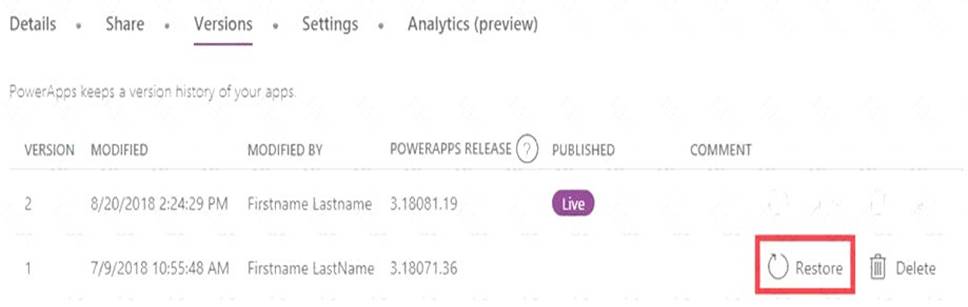
4. In the confirmation dialog box, click or tap Restore. A new version is added to your list.
NEW QUESTION 18
A company uses Power Apps.
You need to perform administrative tasks for the company.
Which admin centers should you use? To answer, drag the appropriate admin centers to the correct requirements. Each admin center may be used once, more than once, or not at all. You may need to drag the split bar between panes or scroll to view content.
NOTE: Each correct selection is worth one point.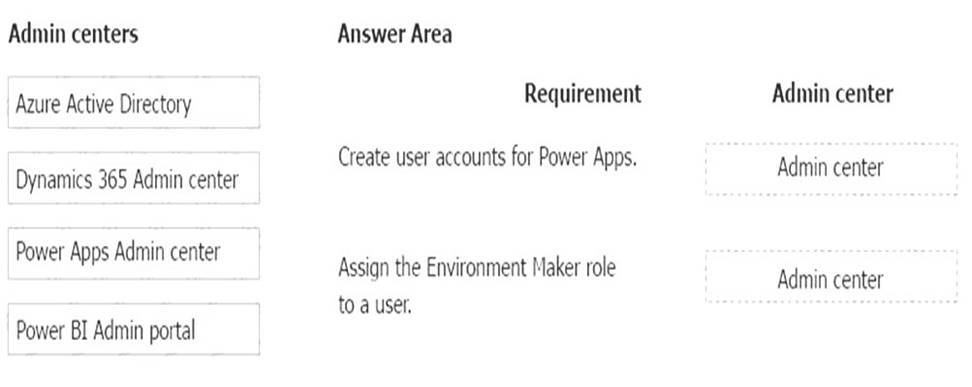
- A. Mastered
- B. Not Mastered
Answer: A
Explanation:
Box 1: Azure Active Directory
Create the company users in the Azure Active Directory. Box 2: Power Apps admin center
In the Power Apps Admin center, manage environments that you've created and those for which you have been added to the Environment Admin or System Administrator role. From the admin center, you can perform these administrative actions:
Create environments. Rename environments.
Add or remove a user or group from either the Environment Admin or Environment Maker role. Etc.
NEW QUESTION 19
A user is trying to understand the differences between the various ways apps can be built by using Power Apps.
For each of the following statements, select Yes if the statement is true. Otherwise, select No.
NOTE: Each correct selection is worth one point.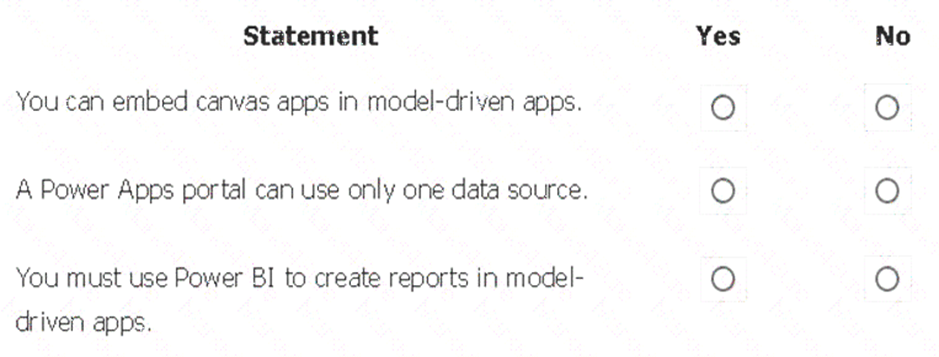
- A. Mastered
- B. Not Mastered
Answer: A
Explanation:
Box 1: Yes
You can create a canvas app and then embed that within a model driven app. Box 2: No
With the capability to build a portal in PowerApps, you can create a website for external and internal users enabling them to interact with data stored in Common Data Service.
Note: Common Data Service lets you securely store and manage data that's used by business applications. Data within Common Data Service is stored within a set of entities. An entity is a set of records used to store data, similar to how a table stores data within a database. Common Data Service includes a base set of standard entities that cover typical scenarios, but you can also create custom entities specific to your organization and populate them with data using Power Query. App makers can then use PowerApps to build rich applications using this data.
Box 3: Yes
To get started building a report you'll need the latest version of Power BI Desktop and a PowerApps environment with the latest version of the Common Data Service.
NEW QUESTION 20
......
100% Valid and Newest Version PL-900 Questions & Answers shared by Simply pass, Get Full Dumps HERE: https://www.simply-pass.com/Microsoft-exam/PL-900-dumps.html (New 48 Q&As)
- What Practical 70-487 exam question Is?
- Microsoft 70-475 Dumps Questions 2021
- The Update Guide To SC-200 Braindumps
- Microsoft 70-333 Free Practice Questions 2021
- Downloadable AZ-102 Study Guides 2021
- how many questions of 70-499 examcollection?
- how many questions of 70-467 practice test?
- how many questions of 70-346 braindumps?
- Approved Mb-300 Pdf 2021
- The Latest Guide To 70-499 exam